

Instant Comment Validation
Add a instant validator for WordPress comment form, instead of sending users to default error page.
Plugin info
Maintenance & Compatibility
Maintenance score
Possibly abandoned • Last updated 3760 days ago • 5 reviews
Is Instant Comment Validation abandoned?
Possibly abandoned (last update 3760 days ago).
Compatibility
Similar & Alternatives
Explore plugins with similar tags, and compare key metrics like downloads, ratings, updates, support, and WP/PHP compatibility.
Description
WordPress deafult comment error page sucks? Its just showing an error message like “please fill out required fields” and nothing else? Trying to get rid out of this & keep users in that page. Then “Instant Comment Validation” is for you. This plugin adds validation to the comment form. When a user submits the form and something is missing, an appropiate message is displayed and individual fields are highlighted.
That’s it, no configuration needed, just install & enjoy!
Contribute
While using this plugin if you find any bug or any conflict, please submit an issue at
Github (If possible with a pull request).
Credit
This plugin used jQuery Validation plugin library.
Installation
Automatic installation
Automatic installation is the easiest option as WordPress handles the file transfers itself and you don’t need to leave your web browser. To do an automatic install of Instant Comment Validation, log in to your WordPress dashboard, navigate to the Plugins menu and click Add New.
In the search field type “Instant Comment Validation” and click Search Plugins. Once you’ve found plugin, you can install it by simply clicking “Install Now”.
Manual installation
- Extract the zip file
- Upload the
instant-comment-validationfolder to/wp-content/plugins/ - Activate the plugin through the ‘Plugins’ menu in WordPress
Frequently Asked Questions
The plugin files load even if the comments are closed?
Answer: No, then plugin assests do not load unnecessarily. If your post in single & comments are open then then plugin loades it files.
Review feed
Screenshots

Instant Validation error message showing to logged in user
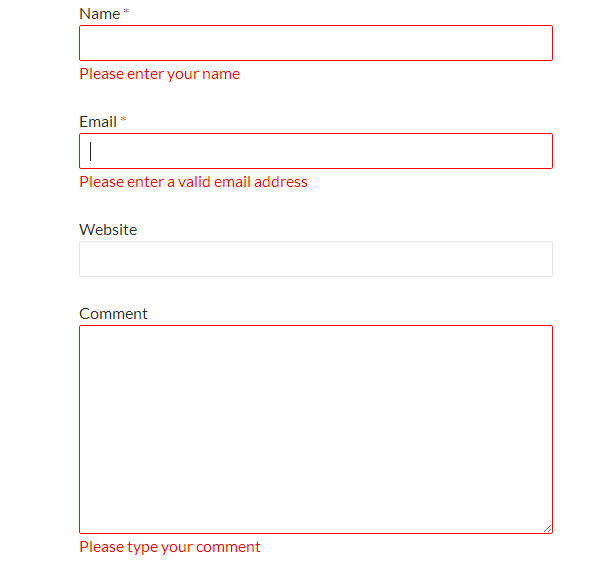
Instant Validation error messages showing to general user
Changelog
1.0
- Initial release
1.0.1
- Updated readme.txt file
- Updated main plugin file (Direct Access blocked to plugin URL)