

Instant Knowledge Base – AI Knowledge Base, Documentation, Wiki & Help Center
Create a fast, searchable knowledge base and docs in WordPress with AI search, FAQ schema, and analytics.
Plugin info
Maintenance & Compatibility
Maintenance score
Maintained • Last updated 163 days ago • 1 reviews
Is Instant Knowledge Base – AI Knowledge Base, Documentation, Wiki & Help Center abandoned?
Likely maintained (last update 163 days ago).
Compatibility
Similar & Alternatives
Explore plugins with similar tags, and compare key metrics like downloads, ratings, updates, support, and WP/PHP compatibility.
Description
Instant Knowledge Base helps you launch a modern self-service help center in minutes—perfect for product docs, SaaS onboarding, internal SOPs, and FAQs. It includes a clean UI, AJAX live search, FAQ schema for rich results, role-based access, and flexible templates. Reduce tickets, improve CSAT, and keep answers consistent across your site.
Highlights
– AI-assisted search & AJAX filters for instant results.
– Custom post type for structured articles plus Help Topics (categories).
– FAQ system with Google FAQ schema for SEO-friendly snippets.
– Role-based access (global + per-article overrides).
– Related & most-viewed articles, breadcrumbs, and icons for topics.
– Fully responsive and theme-friendly.
– Shortcode to embed anywhere: [instant_knowledgebase].
Why it’s different
– Built for speed and clarity (reduces support friction).
– Thoughtful privacy/GDPR controls (analytics respect consent).
– Templates for home, category, and single views; upgrade for premium designs.
LIVE DEMO:
Free features
- Modern, responsive layout
- Custom post type for Knowledge Base Articles
- Help Topics (categories) + hierarchy
- Real-time AJAX search and filters
- Shortcode:
[instant_knowledgebase] - Related and Most Viewed articles
- Like/Dislike feedback
- Breadcrumbs and topic icons
- Role-based access (global + per-article)
- GDPR consent handling (analytics respect consent)
- FAQ manager with schema (from 1.0.5)
- Category visibility controls & empty-category options
Premium (optional)
- Advanced analytics dashboard: searches, engagement, article performance
- Conversion funnels & automated insights
- External analytics (GA4, Mixpanel)
- Advanced search UI (dropdown, live suggestions)
- Premium templates: Help Center Modern, Opt-in Focus v2, Content Focus
- Hero section builder & typography (Google Fonts)
- Interactive checklists and single checkboxes
- PDF export (articles & reports)
- KB Widget
[ikbase_widget]+ widget analytics - Custom article ordering within categories
🎨 Premium Templates
- [Premium] Help Center Modern – Professional help center layout with modern design
- [Premium] Opt-in Focus v2 – Lead generation focused template with conversion optimization
- [Premium] Content Focus – Content-first layout for comprehensive documentation
👨💻 Help Center & Support
Need help setting up? Want to explore features or request support?
💙 Love Instant Knowledgebase?
If this plugin saves you time or improves your support process, show your support:
Installation
You can install the Instant Knowledgebase plugin in three ways:
Automatic
- In Plugins Add New, search for Instant Knowledge Base.
- Click Install Now, then Activate.
Upload
- Download the ZIP.
- Go to Plugins Add New Upload Plugin.
- Upload the ZIP, Install Now, then Activate
Frequently Asked Questions
Use the [instant_knowledgebase] shortcode on any WordPress page or post to display the knowledge base.
Yes. You can enable user-role restrictions from Settings > Knowledge Base to control who can view articles.
Yes, it is fully responsive and optimized for smartphones and tablets.
Absolutely. You can apply custom CSS or override the plugin’s templates to match your site’s branding.
Yes. Built-in view counters, like/dislike feedback system, and comprehensive analytics dashboard help track user engagement.
Yes. The plugin includes import/export functionality for easy backup and transfer of knowledge base content.
Yes. From v1.0.5, you can enable a dedicated FAQ system with schema markup for SEO.
Yes. Categories can be hidden or shown on the frontend from category settings (new in 1.0.5).
Yes. There’s a global option in Basic Settings to show/hide empty help topics.
Yes. Free users get basic counters & feedback. Premium users get advanced analytics, conversion funnels, and external integrations (GA4, Mixpanel).
Yes. Premium users can use [ikbase_widget] to embed a KB widget anywhere.
Yes. You can rename “Articles” to “Knowledge Base” and “Categories” to “Help Topics” in the settings.
Articles can be grouped using help topics (formerly categories) for better organization and navigation.
Yes. You can set access permissions globally or override them on a per-article basis.
The plugin provides options to retain or remove data, giving you more control during uninstallation.
The plugin includes search analytics, article performance tracking, user engagement metrics, and exportable reports. [Premium features require a premium license.]
Yes. The plugin supports Google Fonts integration and custom typography settings. [Premium feature requires a premium license.]
Yes. Premium templates include Help Center Modern, Opt-in Focus v2, and Content Focus layouts. [Premium features require a premium license.]
Review feed
Screenshots
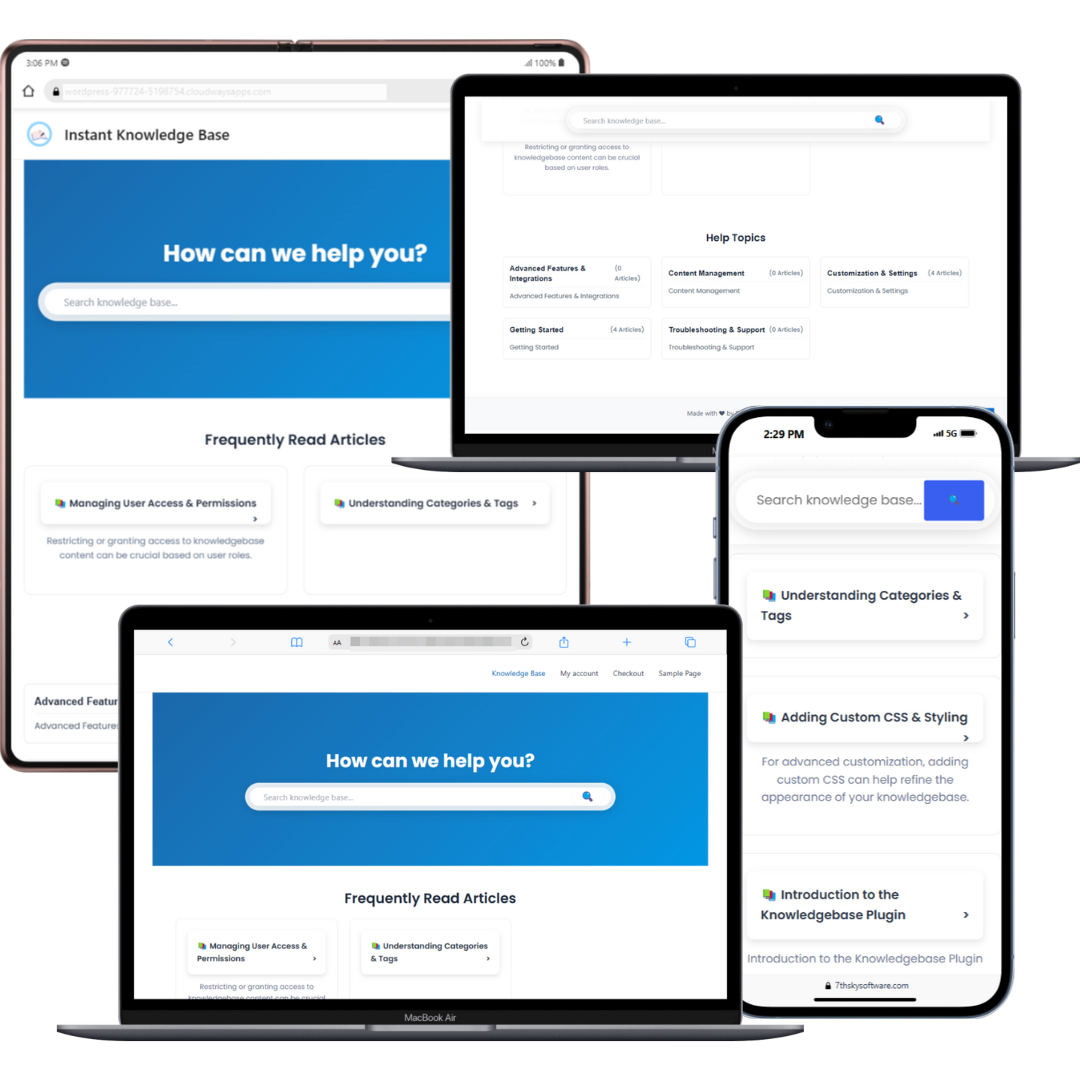
Knowledge Base Home – Search bar and categories layout

Default Template (Free) – Home Page – Clean homepage layout with search and category structure

Compact Template (Premium) – Single Article Page – Focused article layout for easy reading

Compact Template (Premium) – Category Page – Condensed view of categories and topics

Compact Template (Premium) – Home Page – Minimalist home layout with compact blocks

Default Template (Free) – Single Article Page – Basic article layout with sidebar navigation

Opt-in Focus (Premium) – Category Page – Conversion-optimized category view with opt-in section

Opt-in Focus (Premium) – Home Page – Homepage design focused on lead capture

Opt-in Focus (Premium) – Single Article – Article layout with emphasis on engagement and signups

Content Focus (Premium) – Home Page – Documentation-style home layout with clarity and space

Content Focus (Premium) – Single Article Page – Reader-focused article format for tutorials or guides

Help Center Modern (Premium) – Category Page – Sleek, modern layout for browsing categories

Help Center Modern (Premium) – Home Page – Stylish homepage with helpful CTAs and structure

Help Center Modern (Premium) – Single Article – Vibrant article design with clean typography

GDPR and Privacy Policy – Settings panel for managing privacy and compliance preferences

Knowledge Base Layout and Appearance – Customize layout elements, colors, and styles

Knowledge Base Analytics Page – Track article views, feedback, and engagement

Knowledge Base General Settings – Core plugin settings and configuration panel

Knowledge Base Analytics Dashboard – Overview of knowledge base performance and trends

Knowledge Base Analytics Chart and Graphs – Visual data for traffic, searches, and performance

Knowledge Base Analytics Article Performance – Detailed stats on individual articles

Typography Options – Customize fonts, sizes, and line spacing for readability

Changelog
1.0.8 – 2025-10-21
🚀 Major Update: Complete FAQ Template System & Navigation Improvements
✨ Feature: Style-specific FAQ templates – all FAQ URLs now support style selection (Default, Compact, Content Focus)
✨ Feature: FAQ category taxonomy templates – complete template system for FAQ category pages (/faq-category/)
✨ Feature: Compact style FAQ templates – archive, single, and category templates with modern gradient design
✨ Feature: Enhanced FAQ breadcrumb system – automatically includes “Knowledge Base > FAQ > Category” hierarchy
✨ Feature: Fallback content processing function – ensures compatibility when Pro plugin is not active
✨ Feature: Complete separation of premium features into standalone Pro plugin
✨ Feature: Added complete French (France) translation with 30+ translated strings
✨ Feature: Added complete Spanish (Spain) translation with 30+ translated strings
🎨 Improvement: All FAQ templates follow consistent design standards matching article templates
🔧 Tweak: Related FAQs and category links added to single FAQ templates
🔧 Tweak: Search functionality integrated into all FAQ archive templates
🛠 Fix: Template hierarchy now properly supports all FAQ URLs (archive, single, category)
1.0.7 – 2025-09-15
🛠 Fix: Minor bug fixes and improvements
🛠 Fix: Enhanced stability and performance optimizations
1.0.6
🔧 Fix: Shortcodes in article content now display as plain text instead of being executed
✨ Feature: Article ordering within categories – set custom order numbers for articles (Premium)
✨ Feature: Subcategories with parent category relationships – organize content hierarchically
✨ Feature: Interactive checklists – add checkable task lists to articles (Premium)
✨ Feature: Single checkboxes – add individual checkboxes anywhere in articles (Premium)
🎨 Improvement: Optimized article content spacing – reduced line spacing and list item spacing for better readability
🎨 Improvement: Updated default layout with clean “Was this helpful?” feedback system and simplified “Also Read” section
✨ Feature: Customizable widget text – edit widget title and subtitle from Knowledge Base > Settings > Widget
1.0.5
🚀 Major Update: Advanced Analytics, FAQs & Content Management
✨ Feature: Category visibility controls – hide or show help topics/categories on the frontend
✨ Feature: Admin interface – added “Frontend Visibility” dropdown in category editor
✨ Feature: Category list view – new “Visibility” column with status indicators
✨ Feature: Empty categories setting – option to show/hide empty help topics
✨ Feature: FAQ system – enable/disable from settings with dedicated categories
✨ Feature: Google FAQ structured data – proper schema markup for SEO rich snippets
✨ Feature: Default FAQ category – automatically created when FAQ system is enabled
✨ Feature: [Premium] Knowledge Base Widget [ikbase_widget] with customization options
✨ Feature: [Premium] Real-time analytics dashboard with live activity tracking
✨ Feature: [Premium] Conversion funnel tracking with visualization
✨ Feature: [Premium] External analytics integration with Google Analytics 4 (GA4) and Mixpanel
✨ Feature: [Premium] Automated insights and recommendations system
✨ Feature: [Premium] Widget-specific analytics tracking and performance monitoring
✨ Feature: [Premium] Advanced activity feed with user behavior visualization
🔧 Tweak: Hidden categories are excluded from frontend but remain accessible via direct URL
🔧 Tweak: Updated templates to support category filtering consistently
🔧 Tweak: Empty category logic improved – global setting to hide them from frontend
🔧 Tweak: FAQ SEO optimization – FAQs follow Google schema guidelines
🔧 Tweak: [Premium] Widget – improved customization, responsive design, and AJAX search
🔧 Tweak: Enhanced analytics database structure for real-time data and funnels
🔧 Tweak: Improved error handling, debugging, and security for analytics endpoints
🛠 Fix: Fixed real-time analytics data refresh and display issues
🛠 Fix: Resolved conversion funnel visualization and loading problems
🛠 Fix: Improved analytics tracking reliability and consistency
🛠 Fix: Enhanced widget analytics with proper event tracking
1.0.4
✨ Feature: [Premium] Content editor tools with code formatting and content boxes (Tip, Info, Warning)
✨ Feature: [Premium] Media support with image, GIF, video, and iFrame embedding via WordPress Media Library
✨ Feature: Image Lightbox – Click any editor-inserted image/GIF to open a fullscreen preview with next/previous navigation and keyboard support (Arrow keys, Esc)
✨ Feature: [Premium] iFrame embedding with customizable dimensions and responsive design
✨ Feature: Editor toolbar buttons for Tip, Info, Warning, GIF, Video, and iFrame now use icons for a cleaner, consistent UI
✨ Feature: Automatic frontend styling for code blocks, content boxes, media elements, and iFrames
🛠 Fix: Import/Export – Improved reliability, added support for all settings, categories, and tags, and enhanced security checks
🔧 Tweak: Enhanced frontend styling with responsive design and dark theme support
🔧 Tweak: Improved import/export interface with clearer messages and better usability
🔧 Tweak: Rebranded footer text to “Powered by Seventh Sky” across templates and admin preview
🛠 Fix: Branding visibility logic – free users always see branding; licensed users can enable it via “Show Plugin Branding” (no longer auto-disabled by license)
✨ Feature: Slug/Permalink improvement – you can now use a page at /knowledgebase without conflicts; the CPT archive auto-disables when a page with the same slug exists, while single article URLs remain at /knowledgebase/{article}. After creating/removing the page, re-save Permalinks to flush rewrites
1.0.3
🚀 Major Update: Analytics & Premium Features
✨ Feature: [Premium] Comprehensive analytics dashboard with search tracking, article performance, and user engagement metrics
✨ Feature: [Premium] Advanced hero section builder with customizable backgrounds, animations, and content
✨ Feature: [Premium] Premium templates (Help Center Modern, Opt-in Focus v2, Content Focus) with enhanced layouts
✨ Feature: [Premium] GDPR compliance tools with customizable cookie consent banner
✨ Feature: [Premium] Typography customization with Google Fonts integration
✨ Feature: [Premium] Export/Import functionality for easy data management and backup
✨ Feature: Article hierarchy system with sections, subcategories, and article types
✨ Feature: Breadcrumb navigation for improved user experience
✨ Feature: [Premium] PDF export functionality for reports and articles
✨ Feature: [Premium] Performance tracking with scroll depth and time spent metrics
✨ Feature: [Premium] Advanced search features including dropdown search and live suggestions
🔧 Tweak: Enhanced admin interface with improved settings organization
🔧 Tweak: Better mobile responsiveness across all templates
🔧 Tweak: Improved search algorithm for more relevant results
🔧 Tweak: Enhanced user role management and access controls
🛠 Fix: Various bug fixes and performance improvements
🛠 Fix: Improved compatibility with different WordPress themes
🛠 Fix: Enhanced security measures and data validation
1.0.2
✨ Feature: Added option to restrict knowledge base access to logged-in users. This can be set globally, with the option to override on individual articles.
✨ Feature: Introduced import/export functionality for easier data management.
✨ Feature: Added more user control during uninstallation.
🔧 Tweak: Renamed Articles to Knowledge Base.
🔧 Tweak: Renamed Categories to Help Topics.
🔧 Tweak: Improved UI/UX for a smoother user experience.
🛠 Fix: Minor bug fixes and performance enhancements.
1.0.1
🔍 Improvement: Enhanced relevance of search results.
🎨 Fix: Corrected search result alignment to better match theme settings.
1.0.0
🚀 Initial Release
📚 Custom post type for Knowledge Base Articles
📚 Category-based organization
📚 AJAX-powered search and filters
📚 Shortcode support
📚 User role-based access restrictions
📚 Related Articles and Most Viewed sections
📚 Like/Dislike feedback system
📚 Fully responsive design
📚 Support for custom templates and CSS overrides