

InstaScaler – Get Traffic
InstaScaler helps you get high-quality traffic using A.I and marketing automation. Get guaranteed traffic with the push of a button.
Plugin info
Maintenance & Compatibility
Maintenance score
Possibly abandoned • Last updated 2659 days ago
Is InstaScaler – Get Traffic abandoned?
Possibly abandoned (last update 2659 days ago).
Compatibility
Similar & Alternatives
Explore plugins with similar tags, and compare key metrics like downloads, ratings, updates, support, and WP/PHP compatibility.
Description
InstaScaler is the world’s first fully automated marketing solution. It uses A.I. (artificial intelligence) to automate marketing for any website, and it is a perfect tool to drive traffic for WordPress websites.
All you need to do is:
- Enter your website’s URL and
- Choose the geographies (country, state, city, etc) where you want traffic from.
- Push a button..
..and you’re all set. Sit back and relax while our A.I. starts acquiring high quality traffic for you traffic for you.
How does it work?
InstaScaler analyzes your website, extracts information such as text, images, and links. It then creates advertising campaigns for you on several marketing platforms it is integrated with (such as Google, Facebook, Twitter, LinkedIn, and hundreds more) to start getting high quality visitors for your website.
InstaScaler automates the entire process from creating the campaigns, generating the targeting, the banners, and does the optimization too. All you do is push a button and let the A.I. handle the rest.
And the best part is you only pay for the traffic you get!
Installation
- Copy “instawp.php” to “/wp-content/plugins” directory
- In the WordPress admin dashboard navigate to “Plugins” menu
- Activate the “InstaScaler – Get Traffic” plugin
Frequently Asked Questions
How do I get an account?
You need to sign up for an account on InstaScaler.com and setup your campaign. All you need is to add your website’s info, choose the package that suits your needs, and make the payment.
What do I need to do after subscribing to the service?
You need to link your Google Analytics by following the instructions you get after you successfully make the payment. You will just click a link and authorize InstaScaler to access your Google Analytics account.
Why do you need access to Google Analytics?
This is how our engine optimizes your campaigns. We use Google Analytics to optimize towards high quality traffic that is performing well in terms of session time, bounce rate, pages per session, conversion rate, etc.
How can I monitor the progress of my campaign?
After integrating with Google Analytics you can either track the visits from InstaScaler’s dashboard in your WordPress dashboard, or on your Google Analytics dashboard by checking all traffic under utm_source=instascaler.
How many visits can I get per month?
The number of visits you get depends on the package you subscribe to, and your campaign objective. The number of visits will vary between 150 and 7000 visits per month, there are also custom packages if you have a higher budget or require higher volumes of visitors to your site.
Is this real traffic or bots?
InstaScaler only uses high quality marketing platforms such as Google, Bing, Twitter, and hundreds more. We only drive real and high quality human visitors to your website. No bots allowed!
Where can I read a more detailed FAQ?
For more information visits https://www.instascaler.com/faq
Review feed
Screenshots
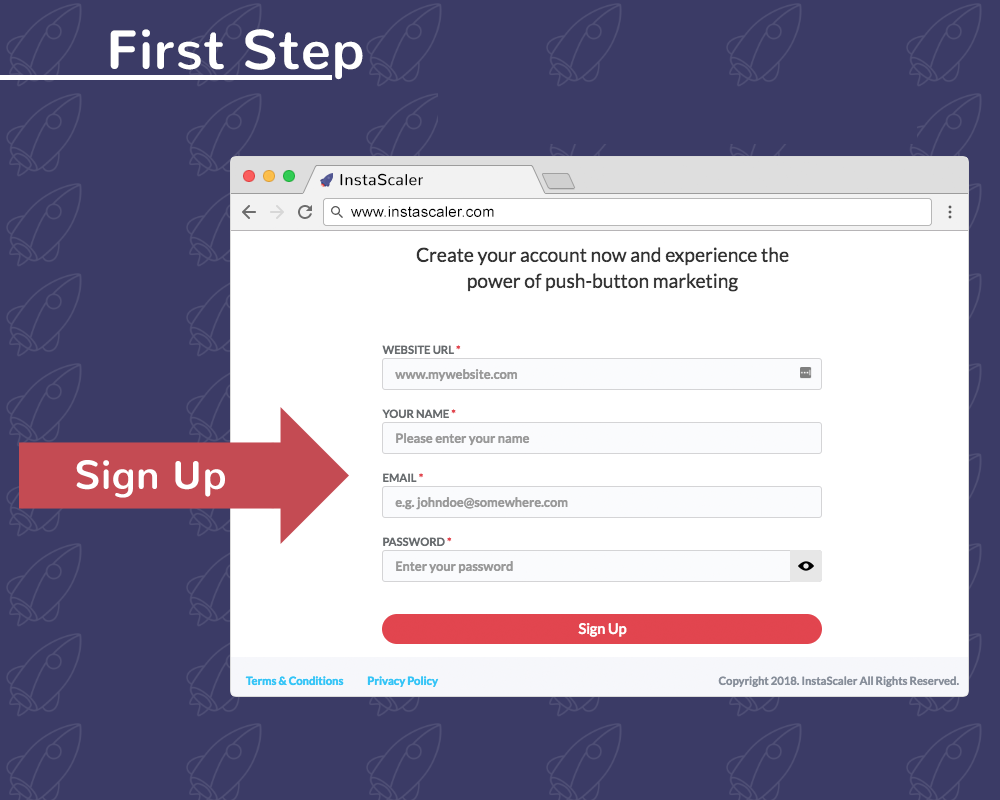
Go to InstaScaler.com and create your account

Add some basic info on your website

Choose the objective you want traffic for (awareness or conversions)

Choose how much you want to pay