

Integrazo – Integration for Zoho CRM, Books, Invoice, Inventory and Others
Connect Zoho CRM, Books, Invoice, Inventory, Desk, Campaigns and Bigin to send WooCommerce and form submission data.
Plugin info
Maintenance & Compatibility
Maintenance score
Maintained • Last updated 127 days ago
Is Integrazo – Integration for Zoho CRM, Books, Invoice, Inventory and Others abandoned?
Likely maintained (last update 127 days ago).
Compatibility
Similar & Alternatives
Explore plugins with similar tags, and compare key metrics like downloads, ratings, updates, support, and WP/PHP compatibility.
Description
This plugin allows you to connect any supported Zoho product with WooCommerce or any WordPress form plugin. You can send form submissions or WooCommerce data such as orders, products, and customers directly to Zoho.
The plugin enables structured data transfer using secure authentication and API-based communication.
Set up your integration in a few steps: select the plugin, choose the Zoho service, connect your account, and map your fields.
Supported Plugins
This plugin supports the following WordPress form plugins and tools:
- WooCommerce
- Contact Form 7
- Elementor Forms
- Gravity Forms
- WPForms
- ARForms
- Everest Forms
- Fluent Forms
- Formidable Forms
- Forminator Forms
- HappyForms
- JetFormBuilder
- Kali Forms
- MetForm
- NEX-Forms
- Ninja Forms
- SureForms
- weForms
- WordPress Core
- WSForm
These supported plugins can be selected during setup to create integrations.
Supported Services
This plugin connects with the following Zoho products:
- Zoho CRM
- Zoho Books
- Zoho Invoice
- Zoho Inventory
- Zoho Desk
- Zoho Campaigns
- Zoho Bigin
Supported services may vary by account type. You can view all available services in the Select Product popup.
Connect Service
- Go to the Setup page.
- Select a supported plugin from the left side.
- Select a supported Zoho product from the right side.
- Click Save and Next.
Sign In / Authenticate
- Enter an account name.
- Follow the instructions shown for the selected Zoho product.
- Authenticate the account.
- Manage multiple authenticated connections in the Accounts tab.
Map Fields
- Select a form or WooCommerce event.
- Select a module or list based on the chosen Zoho service.
- Map fields between your plugin and Zoho.
- Configure optional Add or Update options.
- Apply filter conditions if required.
- Save the mapping.
Logs
- View all integration logs in a structured list.
- Status values include SUCCESS and RECORD_FAILED.
- Resync or delete records individually or in bulk.
- Filter logs by integration, status, or time.
- View detailed API responses and submitted data.
Settings
General
– Enable Delete Data on Uninstall.
– Configure automatic log cleanup.
Notifications
– Enable email alerts for failed syncs.
– Add multiple notification email addresses.
– Set the email subject line.
Accounts
– View all authenticated Zoho accounts.
– Rename or reauthenticate accounts.
Upgrade to Pro
The premium version includes additional features for advanced Zoho integrations and expanded field mapping.
Free Version Includes:
– Unlimited integrations
– Supports Contact Form 7, WPForms, Elementor Forms, WordPress Core, and WooCommerce
– Add-only record creation
– Custom values and system fields
– Log resync for failed records
– Error notifications
– No submission limits
Premium Version Adds:
– Support for additional form plugins
– Add or update record actions
– Custom modules support
– Premium and custom Zoho field mapping
– File attachments
– Tags and notes
– Advanced filter conditions
– Extended log features
– Multiple account support
Support
- Contact Support: https://integrazo.com/pages/contact
- Feature Request: https://integrazo.com/pages/request-feature
Website: https://integrazo.com/
Email: [email protected]
Additional Notes
This plugin is compatible with WordPress multisite installations.
Installation
Automatic Installation
1. Go to Plugins Add New in your WordPress dashboard.
2. In the search bar, type Integrazo and locate this plugin.
3. Click Install and then Activate.
Manual Installation
1. Upload the plugin ZIP file via Plugins Add New Upload Plugin.
2. Activate the plugin.
3. Go to the plugin settings and complete the setup.
Frequently Asked Questions
Supported plugins include Contact Form 7, Elementor Forms, WPForms, Gravity Forms, Forminator, Formidable Forms, Fluent Forms, Ninja Forms, Everest Forms, ARForms, HappyForms, JetFormBuilder, Kali Forms, MetForm, NEX-Forms, SureForms, weForms, WSForm, WordPress Core, and WooCommerce.
All supported plugins appear on the Setup page.
The plugin supports the following Zoho applications: Zoho CRM, Zoho Bigin, Zoho Books, Zoho Inventory, Zoho Invoice, Zoho Campaigns, and Zoho Desk.
All supported Zoho products appear in the Select Product popup.
Yes. WooCommerce order events can sync to Zoho Inventory.
After selecting WooCommerce and Inventory:
1. Authenticate your account.
2. Select a module such as Sales Orders.
3. Map fields like items, customer details, billing, shipping, and totals.
4. Save the mapping.
Yes. WooCommerce orders can sync to Zoho Books.
After selecting WooCommerce and Books:
1. Authenticate your account.
2. Select a module such as Contacts, Sales Orders, or Invoices.
3. Map WooCommerce fields including items, totals, taxes, and customer information.
4. Save the mapping.
Yes. WooCommerce orders can be sent to Zoho Invoice.
After selecting WooCommerce and Invoice:
1. Authenticate your account.
2. Select a module such as Invoices or Customers.
3. Map order details including items, totals, billing, and taxes.
4. Save the mapping.
Yes. Integrations can be enabled or disabled from the Setup page.
Open the Logs page to check error details. You may fix the issue and resync the record.
Review feed
Screenshots
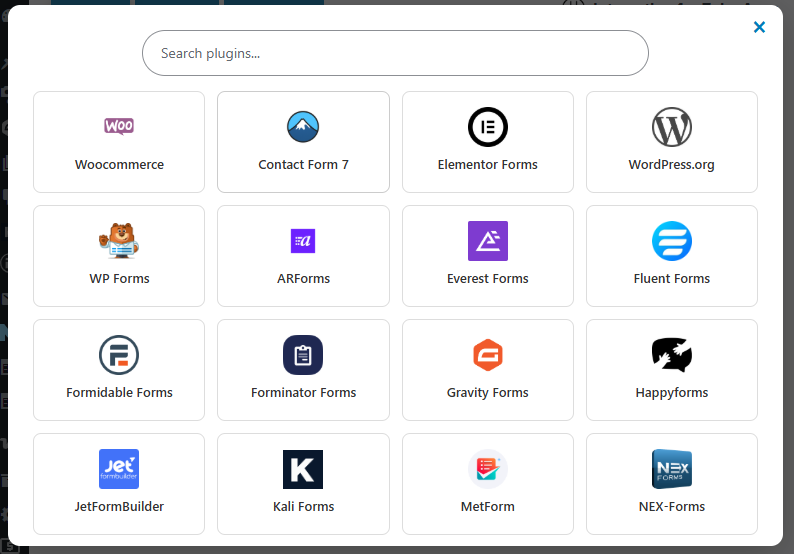
Select Plugin
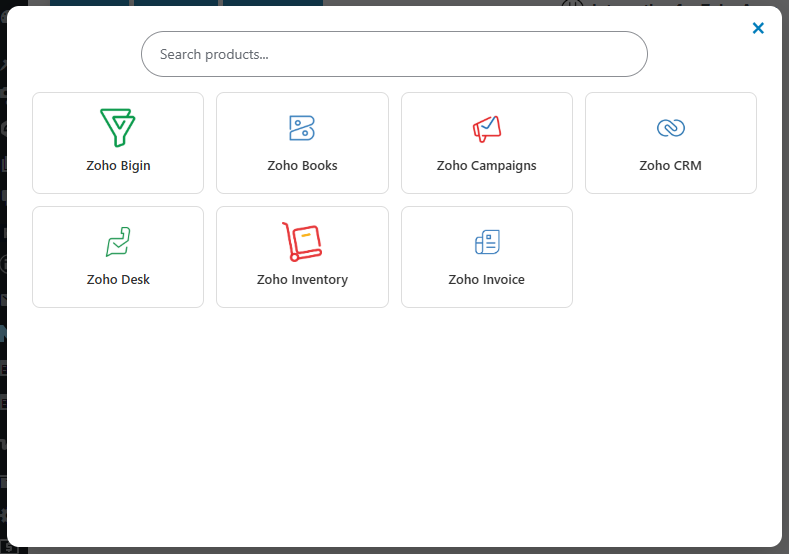
Select Service
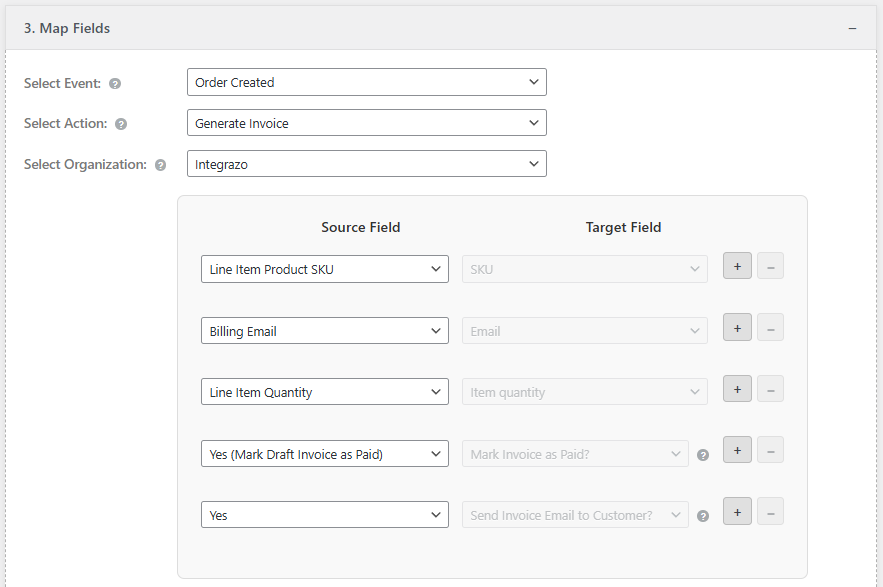
Field Mapping
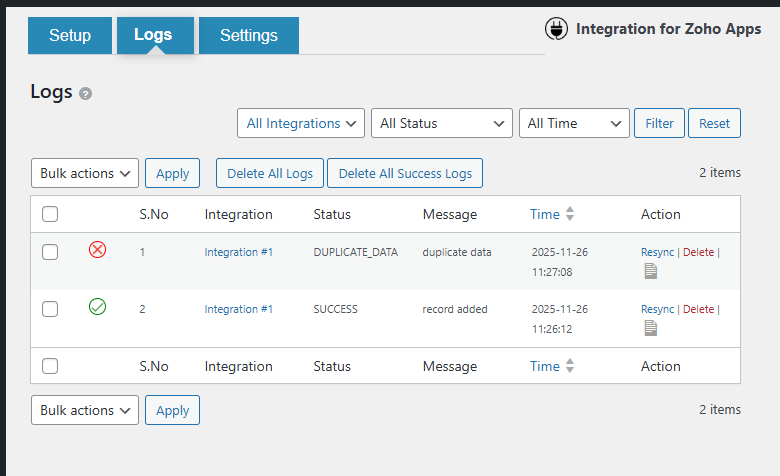
Log Page
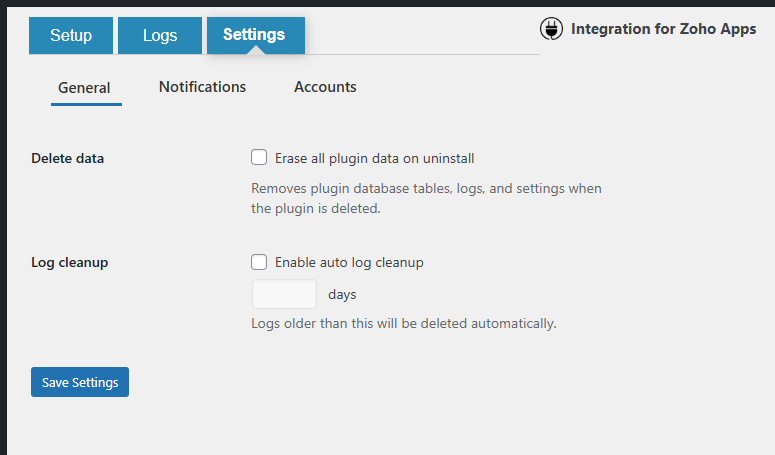
Settings
Changelog
1.0.0
- Initial release
- Added support for multiple WordPress form plugins
- Added Zoho CRM, Books, Inventory, Invoice, Desk, Campaigns, Bigin
- Added field mapping, filters, logs, and notifications