

iSpring Learn JWT
Enable the Single Sign On between WordPress and iSpring Learn
Maintenance 20/1003159d since update
Active installs
10
Downloads
1,548
Reviews
0
Age
8.7y
Plugin info
Total downloads: 1,548
Active installs: 10
Total reviews: 0
Average rating: 0
Support threads opened: 0
Support threads resolved: 0 (0%)
Available in: 2 language(s)
Contributors: 1
Last updated: 8/8/2017 (3159 days ago)
Added to WordPress: 8/8/2017 (8 years old)
Minimum WordPress version: 4.0
Tested up to WordPress version: 4.8.27
Minimum PHP version: f
Maintenance & Compatibility
Maintenance score
Possibly abandoned • Last updated 3159 days ago
20/100
Is iSpring Learn JWT abandoned?
Possibly abandoned (last update 3159 days ago).
Compatibility
Requires WordPress: 4.0
Tested up to: 4.8.27
Requires PHP: f
Similar & Alternatives
Explore plugins with similar tags, and compare key metrics like downloads, ratings, updates, support, and WP/PHP compatibility.
No similar plugins found yet.
Description
iSpring Learn JWT lets you easily integrate your WordPress blog with your iSpring Learn account so that your users can seamlessly log into both services with one login/password pair.
Installation
- Activate the plugin through the ‘Plugins’ menu in WordPress
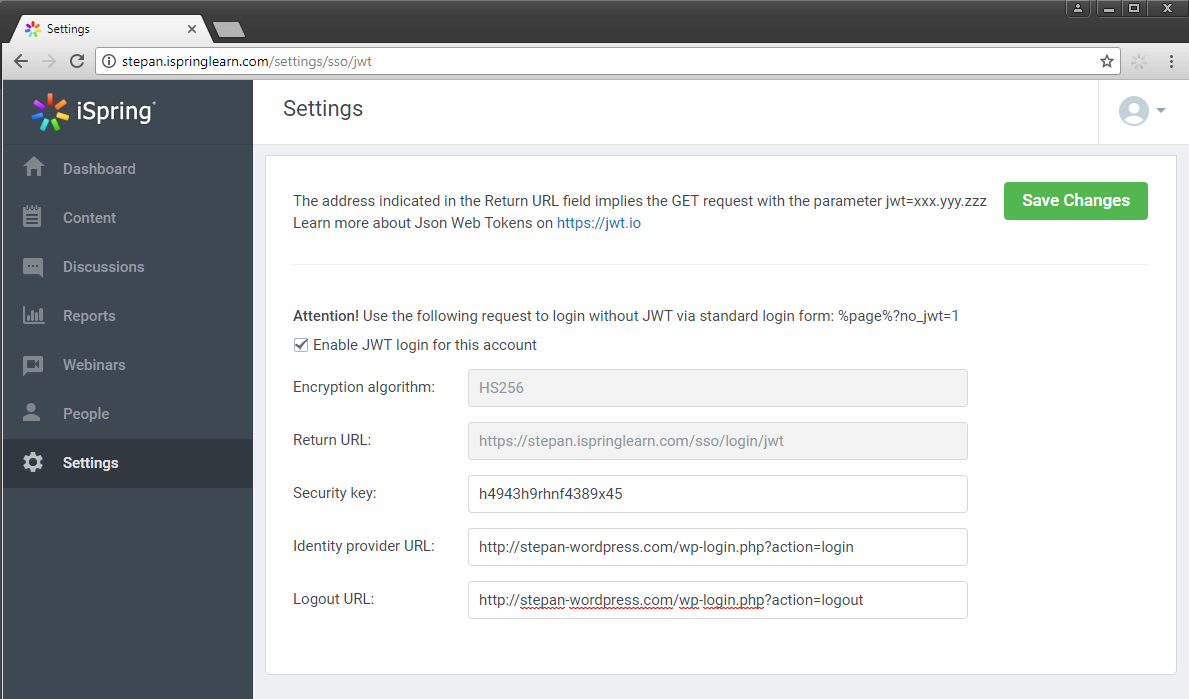
- Go to your iSpring Learn account to configure the JWT settings. To access the JWT settings follow https://yourdomain.ispringlearn.com/settings/sso/jwt
- Configure the plugin through the “General settings” page in the plugin, you can retrieve the info requested here from the JWT settings page of your iSpring Learn account.
Frequently Asked Questions
You are welcome to get a free 14-day trial of iSpring Learn at http://www.ispringsolutions.com/ispring-learn to test all of its features.
Review feed
No reviews available
Screenshots

Changelog
No changelog available