
WPBULKiT – Bulk Edit WordPress Posts & Pages
Editing Date in WordPress is very painful. Be professionals with managing data in the reliable and flexible way by Wordpress Bulk Posts Editing.
Plugin info
Maintenance & Compatibility
Maintenance score
Maintained • Last updated 137 days ago • 6 reviews
Is WPBULKiT – Bulk Edit WordPress Posts & Pages abandoned?
Likely maintained (last update 137 days ago).
Compatibility
Similar & Alternatives
Explore plugins with similar tags, and compare key metrics like downloads, ratings, updates, support, and WP/PHP compatibility.
Description
WordPress Bulk Posts Editing Plugin is the best extension to improve the default WordPress bulk edit feature for posts, custom posts and pages. On the other hand, WordPress Bulk Posts Editing is a professional WordPress plugin for managing and bulk editing WordPress posts, pages and custom post type’s data in a more robust and flexible way.
Why do you need WordPress Bulk Posts Editing?
✅ Saving your time:
- Bulk editing everything in the posts at one time
- Filter, select and change specific posts
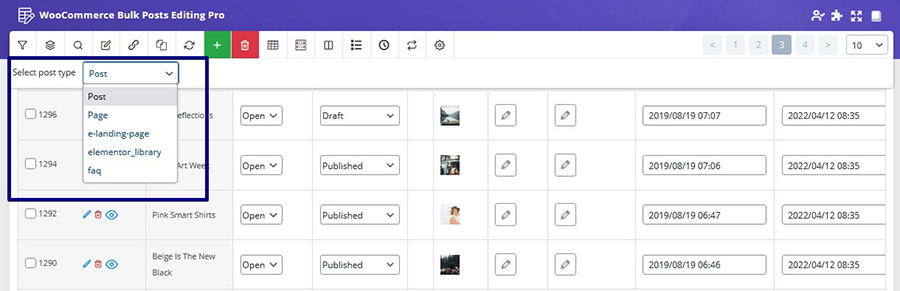
- Switch WordPress post types
- Bind editing: With this option, you can set the same value of edited posts to all selected posts. This will help you edit several posts at once and will result in a faster editing and save a huge amount of your time!
- Delete multiple post / custom post: You can select multiple posts and choose to either delete them permanently, or if you think you might need to use them later, it is possible to move them to the trash and access these posts later.
- Duplicate posts / custom posts: If you want to duplicate posts or custom posts, you can clone them and duplicate all of the selected posts with just one click.
- Save search queries for later use: You can save the most used search queries for later use (or any search query you want). This way, you don’t have to choose the search options every time, and with just two clicks you can use your most used search queries to find the posts you need.
✅ Easily scale-up your site:
- Import and export any posts according to your requirements
- Make a customized column from your posts
- Use a spreadsheet to control, manage and edit numerous posts at the same time:
- View all your posts, pages and custom psots simultaneously
- Edit posts and pages easily
- Create a lot of posts / products at once
- Copy information between posts quicker
- And more…
✅ Support all of fields
- Support all posts and custom posts fields and custom fields
- Support all of categories, tags, and taxonomies
Please check other videos in wordpress bulk posts editing channel
Key Features
- User friendly design
- Support all of posts and custom posts
- Filtering by all wordpress post/page/custom posts fields :: title, category, taxonomy, …
- Advanced bulk editing form: edit all wordpress post/page/custom posts fields in specific operands :
- Append, prepend, replace for text fields :: title, link and …
- Increase, decrease for numberic fields
- Calculator for decimal values
- Featured image and gallery
- Date picker for date fields
- Multiple selection :: category, taxonomy, tag
- And …
- Show/Hide columns
- Column manager:
- Set color and BG color for columns
- Set custom label for columns
- Create posts and custom posts
- Duplicate posts
- Delete several posts with one click.
- Set category and taxonomy for multiple posts at once
- Inline edit: edit values in separate types: numeric, text, date, checkbox and …
- Save search form query
- Add custom fields / taxonomy as columns, search field and bulk edit field
- Import / Export
- Binded editing : edit several posts at once.
- History: Save all of change log beside of Undo / Redo :: You can revert your changes.
- Sticky column: fix ID column
- Find duplicate posts and delete all of them easily
- Support all WordPress Posts fields
Check demo version: Pro Version
External services
This plugin connects to a license server to activate the plugin and check for updates.
It sends the site admin’s email address and license key to iThemelandCo when the license is activated or when checking for updates. The server responds with activation status, update availability, or error messages.
This service is required to verify valid licenses and deliver updates.
This service is provided by “iThemelandCo”. http://ithemelandco.com/
This plugin, with the user’s consent (via a telemetry form), sends usage data and examples of how the plugin is used to our server (http://ithemelandco.com/). The data includes information on which plugin features are most frequently used, and is analyzed to improve performance and deliver updates aligned with user needs.
Installation
This section describes how to install the plugin and get it working.
e.g.
- Upload the plugin files to the
/wp-content/plugins/plugin-namedirectory, or install the plugin through the WordPress plugins screen directly. - Activate the plugin through the ‘Plugins’ screen in WordPress
- After Install and Activate this plugin a menu will be added in your admin menu named “iT WP Posts”
Frequently Asked Questions
There are two ways to check the wordpress bulk posts editing plugin before buying:
Build Test Drive
Build Test-Drive(Amin Demo) and work with plugins in a real environment. For this, Please go to plugin page and then click the Live Preview button to enter the plugin demo page. In the top bar that appears, click Launch Admin Demo. A popup will appear asking you to enter your email and submit the form. The relevant link will be sent to your email now.
PHP compatibility: from 7.x
WordPress compatibility: from v5.x to the latest WordPress version.
Please check WordPress Bulk Posts Editing Plugin youtube channel
Please check WordPress Bulk Posts Editing Plugin
Please check the knowledge base
You can use this plugin in any language, this means you can translate this plugin to another language.
There is a translate file in the “Language” folder as ‘.pot’ extension.
You can easily translate the plugin into the desired languages by using translation plugins such as WPML and Loco Translate.
Yes! As you know, WordPress Bulk Posts Editing is a premium product that is sold through the codecanyon store. For each purchase, you will be assigned a purchase code and you can use this purchase code on only one website, so to use the WordPress Bulk Posts Editing on your various websites, you need to separate license for each site.
If you believe that you’ve bought the wrong product and the purchased product is useless, you can send a refund request for that. Within 30 days of purchase, iThemelandCo will Refund your money.
Please leave your message in our support system
Review feed
walaw ee
Works Great
Screenshots
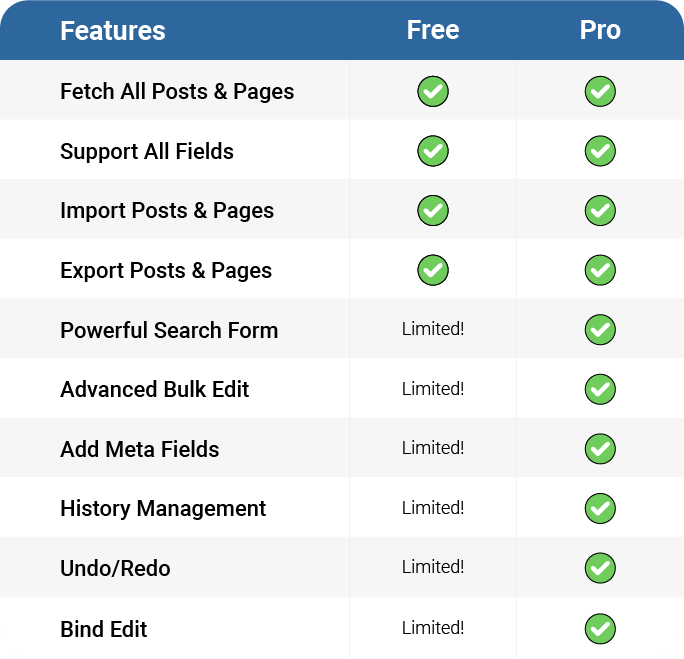
Compare Lite & Premium
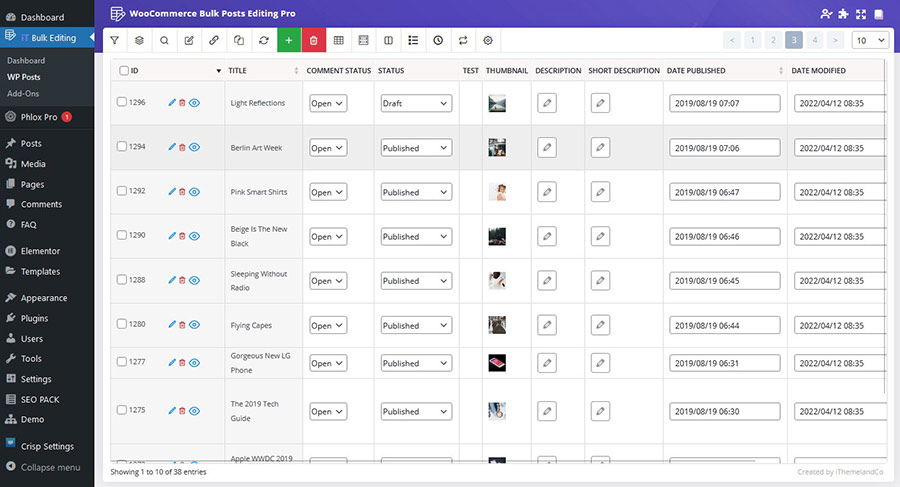
Editing Table

Search Form

Bulk Form

Inline Editing
Changelog
5.0.6
- Fixed Rank Math Compatible issue
- Fixed Some Issues
5.0.5
- Fixed Some Issues
5.0.4
- Tested up to: WP 6.8.3
- Fixed Some Issues
5.0.3
- Fixed some important issues
5.0.2
- Fixed some important issues
5.0.1
- Fixed some important issues
5.0.0
- Changes to the core plugin
- Implementing important security changes
- Tested up to: WP 6.8.x
- Fixed WP 6.8
- Fixed Some Issues
4.3.3
- Updated Support RTL themes
- Fixed WP 6.7
- Fixed Some Issues
4.3.2
- Fixed Blank page after saving on Column Manager
- Fixed Some Issues
4.3.1
- Tested up to: WP 6.6.x
- Fixed Some other issues
4.2.4
- Update Passed Wordfence Security
- Update Compatible with WordPress 6.5
- Fixed Some other issues
4.2.3
- Update Change completely UI
- Fixed Some other issues
4.1.1
- Fixed Compatible with WordPress 6.2
- Fixed Some other issues
4.1.0
- Fixed Empty and Restore Trash
- Fixed Some other issues
4.0.0
- Fixed Optimizing the History system
- Fixed Some other issues
3.9.5
- Fixed Compatible with WordPress 6.1.1
- Fixed Some other issues
3.9.4
- Fixed Set shortcode on post content
- Fixed some other issues
3.9.3
- Fixed Compatible with WordPress 6.1.0
- Fixed some other issues
3.9.2
- Fixed Change post content and excerpt for all posts
- Fixed some other issues
3.9.1
- Fixed Add new image to post gallery
- Fixed some other issues
3.9
- Fixed Search by multiple categories
- Fixed Some issues
3.7
- Fixed Fetch Other posts
- Fixed Change Content in Bulk
- Fixed Some issues
3.5
- Fixed Search Query
- Fixed Edit Publish Date
- Fixed Some issues
3.4
- Fixed Compatible with PHP8
- Fixed Compatible with WordPress 5.9
- Fixed Compatible with WooCommerce 6.2
3.2
- Fixed Add meta fields from other plugins
- Fixed Post images for several posts
- Fixed Some issues
3.1
- Fixed Some issues
- Fixed Search by featured products
- Fixed Optimizing performance
3.0
- Fixed some issues
2.0
- Compatible with WordPress and WooCommerce
1.0
- Hello World!