

Plugin info
Maintenance & Compatibility
Maintenance score
Stale • Last updated 281 days ago • 11 reviews
Is Module Control for Jetpack abandoned?
Likely maintained (last update 281 days ago).
Compatibility
Similar & Alternatives
Explore plugins with similar tags, and compare key metrics like downloads, ratings, updates, support, and WP/PHP compatibility.
Description
Jetpack adds powerful features, but sometimes we don’t want them all… This light-weigth but effective plugin brings additional control over Jetpack.
Features
- Blacklist / remove individual Jetpack modules.
- Optionally prevent module auto-activation on connection or after an upgrade.
- Optionally run Jetpack “unplugged”, without a WordPress.com connection.
- Single site and Multisite compatible.
Examples
In most use cases, a carefully considered combination of Jetpack modules can be a really good thing. But not always is much consideration being done beforehand. Or site admins just don’t know all the implications…
- Using Jetpack on a network? Then network incompatible WAF (Web Application Firewall) module should be blacklisted to prevent accidental activation!
- Do you already use a light box provided by your theme or another plugin? Then blacklist the Carousel module to prevent accidental activation.
- Or you’re running a Multisite and do not want any admins monitoring uptime with the Monitor module just to call you every time their site is briefly inaccessible?
- Offer your own backup service? Backlist VaultPress if you do not care for VaultPress competition.
- You’re running a school network and sites are managed by minors who are not allowed to sign up for an account at WordPress.com? Then use the Jetpack Offline Mode option to allow usage of modules that do not require a connection.
Any one of Jetpack’s modules can bring overlapping or even conflicting functionality. In such cases, being able to prevent (accidental) activation is a good thing.
Single site and Multisite
Although the original idea arose on a multisite installation, Module Control for Jetpack is developed for both single and multisite installations.
On multisite, it can only be network activated and allows global rules for Jetpack on all sites. At this point it also allows per-site changes by Super Admin only. Jetpack itself can, but does not need to be network activated. In that case, activate Jetpack on the main site and then network-activate Module Control.
For single site installations, plugin settings can be locked down by adding define('JETPACK_MC_LOCKDOWN', true) to wp-config.php for complete security. This can be useful to prevent other admins being able to reactivate blacklisted modules.
Development
The project can be forked and or contributed to on Github.
All contributions — be it in the form of feature requests, bug reports, translations or code — are welcome!
Installation
- Install Module Control for Jetpack either via the WordPress.org plugin directory, or by uploading the files to your server.
- After activating the plugin, go to either Settings > General (on single site) or Network Admin > Settings (on multisite) you can find the new Module Control for Jetpack section.
- Select any module you wish to remove and save settings.
- If you are on a single site installation and you wish to prevent other admins from reactivating any blacklisted modules, add
define('JETPACK_MC_LOCKDOWN', true);to your wp-config.php to lock down settings. - That’s it.
Frequently Asked Questions
Review feed
Very useful
Tames the beast
great plugin
Screenshots
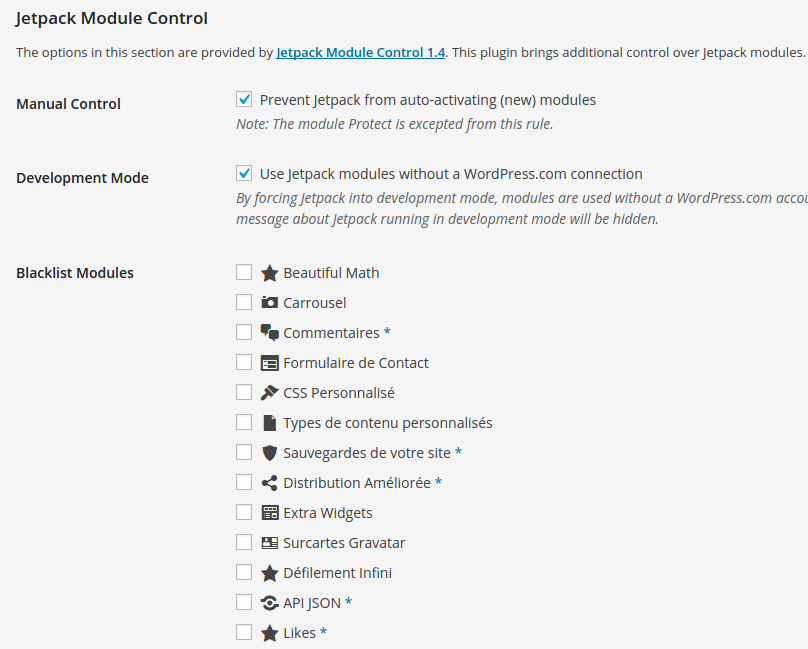
Options section with Blacklist.
Changelog
1.7.2
Date: 2025/06/25
* Remove Search and Social submenus when related module is blacklisted
* FIX: Manual control failing
1.7.1
Date: 2025/06/20
* FIX: Save empty blacklist as empty, not false (relevant for options cache)
* FIX: Allow autoload filter to return null
* Split up admin class
1.7
Date: 2025/06/16
* Updated fallback and icons list
* Namespace and autloading
* Coding standards
* Network settings nonce verification
* NEW: filter jmc_get_available_modules
* FIX: jetpack_offline_mode filter added too late, thanks @jqz
1.6
Date: 2020/08/19
* Replace jetpack_development_mode with jetpack_offline_mode filter
* New module icons
* Shorter list when Offline Mode is activated
1.5
Date: 2016/12/07
* NEW: option to allow site admins override contributed by @harshit_ps https://github.com/RavanH/jetpack-module-control/pull/8
1.4.2
Date: 2016/04/14
* Text domain name change to correspond with plugin slug
1.4.1
Date: 2016/04/01
* Added FR/NL translation files
1.4
Date: 2016/03/29
* Allow per site settings by Super Admin
* Added Sitemaps to known modules
1.3
Date: 2015/09/02
* Module names now translated using jetpack.mo
* BUGFIX options not saving deactivation
* BUGFIX translation files not found
1.2
Date: 2015/08/01
* Fix “Missing argument 1 for Jetpack_Module_Control::add_settings_section()” https://github.com/RavanH/jetpack-module-control/issues/2
1.1
Date: 2015/05/11
* Detect the Unplug Jetpack plugin
1.0
Date: 2015/05/05
* Jetpack Debug Mode to allow modules without connection
* Show which modules require a connection
0.4
Date: 2015/05/01
* Settings action link on Network plugins page
0.3
Date: 2015/04/27
* Added dashicons
0.2
Date: 2015/04/26
* Added network options
0.1
Date: 2015/04/25
* Initial release