

Jetpack Subscription Form
Provides You a customizable widget for jetpack subscription Form
Maintenance 22/1003504d since update
Active installs
200
Downloads
12,978
Reviews
4
Age
11.6y
Plugin info
Total downloads: 12,978
Active installs: 200
Total reviews: 4
Average rating: 4
Support threads opened: 0
Support threads resolved: 0 (0%)
Available in: 1 language(s)
Contributors: 1
Last updated: 8/29/2016 (3504 days ago)
Added to WordPress: 8/20/2014 (11 years old)
Minimum WordPress version: 3.1.2
Tested up to WordPress version: 4.6.30
Minimum PHP version: f
Maintenance & Compatibility
Maintenance score
Possibly abandoned • Last updated 3504 days ago • 4 reviews
22/100
Is Jetpack Subscription Form abandoned?
Possibly abandoned (last update 3504 days ago).
Compatibility
Requires WordPress: 3.1.2
Tested up to: 4.6.30
Requires PHP: f
Similar & Alternatives
Explore plugins with similar tags, and compare key metrics like downloads, ratings, updates, support, and WP/PHP compatibility.
No similar plugins found yet.
Description
Jetpack Subscription Form
This a plugin based on a feature in the jetpack by wordpress. This plugin prvides you a widget that will help to customize the jetpack subscription
box. This widget provides options to add placeholder , remove p tags surrounding the text box and submit button, also you can add custom classes to
email filed and submit button field.
1.1.2
- Bug fix related to email field
1.1.2
- Removed Required Class From email field
Installation
Install Jetpack Subscription Form:
- Download Jetpack Subscription Form to your computer
- Log into your WordPress admin
- Click Plugins –> Add New
- Click Upload (in the header)
- Search your computer for jetpack-subscription-form.zip
- Click Install Now
- Click Activate Plugin
- Click Appearance –> widgets to Find the widget ( Widget Name Blog Subscriptions Customized(Jetpack)).
- Note: If your computer automatically unzips your download, you’ll need to re-compress it first.
- On Mac OSX: Ctrl+click the plugin folder –> Compress.
- On Windows: Right-click the plugin folder –> Send To –> Compressed (zipped) Folder.
Frequently Asked Questions
No FAQ available
Review feed
Scott Winterroth
Mentioned your plugin on my blog
http://plugincopywriter.com/new-notable-wordpress-plugins-week-ending-aug-24/
Screenshots
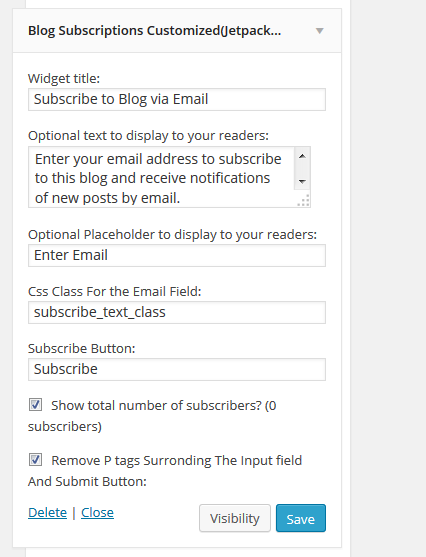
Jetpack Subscription Custom Widget
Changelog
1.0
- Initial release of plugin
1.1
- Changes Based On Jetpack Updates
- Added Submit Button Image Option
- Added Subscribe Logo Option