

JoomConnect Quick Ticket Lite
JoomConnect Quick Ticket Lite allows you to place a form on your website that connects to your ConnectWise
Plugin info
Maintenance & Compatibility
Maintenance score
Possibly abandoned • Last updated 4874 days ago
Is JoomConnect Quick Ticket Lite abandoned?
Possibly abandoned (last update 4874 days ago).
Compatibility
Similar & Alternatives
Explore plugins with similar tags, and compare key metrics like downloads, ratings, updates, support, and WP/PHP compatibility.
Description
Have you ever wanted a quick, easy way to create a ticket in Connectwise without having to navigate away from your site? Quick Ticket Lite, the newest module from the innovative developers of JoomConnect, allows a user to quickly create a ticket and submit it directly to ConnectWise without having to navigate away from the page. As a standalone module, it can be employed anywhere on your site, does not require the full version of JoomConnect and is completely free. The only information that Quick Ticket Lite requires to create a ticket is the service board name and email connector email address configured in the backend of the module.
This module will place a form on the frontend of your website. Once a user has entered and submitted his/her information through the form, the data will be inserted into a newly created ticket. By using an email connector, the ticket is created with the user’s email address so that the correct contact information is used in ConnectWise. The ticket is automatically generated in ConnectWise on the service board chosen by the user.
If you like the features that Quick Ticket Lite offers, please be sure check out JoomConnect for a full suite of integration options between your website and ConnectWise.
Installation
This section describes how to install the plugin and get it working.
- Extract
joomconnect-quick-ticket-liteand upload the directory to the/wp-content/pluginsdirectory - Activate the plugin on the ‘Plugins’ in the WordPress backend
- Go to the Appearance->Widgets menu in the WordPress backend and place the widget in the position of your choice
Frequently Asked Questions
Q: How do I configure the widget?
A: There are several settings that can be set on the widget in the WordPress backend. You can find them on the Appearance->Widgets menu. Each setting has a tooltip that will give more explanation if needed.
Review feed
Screenshots
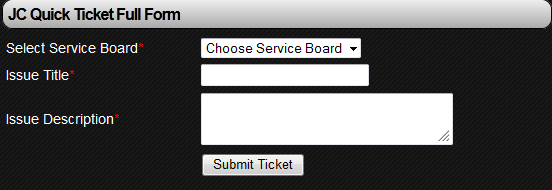
This is a shot of the JoomConnect Quick Ticket Lite form on the Full Form setting.

This is a shot of the JoomConnect Quick Ticket Lite form on the Slim Line setting.

This is a shot of the settings for JoomConnect Quick Ticket Lite in the WordPress backend.
Changelog
1.0
- This is the initial release