

JP Theme Switcher Bar
Adds a theme switcher/ theme demo bar to the bottom of your site to allow users to switch the theme they see on your site.
Plugin info
Maintenance & Compatibility
Maintenance score
Possibly abandoned • Last updated 4184 days ago • 1 reviews
Is JP Theme Switcher Bar abandoned?
Possibly abandoned (last update 4184 days ago).
Compatibility
Similar & Alternatives
Explore plugins with similar tags, and compare key metrics like downloads, ratings, updates, support, and WP/PHP compatibility.
Description
Use this plugin to create a demo site for your themes, or use it to allow users to customize the presentation of your site.
The JP Theme Bar Plugin adds a theme switching bar to the bottom of your site, perfect for theme preview sites. The settings page for the plugin lets the end user choose which themes to add, as well as set the colors for the theme bar. You can see it in action on this site.
New in version 0.0.3 -> Themes will update theme mods when changing themes allowing for individual theme settings to be previewed properly.
This plugin is based on the IJM Theme Switcher Bar v2.0 by Iain J McCallum
IMPORTANT- The plugin Theme Test Drive by Vladimir Prelovac must be installed and activated in order for the theme switching to work.
Installation
installing from WordPress.
Log into your WordPress site.
Navigate to “Plugins” => “Add New”.
Search “JP Theme Bar”.
Click “Install Now” then “Activate”.
And again, revel in this super-simple theme switcher by going theme switcher crazy!
After installation
This plugin requires the plugin Theme Test Drive (https://wordpress.org/plugins/theme-test-drive/)
Theme Test Drive is by Vladimir Prelovac (http://www.prelovac.com/vladimir/)
If Theme Test Drive is not installed THEME SWITCHING WILL NOT WORK
In Appearance->JP THEME BAR you can specify the following settings:
“Label For Theme Bar” – The text that will preceded the list of themes. For example, “Switch Themes.”
Each installed theme can be optionally enabled as an option to switch to.
“Background Colour” – Background colour for the theme switch bar.
“Text Colour” – Text colour for the theme switch bar.
“Label Background Colour” – Background colour for the label section.
“Label Text Colour” – Text colour for the label.
Frequently Asked Questions
Can I Move The Bar To Another Location?
Yes.
As of version 0.0.2 there is no option to do this, but there are filters. You can use the filter ‘jptb_where_bar’ to specify which action the bar is outputted on and you can use the ‘jptb_bar_position’ to set custom CSS for the positioning, which by default pegs the bar to the bottom of the page.
For more information see: http://joshpress.net/themes/jp-theme-bar-plugin/jp-theme-bar-filters/
Review feed
Screenshots
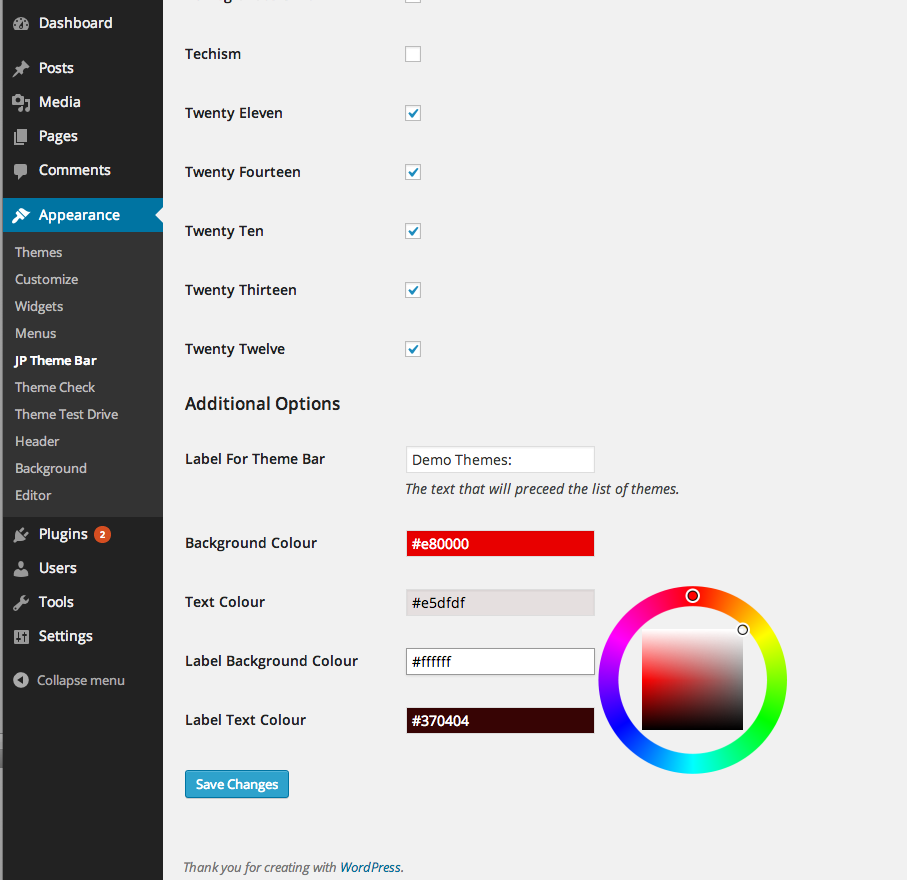
The colour options in plugin settings page.

Example of the bar in the front end.
Changelog
0.0.2
- All code OOP
- Added Filters
0.0.3
- New filters for adding stuff to the end of the bar
- Theme switching will now be continued when following internal links.
- Theme mods are updated when switching themes.