

jQuery Dropdown Menu
JQuery Dropdown Menu provide a perfect dropdown menu, listing pages for your website. You can change your Wordpress navigation menu into multiple avai …
Plugin info
Maintenance & Compatibility
Maintenance score
Possibly abandoned • Last updated 3025 days ago • 1 reviews
Is jQuery Dropdown Menu abandoned?
Possibly abandoned (last update 3025 days ago).
Compatibility
Similar & Alternatives
Explore plugins with similar tags, and compare key metrics like downloads, ratings, updates, support, and WP/PHP compatibility.
Description
JQuery Dropdown Menu provide a perfect dropdown menu, listing pages for your website. You can change your WordPress navigation menu into multiple available menu themes by this dropdown menu plugin.
Responsive Menu Support is also avilable under that plugin.
Template tag use function on your theme header.php or where you want to display menu.
Shortcode [jquery_drop_down_menu]
Features:
Responsive menu, Mobile menu
Automatically generated menus
Support theme menu locations, overwrite any exiting available menu
Supports pages, Custom menus
jQuery Animation Effects
Multiple themes
Supports Multiple Instances
Can be embedded into theme using PHP Template Tag
Installation
Just follow the steps below to add it to your site.
1. Login to your WordPress dashboard and go to Plugins > Add New.
2. If you have downloaded the plugin, click on Upload link and upload the plugin.
3. If you haven’t downloaded yet, type JQuery Drop Down Menu to search field and click Search.
4. Click on Install and click Activate plugin once it is loaded.
5. Go to Dropdown menu under Settings to change dropdown theme and edit your settings.
6. Add the dropdown menu to your site using ‘Theme Location’, ‘shortcoe’ or template tag codes.
7. Done. Enjoy!
Template tag use <?php jquery_drop_down_menu('HOME') ?> function on your theme header.php or where you want to display menu.
** Shortcode** [jquery_drop_down_menu]
For basic usage, you can also have a look at the plugin homepage.
Frequently Asked Questions
Do you have questions or issues with JQuery Drop Down Menu? Use these support channels appropriately.
Installation Instructions
Just follow the steps below to add it to your site.
1. Login to your WordPress dashboard and go to Plugins > Add New.
2. If you have downloaded the plugin, click on Upload link and upload the plugin.
3. If you haven’t downloaded yet, type JQuery Drop Down Menu to search field and click Search.
4. Click on Install and click Activate plugin once it is loaded.
5. Go to Dropdown menu under Settings to change dropdown theme and edit your settings.
6. Add the dropdown menu to your site using ‘Theme Location’, ‘shortcoe’ or template tag codes.
7. Done. Enjoy!
Template tag use <?php jquery_drop_down_menu('HOME') ?> function on your theme header.php or where you want to display menu.
** Shortcode** [jquery_drop_down_menu]
For basic usage, you can also have a look at the plugin homepage.
Review feed
Screenshots
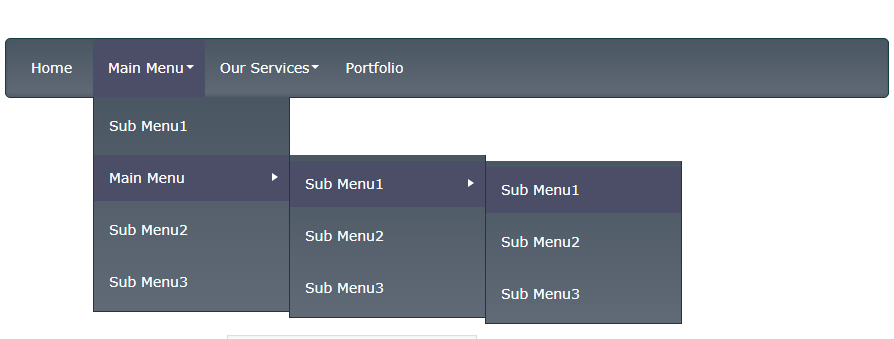
A preview of Black Style Menu

A preview of Blue Style Menu

Dropdown menu options page.


Changelog
3.0
Big Update, Supporting Menu Locations, Responsive Menu, Animation Effects, Multiple Menu Style/Themes, Mobile Menu
2.5
Stop the currently-running animation on the matched elements.
2.4
Solved Jquery conflict problem,
Now this plugin is compatible for any jquery based plugin like, LightBox,wp-cycle.
So, you can use both plugin without confliction.
2.0
Add arrow that indicate parent menu has childs,
Add exclude pages control
Add custom menu option
Add two option for menu animation etc
1.0
First build
Fixed some bugs with the code. Sorry, I accidentally left some test code in!