

jQuery Post Splitter
This plugin will split your post and pages into multiple pages with a tag. A button to split the pages and posts is available in text editor icons.
Plugin info
Maintenance & Compatibility
Maintenance score
Maintained • Last updated 162 days ago • Support resolved 100% • 37 reviews
Is jQuery Post Splitter abandoned?
Likely maintained (last update 162 days ago).
Compatibility
Languages
Similar & Alternatives
Explore plugins with similar tags, and compare key metrics like downloads, ratings, updates, support, and WP/PHP compatibility.
Description
-
Author: Fahad Mahmood
-
Project URI: http://androidbubble.com/blog/wordpress/plugins/jquery-post-splitter
-
License: GPL 3. See License below for copyright jots and titles.
jQuery Post Splitter is compatible with almost all themes and it can be implemented in 4 different ways from which you might will require one. For user friendliness, this plugin come up with a button “Split Page” and easy usage within the text editor. It is light weight and comparatively optimized so it will not interrupt your scripts uselessly.
- Demo URI: http://demo.androidbubble.com/jquery-post-splitter-pro
- Demo URI: http://demo.androidbubble.com/how-it-works-jps
- Demo URI: http://demo.guavapattern.com/?page_id=443
- Demo URI (Page Break Block): http://demo.guavapattern.com/?page_id=447
WordPress has an excellent, but little known, feature for splitting up long posts into multiple pages. However, a growing trend among major news and blog sites is instead to split up posts into dynamically loading sliders. While there are many slider plugins available for WordPress, none of them quite tackles this functionality. That’s where the jQuery Post Splitter comes in: it takes normal multi-page posts from WordPress and replaces them with jQuery transition, ajax and page-refresh methods.
Tags
slider, pagination, ajax, carousel, multi-page, newspaper
Video Tutorial
Basic Features
- Posts and Pages can be divided into parts with page-breaks.
- View full post optional link
- Navigation captions can be edited
- Slides counter can be displayed
- Custom HTML and CSS can be added above and below post slides
- Scroll to top option is available for long posts
- Exceptional support on wordpress.org
- Slider navigation position
- Insert
with each return key - Slider count (e.g. “2 of 4”) position
- Scroll to top after slide load? (jQuery/Ajax)
- Clean tags from all posts/pages
Advanced Features
- Default post navigation, line numbers display as pagination
- JavaScript Function on Slide, on each next and previous button you can trigger multiple JS functions
- Beautiful Styles for Slider Navigation
- SEO Trick – Display full content on first page as hidden?
- Loop slides – Creates an infinite loop of the slides
- Editable navigation captions
- Disable theme’s default post navigation
- Display full content on first page as hidden
- Combine different pages/posts with shortcode
What the slider does:
-
Provides an awesome functionality to combine many posts/pages into one with the shortcodes. Example: [JPS_CHUNK id=”62″ type=”title”]
-
Replaces WordPress’ built-in post pagination funtionality with jQuery, ajax-based carousel and page-refresh method.
-
Uses hash based URLs for easy direct linking to specific slides. This also preserves the functionality of the browser’s Back button.
-
Automatically adds slide navigation and a slide counter (e.g. ‘1 of 7’) to sliders according to the preferences you set.
-
Adds the ‘Insert Page Break’ button to the TinyMCE post editor so that you can easily split your content into multiple pages/slides.
-
Provides an optional stylesheet for (very) basic styling of the slider navigation.
-
Optionally allows infinite looping of slides.
-
Optionally provides a link to view all slides on a single page.
-
Optionally allows for scrolling back to top when each slide loads.
Installation
-
Upload the ‘jquery-post-splitter’ directory to the
/wp-content/plugins/directory -
Activate the plugin through the ‘Plugins’ menu in WordPress
-
Customize your display options on the jQuery Post Splitter Settings page
-
Make paginated posts and pages using the newly visible ‘Insert Page Break’ button in the post editor
Frequently Asked Questions
Yes, there is an option “Frog Jump” on settings page. If you turn that ON, on the last page you will get the permalink of the next alphabetically ordered and same with the previous button being on the first page while you are using infinite loop option.
This way I can insert the buttons anywhere, yet there is more content below. At this moment plugin is slicing the content and at the point of page break, it automatically inserts the button. You can do the trick with jQuery/JS instead, simply hide these buttons and trigger with jQuery. That’s better instead of touching the default functionality.
No
Review feed
Screenshots

How to insert page breadk?

Page Break / Split Icon in Content Editor
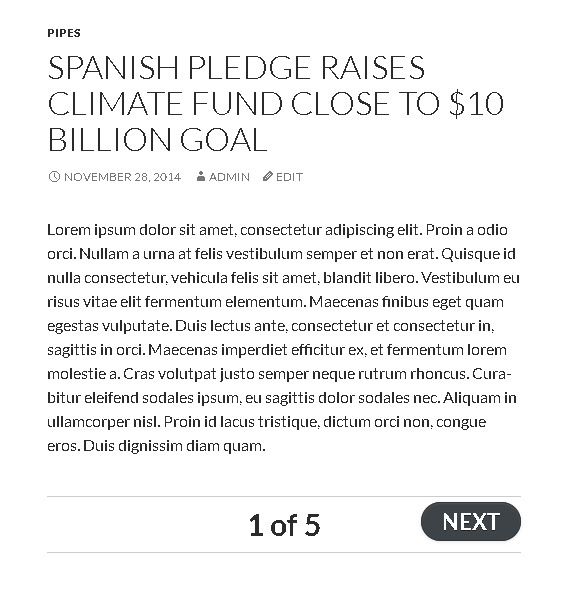
Demonstration#1

Demonstration#2

Slider count for both top and bottom

Settings overview

Specific Post Settings

Pro Settings (New Features)

New Premium Feature In Action (Left Navigation Menu + Single Post as Multiple Posts)

Settings Page (Detailed)

Navigation Caption is Editable

Features at a Glance

Developer Mode > Restrict assets files loading

Customization

Clean your posts from and/or tags PHP
Changelog
3.0.3
- Improved: safer content filtering and ad restoration logic; fixed conditional checks for single/page contexts. [22/10/2025][Thanks to Ahmad Rahhal]
3.0.0
- Fix: Fatal error: Uncaught Error: Call to undefined function jpg_next_post_link(). [07/01/2024][Thanks to Dardan Thaqi]
2.9.9
- Fix: PHP Warning: Undefined variable $wp_link_pages. [31/12/2023][Thanks to Torsten]
2.9.8
- Infinite loop of the slides feature improved. [07/06/2022][Thanks to Anmar Al-Nakib]
2.9.7
- Page refresh related improvements. [06/06/2022][Thanks to Anmar Al-Nakib]
2.9.6
- Ajax based aut loading on page scroll downwards. [25/04/2022][Thanks to Alex]
2.9.5
- Infinite loop to the next article in the same category. [21/02/2022][Thanks to Alex]
2.9.4
- Double buttons were appearing on page refresh option. [21/02/2022][Thanks to Alex]
2.9.3
- WP Doing Ajax added in return conditon. [20/12/2021]
2.9.2
- Performance optimized. [Thanks to Jim / IG Webs][18/12/2021]
2.9.1
- Numeric pagination feature added. [Thanks to yagoman][25/10/2021]
2.9.0
- Delay value is working with jQuery and Refresh methods as well. [Thanks to DentalOrg.Com]
2.8.9
- Buttons apperance delay added from settings page. [Thanks to ЯR]
2.8.8
- Ajax method tested with browser back button. [Thanks to Tyler Archer & Ashok Sharma]
2.8.7
- Ajax method revised. [Thanks to Tyler Archer & Ashok Sharma]
2.8.6
- Language files updated.
2.8.5
- Customization settings are optional. [Thanks to ЯR]
2.8.4
- A few improvements on settings page round #2.
2.8.3
- A few improvements on settings page round #1.
2.8.2
- nextpart button removed and nextpage button will work.
2.8.1
- Optimized for DENTALORG.COM. [Thanks to Don]
2.8.0
- Assets are restricted to settings page only. [Thanks to Lisa Burger]
2.7.9
- Features banner added to settings page. [Thanks to Team GP Themes]
2.7.8
- Custom HTML and Styles above post and below post revised. [Thanks to Игорь Семенко]
2.7.7
- Bootstrap restricted, so it will not load on other pages.
2.7.6
- Just muted count query to make settings page load faster. [Thanks to Cassie Jones]
2.7.5
- Sanitization ensured and a new feature added for uninstall. [Thanks to WordPress Plugin Review Team & Team AndroidBubbles]
2.7.4
- Video tutorial added. [Thanks to Rais Sufyan]
2.7.3
- Notice: Undefined variable: jps_premium fixed. [Thanks to Team GP Themes]
2.7.2
- jQuery navigation revised. [Thanks to Team GP Themes]
2.7.1
- Ajax based pagination improved and settings page UI revised. [Thanks to Exavior]
2.7.0
- Go Premium link fixed on installed plugins page. [Thanks to Howard Edidin]
2.6.9
- Another useful video tutorial added using blocks. [Thanks to Team GP Themes]
2.6.8
- Ajax based pagination improved with default page-break by WordPress. [Thanks to Exavior]
2.6.7
- Another minor CSS fix regarding button hover.
2.6.6
- Shortcodes were not working in ajax mode.
2.6.5
- Shortcodes video tutorial added for better understanding. [Thanks to Howard Edidin]
2.6.4
- Ajax based load will load only post part instead of completed page. [Thanks to Ibulb Work Team]
2.6.3
- Ajax based pagination provided with custom JS function trigger on slide. [Thanks to Exavior]
2.6.2
- Ajax based pagination refined. [Thanks to Exavior]
2.6.1
- A few PHP notices fixed and Ajax based navigation improved. [Thanks to Leopoldo Mauriello & Exavior]
2.6.0
- A few PHP notices were reported, and fixed in this version. [Thanks to Leopoldo Mauriello]
2.5.9
- Next and Previous can be translated. [Thanks to Louring]
2.5.8
- Scroll to top feature improved with an input field. [Thanks to Louring]
2.5.7
- Checked ads code in premium version as well. [Thanks to виконується перек]
2.5.6
- Stripslashes function added. [Thanks to виконується перек]
2.5.5
- Custom HTML/Styles section added in Premium version. [Thanks to виконується перек]
2.5.4
- Languages refined. [Thanks to Abu Usman]
2.5.3
- Faqs added. [Thanks to Jon Dykstra]
2.5.2
- Languages added. [Thanks to Abu Usman]
2.5.1
- Navigation and count combination checked and improved. [Thanks to Игорь Семенко]
2.5.0
- Improved navigation and count area. [Thanks to Игорь Семенко]
2.4.9
- Improved navigation area. [Thanks to Игорь Семенко]
2.4.8
- Fixed nextpart stuff in 2nd round case for the_content filter. [Thanks to Gianluca]
2.4.7
- Add adsense code feature in additional settings. [Thanks to Amina Beny]
2.4.6
- Undefined variable: next_text and prev_text are fixed. [Thanks to Adam King]
2.4.4
- Sanitized input and fixed direct file access issues.
2.4.3
- Newspaper theme compatibility. [Thanks to Ranieri Quadros]
2.4.2
- SEO Trick Added. [Thanks to Roman from Ukraine]
2.4.1
- endless-posts-navigation compatibility added. [Thanks to Deepak Jain]
2.4
- Usability improved.
2.3.5
- Proivde nextpage to nextpart patch in settings area. [Thanks to Rosanna Montoute]
- Pagebreak icon replaced with the JPS pagebreak icon.
2.3.3
- jQuery related bug fixed. [Thanks to Ashtyn Evans]
2.3.2
- Script improved a little more.
2.3.0
- Structure refined and YouTube embed code issue fixed with jQuery implementation. [Thanks to Brian Stewart from UK]
- Sub pages support added with a shortcode and ensured that it works with all pages too. [Thanks to Rosanna Montoute]
2.2.0
- nl2br() option provided in settings page.
2.1.1
- A JavaScript error found in console and fixed. [Thanks to Allan from Brazil]
2.1.0
- A few new features are added and a few important fixes. [Thanks to Nizar & Ahmed]
2.0.7
- An important fix related to content formatting.
2.0.6
- An important fix related to content formatting. [Thanks to Kaye & joopleberry]
2.0.5
- A serious issue is fixed related to syntax error.
2.0.4
- View Full Post repetition is fixed. [Thanks to Dorian]
2.0.3
- An important fix related to content formatting.
2.0.2
- Next button styled. [Thanks to Noman Ahmad]
2.0.1
- An important HTML/CSS fix.
2.0
- An amazing feature is added. [Thanks to Jon Grant]
1.3
- An important fix related to pagination. [Thanks to Peter Grant]
1.2
- An important fix related to layout. [Thanks to Ugo Oliver & Ahyat Pelukis]
1.1
- An important fix related to layout. [Thanks to JokusPokus]
1.0
- Intial commit.