

Simple Contact Form and Multi Step Contact Form
Simple Contact Form and Multi Step Contact Form with Attachment Support, Customizable Labels, Custom CSS, WP Mail SMTP Support, and Improved Design.
Plugin info
Maintenance & Compatibility
Maintenance score
Possibly abandoned • Last updated 471 days ago • 1 reviews
Is Simple Contact Form and Multi Step Contact Form abandoned?
Possibly abandoned (last update 471 days ago).
Compatibility
Similar & Alternatives
Explore plugins with similar tags, and compare key metrics like downloads, ratings, updates, support, and WP/PHP compatibility.
Description
Just Simple Contact Form Offers Multi-Step Forms, Regular Forms, File Attachment Support, and WP Mail SMTP for Improved Fast Email Delivery.
Just Simple Contact Form Demo
Features:
Introducing Just Simple Contact Form 1.2 – The Ultimate Contact Form Plugin for WordPress!
- Multi-Step Contact Form For Better User Experience.
- Green Tick For Valid Inputs: Shows a green tick when form fields are correctly filled out, providing real-time feedback to users.
- Email Validation: Ensures users enter a valid email address before proceeding to the next step.
- WP Mail SMTP Support for enhanced email delivery reliability.
- Contact Form with attachment support.
- Customizable Email Destination via the settings page.
- Customizable Form labels for name, email, subject, and message fields.
- Email Header and Footer Configuration for styling emails.
- Ability to add Custom CSS directly from the settings page.
- Option to Enable or Disable Field Placeholders.
- Improved Form Styling including margin, padding, hover effects, transitions, and colors.
How to use:
- Install and activate the plugin.
- Go to the settings page in the WordPress dashboard and configure your email address, form labels, and other options.
- Use the Shortcode
[contact_form]to display the regular form on any page or post. for multi-step form use [js_contact_form_multistep] - Style the form using the custom CSS box in the settings, or modify the default styles.
License
This plugin is free software; you can redistribute it and/or modify it under the terms of the GNU General Public License as published by the Free Software Foundation; either version 2 of the License, or any later version.
Plugin Homepage
For Custom CSS, visit the plugin’s homepage
Installation
- Upload the plugin files to the
/wp-content/plugins/just-simple-contact-formdirectory, or install the plugin through the WordPress plugins screen directly. - Activate the plugin through the ‘Plugins’ screen in WordPress.
- Use the settings page (Just Simple Contact Form) under WordPress Settings to configure the form as needed.
- Use the shortcode for regular form
[contact_form]or[js_contact_form_multistep]for multi step in any page or post to display the contact form.
Frequently Asked Questions
Use the Shortcode [contact_form] on any page or post where you want the form to appear.
Use the Shortcode [js_contact_form_multistep] on any page or post where you want the form to appear.
You can customize the form labels, CSS, email address, and more from the plugin’s settings page in the WordPress dashboard.
Review feed
Ability to add custom CSS directly from the settings page
Screenshots
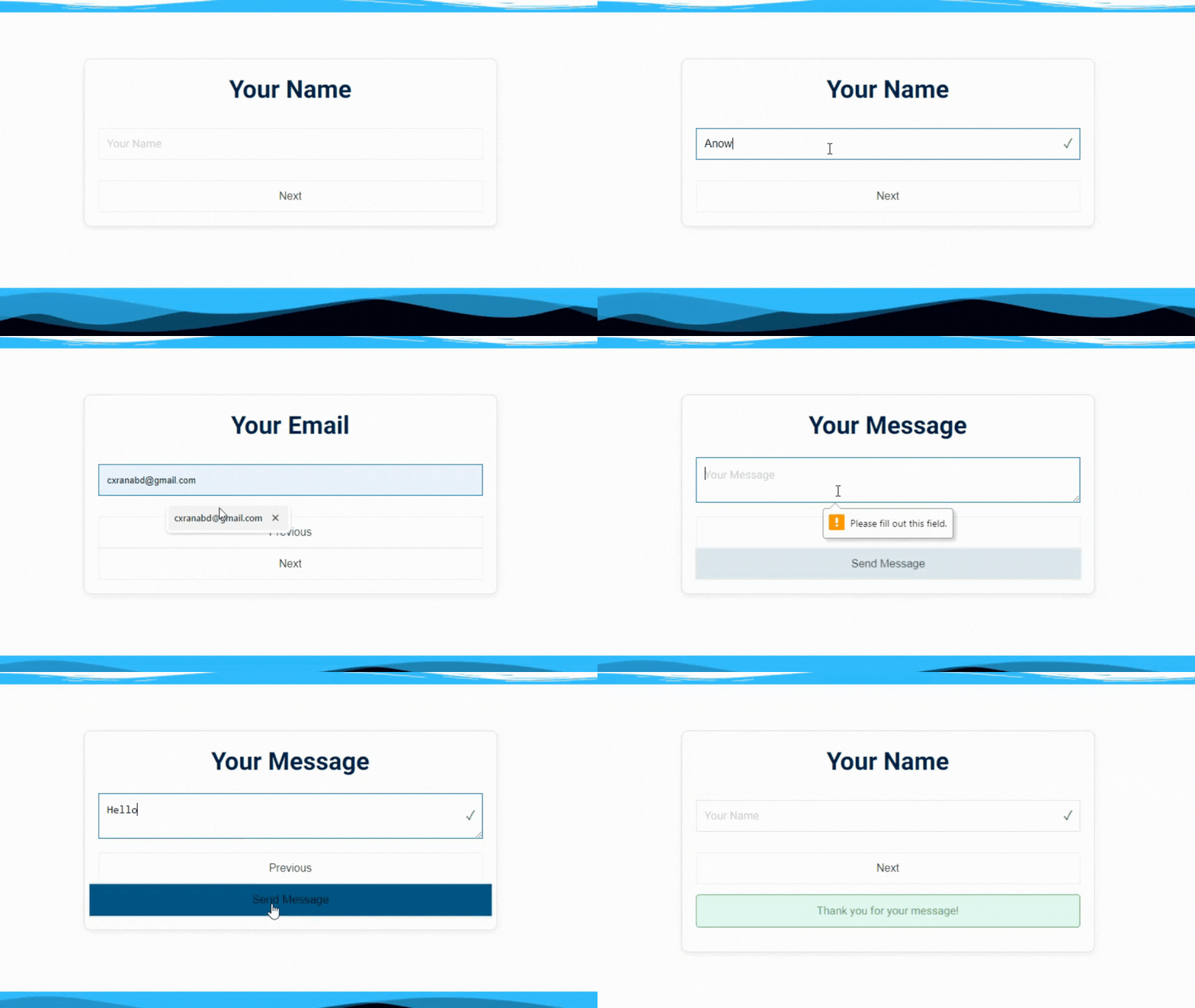
Example of the Multi Step contact form in the Front-end.

The settings page with options for email configuration, custom labels, and custom CSS.

Example of the Regular contact form in the Front-end.

Example of the contact form in the Front-end.

Example of the contact form in the Front-end.
Changelog
1.2
- Added multi-step contact form feature for improved user experience. (2024)
- Integrated WP Mail SMTP support for enhanced email delivery reliability.
- Added a settings page for configuring email, form labels, custom CSS, and more.
- Introduced email header and footer support.
- Added customizable form placeholders (toggle option in settings).
- Improved frontend form design with padding, margins, colors, transitions, and font size.
- Developer credit section added with social media and contact links.
- Removed inline styles from the theme customizer.
- Fixed issues with email delivery and PHPMailer configuration.
- Added green tick for valid form inputs and email validation for preventing incorrect email submissions.
1.1
- Added a settings page for configuring email, form labels, custom CSS, and more. (2024)
- Introduced email header and footer support.
- Added customizable form placeholders (toggle option in settings).
- Improved frontend form design with padding, margins, colors, transitions, and font size.
- Developer credit section added with social media and contact links.
- Removed inline styles from the theme customizer.
- Fixed issues with email delivery and PHPMailer configuration.
1.0
- Initial release of the Just Simple Contact Form plugin with support for attachments and email validation.
- This Plugin was First Created in 2012.