

just Simple Accordions
Here is a short description of the plugin. This should be no more than 150 characters. No markup here.
Maintenance 20/1002489d since update
Active installs
70
Downloads
3,656
Reviews
0
Age
9.0y
Plugin info
Total downloads: 3,656
Active installs: 70
Total reviews: 0
Average rating: 0
Support threads opened: 0
Support threads resolved: 0 (0%)
Available in: 1 language(s)
Contributors: 2
Last updated: 4/25/2019 (2489 days ago)
Added to WordPress: 2/15/2017 (9 years old)
Minimum WordPress version: 4.6
Tested up to WordPress version: 4.7.31
Minimum PHP version: f
Maintenance & Compatibility
Maintenance score
Possibly abandoned • Last updated 2489 days ago
20/100
Is just Simple Accordions abandoned?
Possibly abandoned (last update 2489 days ago).
Compatibility
Requires WordPress: 4.6
Tested up to: 4.7.31
Requires PHP: f
Similar & Alternatives
Explore plugins with similar tags, and compare key metrics like downloads, ratings, updates, support, and WP/PHP compatibility.
Akismet Anti-spam: Spam Protection
Rating 4.7/5 (1,156 reviews) • Active installs 6,000,000
Spam protection, Honeypot, Anti-Spam by CleanTalk
Rating 4.8/5 (3,139 reviews) • Active installs 200,000
iQ Block Country
Rating 3.9/5 (163 reviews) • Active installs 20,000
Cookies for Comments
Rating 4.9/5 (18 reviews) • Active installs 20,000
Throws SPAM Away
Rating 5.0/5 (6 reviews) • Active installs 20,000
Delete Pending Comments
Rating 4.7/5 (94 reviews) • Active installs 10,000
Description
Accordions is pure HTML & CSS3 responsive accordion grid for WordPress. By this plugin you can display unlimited accordion grid at same page via short-code.
add shortcode in your page [simple-accordian]
if you change the title please some code add your plugin
[simple-accordion title=”Accordian”]
Installation
This section describes how to install the plugin and get it working.
e.g.
- Upload the plugin files to the
/wp-content/plugins/plugin-namedirectory, or install the plugin through the WordPress plugins screen directly. - Activate the plugin through the ‘Plugins’ screen in WordPress
- Use the Settings->Plugin Name screen to configure the plugin
- (Make your instructions match the desired user flow for activating and installing your plugin. Include any steps that might be needed for explanatory purposes)
Frequently Asked Questions
No FAQ available
Review feed
No reviews available
Screenshots
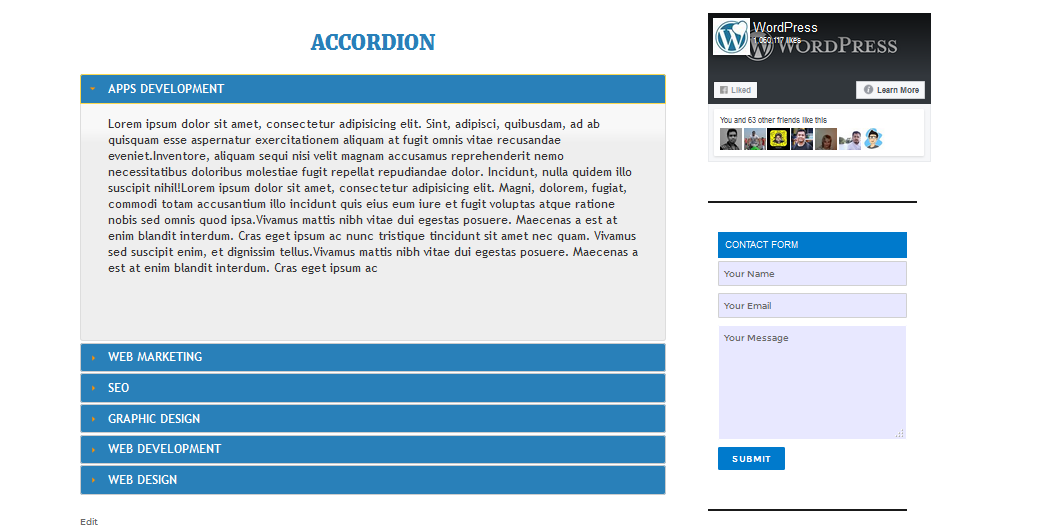
This is the fourth screen shot
Changelog
No changelog available