

JWT Selector Authenticator
This add-on allows the administrator to select which publications will only be accessible by providing a JWT per URL.
Plugin info
Maintenance & Compatibility
Maintenance score
Stale • Last updated 211 days ago
Is JWT Selector Authenticator abandoned?
Likely maintained (last update 211 days ago).
Compatibility
Similar & Alternatives
Explore plugins with similar tags, and compare key metrics like downloads, ratings, updates, support, and WP/PHP compatibility.
Description
With this add-on, you will have the opportunity to enhance the security of your website.
It will allow you to decide which pages can receive a special level of security, authenticating access to your content with JWT and limiting access to the posts you want.
You can also select a different token signature for each of the pages you want to have high security, giving your website an extra layer of protection.
Installation
- Upload the plugin folder to the
/wp-content/plugins/directory. - Activate it from the WordPress ‘Plugins’ menu.
- Configure the options from the Plugin’s ‘Settings’ page.
Frequently Asked Questions
-
Do I need to configure anything to use JWT?
Yes, you must access (you can do this through the JWT Selector Authenticator administration panel) the pages you want to secure and activate the ‘Require JWT authentication’ checkbox and set the signature you want for that page. -
Is it compatible with all themes?
Yes, as long as you use the standard WordPress functions to render content.
Review feed
Screenshots

JWT security settings panel.
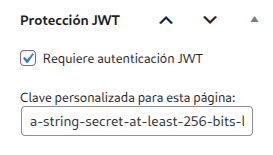
JWT Selector Authenticator panel on the page.

Page inaccessible without a correctly signed token.

Access to the page with a correctly signed token.
Changelog
1.4
- Second version of the plugin. Remember configure correctly the JWT’ signatures. Must be the shame used to sign the token.