
Kalrav AI Agent
Kalrav AI Agent is a powerful, customizable AI chatbot that floats on every page, providing real-time support and engagement.
Plugin info
Maintenance & Compatibility
Maintenance score
Maintained • Last updated 120 days ago • 3 reviews
Is Kalrav AI Agent abandoned?
Likely maintained (last update 120 days ago).
Compatibility
Similar & Alternatives
Explore plugins with similar tags, and compare key metrics like downloads, ratings, updates, support, and WP/PHP compatibility.
Description
-
Interactive Chat Interface – A modern, fully customizable chat window that integrates beautifully with your website’s layout and style.
-
Quick & Easy Setup – Simply install, activate, and start chatting — your AI assistant is ready within minutes, no coding needed.
-
Intelligent Conversations – Engage visitors with fast, natural, and context-aware responses powered by advanced AI technology.
-
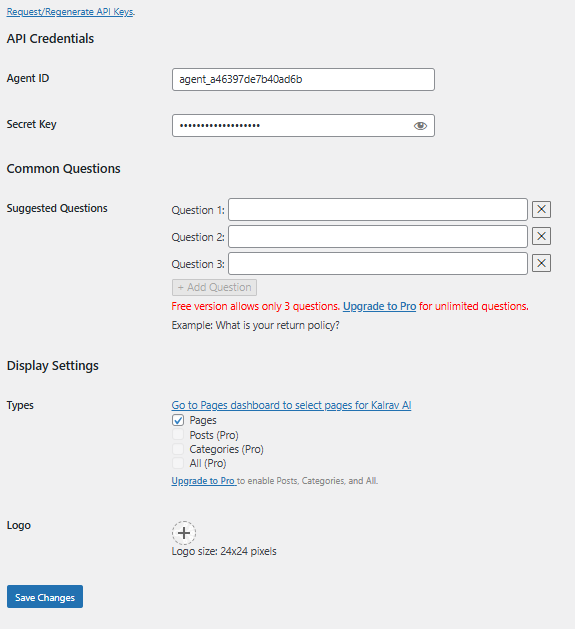
Flexible Customization – Personalize Common questions, icons, and greetings to perfectly reflect Kalrav Ai identity.
-
Smart Engagement Triggers – Automatically welcome visitors, collect leads, or reply to common questions with ease.
-
Lightweight & Secure – Built for speed, stability, and privacy, ensuring smooth performance across all devices.
External Services
This plugin supports integration with external services (such as AWS) to enhance chatbot functionality, including generating or retrieving images as part of chatbot responses.
User questions and session information are sent securely to this API during Kalrav AI interactions.
The external service used:
- Service Name: Kalrav AI
- Purpose: To process and respond to user messages in the chat widget.
- Data Sent: User message, session ID (anonymous), and site identifier.
-
Data Received: AI-generated response content.
Please check our privacy policy and terms of services:Privacy policy : https://kalrav.ai/privacy-policy/
Terms Of service : https://kalrav.ai/terms-of-services/
No personal data is stored or shared with third parties.
License
GPLv2 or later. See license.txt.
Installation
- Upload
kalrav-ai-agentfolder to/wp-content/plugins/ - Activate the plugin through the Plugins screen (Plugins > Installed Plugins).
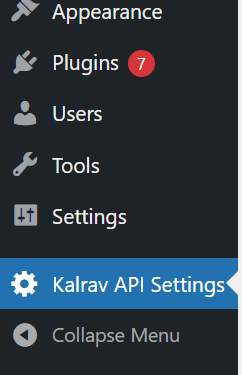
You will find Kalrav Ai settings in your WordPress admin screen.
For basic usage, have a look at the plugin’s website.
Frequently Asked Questions
Kalrav AI Agent is a powerful, customizable AI plugin that adds a floating chat widget to your WordPress site, enabling real-time AI-powered conversations to help visitors get quick answers and engage with your services.
By providing instant, intelligent responses via the kalrav, Kalrav AI Agent helps visitors find information faster, discover relevant content, and interact with your website more effectively.
Yes, you can customize the chat widget’s look and feel by overriding the default CSS or adding custom styles targeting the widget’s elements.
Kalrav AI Agent is designed to work smoothly with most WordPress themes. However, some themes with custom scripts or styles may require minor adjustments for optimal display.
Kalrav AI Agent processes user interactions in real-time to provide responses but does not store personal data unless explicitly enabled through plugin settings.
Review feed
Screenshots
Chat toggle button in bottom-right corner
Chat window expanded
Changelog
= Version 1.0.0=
Initial release.
= Version 1.1.0=
Added new features.
Improved message response performance.
Fixed minor styling issues.
= Version 1.2.0=
Enhanced user interface.
= Version 1.3.0=
Introduced new feature enhancements.
Added conversation history download option.
Updated UI for better usability.
= Version 1.4.0=
Added logo icon.
= Version 1.5.0=
Introduced new feature enhancements.
Added feedback functionality.
Improved UI version.
= Version 1.7.0=
Added voice input and output for chat.
Updated feedback UI design.
= Version 1.8.0=
Introduced session usage for continuous conversations.
Further feedback UI improvements.
= Version 1.9.0=
Improved overall UI, including font size and color adjustments.
Added multi-language support.
= Version 2.0.0=
Fixed all known UI bugs.
Resolved send button issues.
= Version 2.1.0=
Resolved language selection issue.
Added attachment button (upcoming feature).
= Version 2.2.0=
Speaker issue resolved.
UI improvements updated.
= Version 2.3.6=
woocommerce product integration
Zoho integration
= Version 2.3.8=
product menu added and ui fixes
= Version 2.4.0=
lead email fixed
product menu added