

KIJO Serpbook API
Use our plugin to display your SERP rankings right within any WordPress page or post using the popular Serpbook SEO rank tracker.
Maintenance 20/1002943d since update
Active installs
0
Downloads
1,242
Reviews
0
Age
8.1y
Plugin info
Total downloads: 1,242
Active installs: 0
Total reviews: 0
Average rating: 0
Support threads opened: 0
Support threads resolved: 0 (0%)
Available in: 1 language(s)
Contributors: 1
Last updated: 1/26/2018 (2943 days ago)
Added to WordPress: 1/26/2018 (8 years old)
Minimum WordPress version: 3.6
Tested up to WordPress version: 4.9.28
Minimum PHP version: 5.5
Maintenance & Compatibility
Maintenance score
Possibly abandoned • Last updated 2943 days ago
20/100
Is KIJO Serpbook API abandoned?
Possibly abandoned (last update 2943 days ago).
Compatibility
Requires WordPress: 3.6
Tested up to: 4.9.28
Requires PHP: 5.5
Similar & Alternatives
Explore plugins with similar tags, and compare key metrics like downloads, ratings, updates, support, and WP/PHP compatibility.
No similar plugins found yet.
Description
Use our plugin to display your SERP rankings right within any WordPress page or post using the popular Serpbook SEO rank tracker.
Customise the rankings table to suit your websites branding and layout.
Installation
- Sign up for a Serpbook account here https://goo.gl/TE5boK
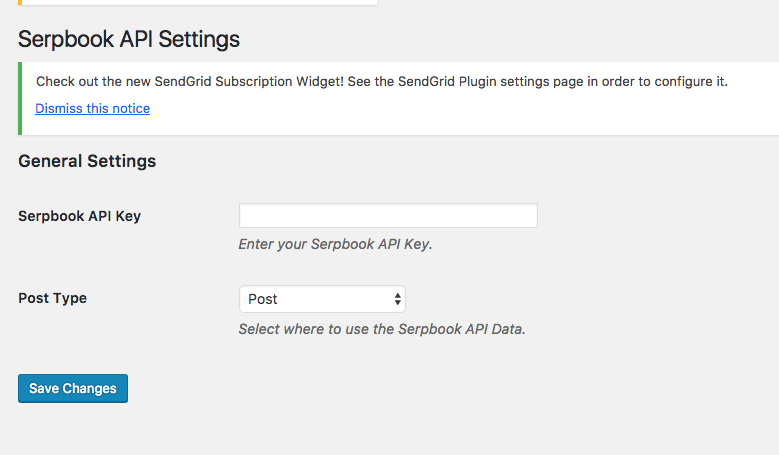
- Add your API key to the settings page and select which post type you would like the data to appear on
- Next step is to select the Serpbook category you want to display
- Drop the handy shortcode [sbapi_serp_table] into your post where you want to the SERP table to appear.
Frequently Asked Questions
Installation Instructions
- Sign up for a Serpbook account here https://goo.gl/TE5boK
- Add your API key to the settings page and select which post type you would like the data to appear on
- Next step is to select the Serpbook category you want to display
- Drop the handy shortcode [sbapi_serp_table] into your post where you want to the SERP table to appear.
Review feed
No reviews available
Screenshots

KIJO Serpbook API Settings
KIJO Serpbook API Results


Changelog
No changelog available