

Plugin info
Maintenance & Compatibility
Maintenance score
Possibly abandoned • Last updated 791 days ago • 2 reviews
Is Lalamove abandoned?
Possibly abandoned (last update 791 days ago).
Compatibility
Similar & Alternatives
Explore plugins with similar tags, and compare key metrics like downloads, ratings, updates, support, and WP/PHP compatibility.
Description
Lalamove provides on-demand, same day delivery by connecting your shipments and drivers inside your cities. Whether it’s as small as a document or as big as a sofa, rest assured.
Ship instantly and conveniently with Lalamove from your WooCommerce storefront
Key Features
- 24/7 on-demand delivery across your cities
- Various vehicle types for all cargo sizes, ranging from Motorcycle, Sedan, Van, and Trucks
- Real-time tracking and notification
- Advance scheduling up to 30 days
- Transparent pricing
- Customized instructions to drivers
- Different special services like thermal bag that are tailored to your every need
Supporting Markets & Cities
- Brazil (Sao Paolo, Rio de Janeiro, Brazilia, Curitiba, Brasília, Porto Alegre, and many more)
- Hong Kong, China
- Indonesia (Jakarta, Bandung, Surabaya)
- Malaysia (Kuala Lumpur, Johor Bahru, Penang)
- Mexico (Mexico City)
- Philippines (Manila, Cebu, Pampanga)
- Singapore
- Taiwan, China (Taipei, Tainan, Taichung, Kaohsiung)
- Thailand (Bangkok, Chonburi)
- Vietnam (Hanoi, Ho Chi Minh City, Haiphong)
How to Lalamove in WooCommerce
- Press “Send with Lalamove” on your order details page
- Check Pick Up & Drop Off details
- Pick your vehicle & time
- Leave a message for the driver if any
- Place Order
- Track delivery through Lalamove link
Installation
- Check whether WooCommerce plugin is installed
- Install Lalamove via the WordPress.org plugin or by uploading the files to your server (See instructions on how to install a WordPress plugin)
- Activate Lalamove
- Click “Lalamove” in the menu list
- “Approve” Lalamove to access your orders
- Login with your existing Lalamove account or sign up
- Send deliveries with Lalamove on the WooCommerce order detail page
Frequently Asked Questions
After successful installation and sign-in, you will see “Send with Lalamove” button in each order’s page.
For pick-up address, we retrieve your store address from WooCommerce > Settings > General > Store Address. We use Address line 1 as the key street address and Address line 2 as the supplementary one. So make sure to put valid street address in Address line 1 as the minimum.
For drop-off address, we retrieve recipient’s phone number from the Billing information and address from the Shipping information. Similarly here as well, we will use Address line 1 to locate the delivery address. So please make sure to guide your customers to enter Address line 1.
We use Google Maps to validate addresses, so the best way would be to get your key address from the Google Maps. Otherwise, make sure to specify address line 1 as the street address and address line 2 as the additional information such as floor, flat #, and block number.
Your delivery fee would be automatically deducted from your Lalamove wallet. So for new users, you must need to top up before placing any orders.
This will most likely happen when your account information has been updated after you installed our plugin. The fastest way to solve is to deactivate and activate again. If you are still seeing same issue, please reach out to [email protected] with your email and shop domain.
This will most likely happen when your account information has been updated after you installed our plugin. The fastest solution is to try deactivating and activating again. If you are still seeing same issue, please follow the instructions here
Visit our FAQ section here or feel free to reach us at [email protected]
Review feed
Screenshots
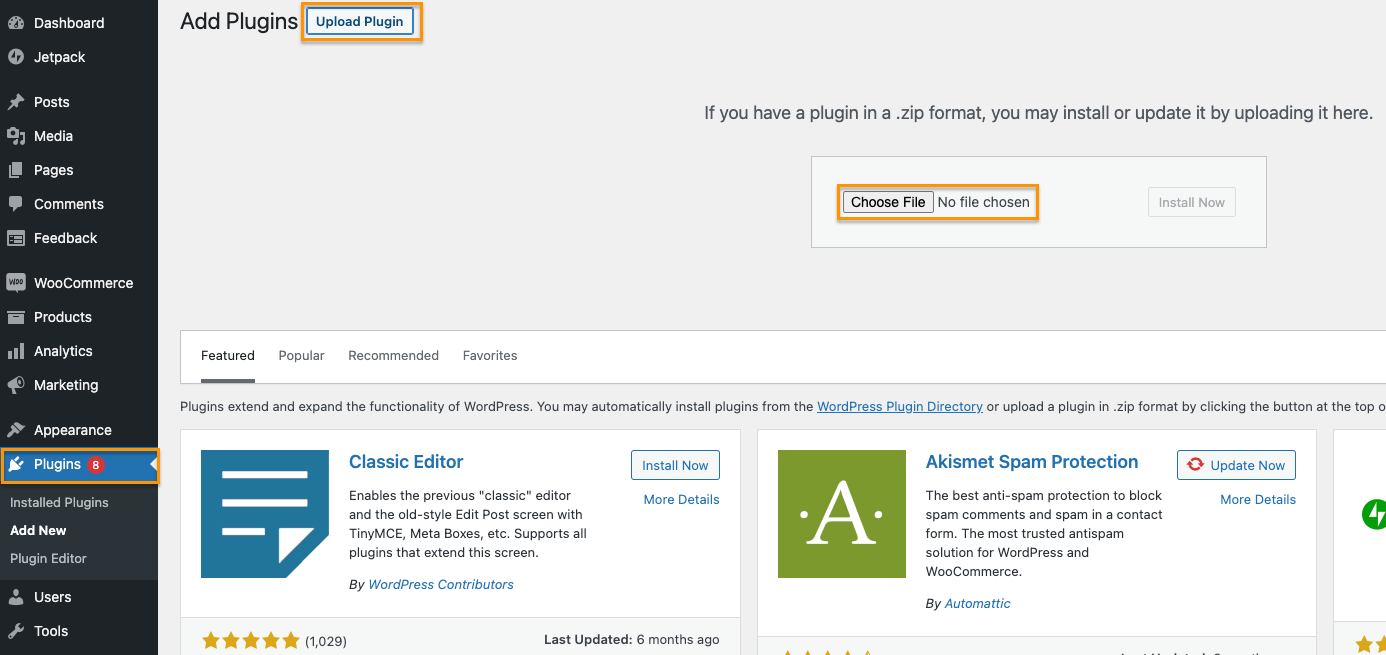
After downloading, Go to Wordpress > Plugins > Add New > Upload Plugin

Install and activate Lalamove

Click Lalamove in the drawer menu to the left

Make sure to set your store address here in Address Line 1. This will be used as your default pick-up address.

Click any order you want to fulfill

Press "Send with Lalamove" in the right widget

Fill order details and submit!

Confirm your orders

Check the order status in your order details page 10.Top up your wallet by going into web.lalamove.com if you don't have any balance. Make sure to login to same Lalamove account.

Changelog
1.0.7
- [Compatibility Support] Adapt WooCommerce High-Performance Order Storage(HPOS) feature
1.0.5
- Support multi-stop order
1.0.4
- Added guideline for troubleshooting
- Updated the Lalamove menu view permission
1.0.3
- Lalamove Quotation at Checkout
- Order Submission at Order List
- Track delivery status at Order List
1.0.0
- First release