

Last FM
Permits the display in your sidebar of your most recent listened to tracks
Plugin info
Maintenance & Compatibility
Maintenance score
Possibly abandoned • Last updated 2533 days ago • 5 reviews
Is Last FM abandoned?
Possibly abandoned (last update 2533 days ago).
Compatibility
Similar & Alternatives
Explore plugins with similar tags, and compare key metrics like downloads, ratings, updates, support, and WP/PHP compatibility.
Description
Permits the display in your sidebar of your most recent listened to tracks
Features:
- Captures the ten most recently played tracks from your last.fm profile
- Provides a widget to display these on your site
Installation
The installation is extremely simple and straightforward. It only takes a second.
Installing
- Upload the whole last-fm directory into your WordPress plugins directory
- Activate the plugin on your WordPress plugins page
- Configure Last FM using the correspondingly named page in the admin panel, adding username and API key
- Add the widget to the desired sidebar
Uninstalling
- Deactivate the plugin on the plugins page of your blog dashboard
- Delete the uploaded files for the plugin
Frequently Asked Questions
Where can I get an API key for use with Last FM?
Use the following URL: http://www.last.fm/api/account/create
Where can I get support for the plugin?
Support is primarily available on Kieran O’Shea’s forum.
A wealth of questions and answers are available here along with a copy of this FAQ. The support forum is located away from WordPress because
at the time the original plugin was authored, the WordPress support forums didn’t provide an easy way to be notified of posts and manage things.
Recently things have changed in this regard and so the WordPress support forums for Last FM are also monitored from time to time.
Where can I request a feature?
Please use the support forums mentioned above, adding your request to the feature requests thread
Review feed
Reviews welcome
Screenshots

The Last FM configuration screen in the admin panel
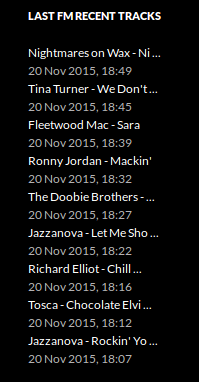
Last FM widget in use on a site
Changelog
1.0.3
- Fixed 1970 date issue on now playing tracks (thanks to hkingman for the report in the forums)
- Verified compatibility with WordPress 5.2
1.0.2
- Validated that the plugin continues to perform correctly with later version of WordPress (up to 5.1)
1.0.1
- Added widget setting to permit limit of rows displayed
- The “now playing” icon will now show
- Enabled album cover display
- Corrected UTC only times by implementing time zone support
- Allow modification of length of lines; shorten song names or not
- Toggle the display of “dots” at the end of shortened song names
1.0
- First release of Last FM