

LCS Fast Calendar Widget for Events Manager
This plugin adds a fast sidebar calendar widget to replace the one that comes with Events Manager.
Plugin info
Maintenance & Compatibility
Maintenance score
Possibly abandoned • Last updated 2479 days ago
Is LCS Fast Calendar Widget for Events Manager abandoned?
Possibly abandoned (last update 2479 days ago).
Compatibility
Similar & Alternatives
Explore plugins with similar tags, and compare key metrics like downloads, ratings, updates, support, and WP/PHP compatibility.
Description
If you are using the Events Manager sidebar calendar widget AND you have a lot of events AND you are using either event categories or event tags or both, this will be a much faster sidebar calendar widget than the one that comes with the Events Manager plugin. Replace the existing slow Events Manger sidebar calendar widget with this one and you will notice a significant boost in page load speed and switching from month to another month in the calendar.
CAUTION: This widget requires the Events Manager plugin to be installed and active, otherwise an error message will be shown in the widget sidebar location.
Support
Installation
If installed and activated directly from within WordPress, you can skip steps 1 through 3.
- Download the latest zip file and extract the
lcs-em-widget-calendardirectory. - Upload this directory inside your
/wp-content/plugins/directory. - Activate ‘Events Manager Fast Calendar Widget’ on the ‘Plugins’ menu in WordPress.
- Go to Appearance – Widgets.
- Drag the LCS Events Calendar widget to the sidebar.
- Set options as desired.
- If already using the built-in Events Manager calendar widget, drag it away from the sidebar to remove it.
Frequently Asked Questions
Is the functionality of this widget different than the one that comes with Events Manager plugin?
No. This widget is identical in functionality and appearance to the original.
If I modify the calendar-small.php template, will the changes be reflected in this widget?
Yes, this widget uses the same template as the original Events Manager widget.
How come this is so much faster than the original?
Several clients who have many events have complained about slow page load times when using the original Events Manager calendar widget. We spent considerable time analyzing existing code and used some speed enhancing tricks to make this version much, much faster. Since our clients were extremely happy with the results, we decided to make this available to the general public at no cost.
How can I tell if this is actually making a difference in performance?
You can try this in place of the original widget, or use the two side by side. A good test is to time how quickly you can switch from month to month in each widget.
What if I discover an issue?
Feel free to email us and we will try to help.
Review feed
Screenshots
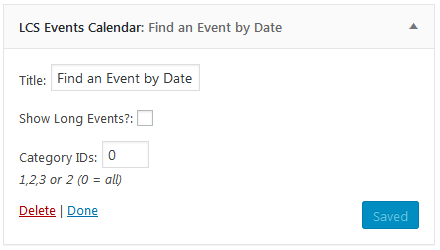
Widget options.

Widget displayed in the sidebar.
Changelog
1.0
- Initial release.