

Roles & Capabilities
Take full control of user roles and capabilities in WordPress with an intuitive, powerful interface.
Plugin info
Maintenance & Compatibility
Maintenance score
Stale • Last updated 268 days ago • 8 reviews
Is Roles & Capabilities abandoned?
Likely maintained (last update 268 days ago).
Compatibility
Similar & Alternatives
Explore plugins with similar tags, and compare key metrics like downloads, ratings, updates, support, and WP/PHP compatibility.
Description
Roles & Capabilities empowers administrators with a complete toolset for managing user roles and capabilities directly from the WordPress admin — no code required.
Designed for simplicity and control, this plugin allows you to customize user permissions to fit any use case. Access is strictly limited to site administrators for maximum security; no additional capabilities can grant access to its features.
Key Features
- Create and manage custom roles.
- Edit role names and assign or remove capabilities.
- Clone existing roles for faster setup.
- Grant or revoke capabilities for individual users.
- Create and assign new custom capabilities.
- Remove user-defined capabilities when no longer needed.
Whether you’re building a membership site, managing editorial permissions, or fine-tuning access, this plugin gives you the precision and flexibility you need.
Development
This plugin is open-source and actively maintained.
👉 View or contribute to the source code on GitHub
Installation
- Upload the
leira-rolesfolder to the/wp-content/plugins/directory. - Activate the plugin through the Plugins menu in WordPress.
- Go to Users Roles or Users Capabilities to start managing permissions.
Frequently Asked Questions
Yes! You can create new roles and assign the capabilities that best suit your needs.
No. Default roles are core to WordPress and cannot be removed for security and stability reasons.
Absolutely. Roles can be created without any capabilities assigned.
Yes. The plugin lets you define and assign new custom capabilities.
No. Core capabilities are essential for WordPress to function correctly and are protected.
Review feed
A hidden gem
Screenshots

New admin menus for managing roles & capabilities.

"Capabilities" quick action on the user list page.

Inline editing of user capabilities.
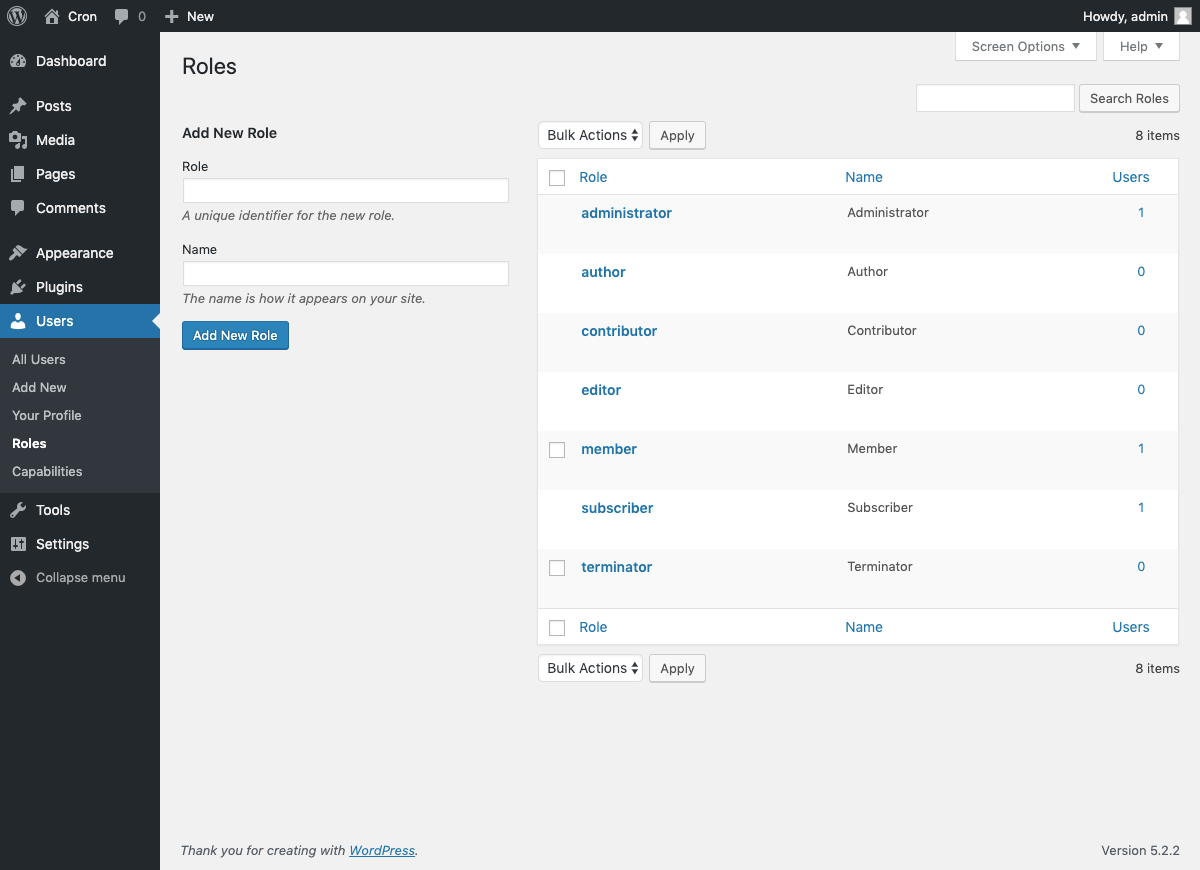
Manage existing roles easily.

Edit a role’s capabilities in seconds.

Apply bulk actions from the user list.

Actions available in the role manager.

Capabilities page with system protection warnings.

Bulk capability editing interface.
Changelog
1.1.13
- Fixed an issue with bulk deletion on the Capabilities list page.
1.1.12
- Improve the build process to automatically update the plugin version.
1.1.11
- Add a help icon to show the capability description.
- Remove the deprecated “inlineEditL10n” variable.
- “public” folder removed from the plugin.
- Fixed issue saving capabilities in quick edit user capabilities.
- Resolved “Function _load_textdomain_just_in_time was called incorrectly” warning.
- Confirmed compatibility with WordPress 6.8
- Corrected several typos.
- Implemented new local development environment.
- Rebuilt using
wp-scripts.
1.1.10
- Confirmed compatibility with WordPress 6.6.
- Fixed the security issue reported by Wordfence.
- Improved input sanitization.
- Properly escaped dynamic output.
- Enhanced UI and fixed CSS layout issues.
1.1.9
- Confirmed compatibility with WordPress 6.4.
- Removed extra whitespace in the 5-star footer link.
- Added the plugin GitHub link.
- Aligned codebase with WordPress coding standards.
- Cleaned up version control noise and enforced consistent line endings.
1.1.8
- Confirmed compatibility with WordPress 5.9.
1.1.7
- Confirmed compatibility with WordPress 5.7.
1.1.6
- Confirmed compatibility with WordPress 5.6.
1.1.5
- Fixed typo in a closing
divtag. - Cleaned up typos in the
readme.txtfile.
1.1.4
- Added GitHub Action for automated deployments.
- Automated updates for
readme.txtand assets. - Updated internal method documentation.
1.1.3
- Added a “Rate Us” message to the admin footer.
- Introduced cookie-based admin notifications.
- Verified compatibility with WordPress 5.5.
- Fixed several typos.
1.1.2
- Fixed formatting of roles list column numbers.
- Updated support link URL.
- Improved CSS for inline edit checkboxes.
1.1.1
- Added Spanish language support.
1.1.0
- Major refactor of the plugin codebase.
- Capabilities now appear immediately after creating or cloning a role.
1.0.2
- Added banners and visuals to plugin assets.
1.0.1
- Fixed role cloning bug.
- Improved list table and capability sorting.
- Added branding assets and banners for the plugin page.
1.0.0
- Initial plugin release.