

Levels Block Editor Styles for Oxygen Builder
Syncs Oxygen Builder 4.x styles into the block editor for visual parity between editor and frontend.
Plugin info
Maintenance & Compatibility
Maintenance score
Maintained • Last updated 141 days ago
Is Levels Block Editor Styles for Oxygen Builder abandoned?
Likely maintained (last update 141 days ago).
Compatibility
Similar & Alternatives
Explore plugins with similar tags, and compare key metrics like downloads, ratings, updates, support, and WP/PHP compatibility.
Description
Levels Block Editor Styles for Oxygen Builder automatically injects your Oxygen Builder CSS into the WordPress block editor, ensuring that what you see in the editor matches what appears on the frontend.
Features
- Automatic Style Detection – Automatically finds and loads all relevant Oxygen CSS files
- Scoped Styling – All CSS is scoped to prevent affecting editor UI elements
- Reusable Block Support – Detects and loads styles for embedded reusable blocks
- Smart Context Detection – Only loads in the block editor for users with edit permissions
- Performance Optimized – Live-read approach with minimal overhead
How It Works
The plugin collects CSS from four sources:
- oxygen.css – Core Oxygen framework styles
- universal.css – Site-wide Oxygen styles
- Page-specific CSS – Cached page styles
- Reusable block CSS – Styles for embedded reusable blocks
All CSS selectors are automatically rewritten to be scoped within the editor content area to prevent affecting the WordPress admin UI.
Requirements
- Oxygen Builder 4.x (must be installed and activated)
- WordPress 5.8 or higher
- PHP 7.4 or higher
Related Plugins
Looking to speed up your Oxygen workflow? Check out Ready Made Oxygen Integration – Turn Figma designs into editable Oxygen Builder sections – copy & paste, just like that.
Optional Dependencies
For 100% reliable CSS scoping, you can install the CSS parser library via Composer:
composer install --no-dev
Without the library, the plugin uses a regex fallback that works for most cases.
Credits
Developed by Levels Branding & Webdevelopment OG
Installation
- Upload the plugin files to
/wp-content/plugins/levels-block-editor-styles-for-oxygen-builder/, or install through WordPress plugins screen - Activate the plugin through the ‘Plugins’ screen in WordPress
- The plugin works automatically – no configuration needed
Note: This plugin requires Oxygen Builder 4.x to be installed and activated.
Frequently Asked Questions
No, this plugin is designed specifically for Oxygen Builder 4.x only.
No, the plugin only loads styles in the block editor. Your frontend remains unchanged.
No, the plugin works automatically once activated. It detects the editor context and injects styles automatically.
All styles are scoped to the content area only. If you experience issues, please report them in the support forum.
No, Composer is optional. The plugin includes a regex fallback for CSS scoping that works in most cases. Installing the CSS parser library via Composer just provides extra reliability for complex CSS.
Review feed
Screenshots
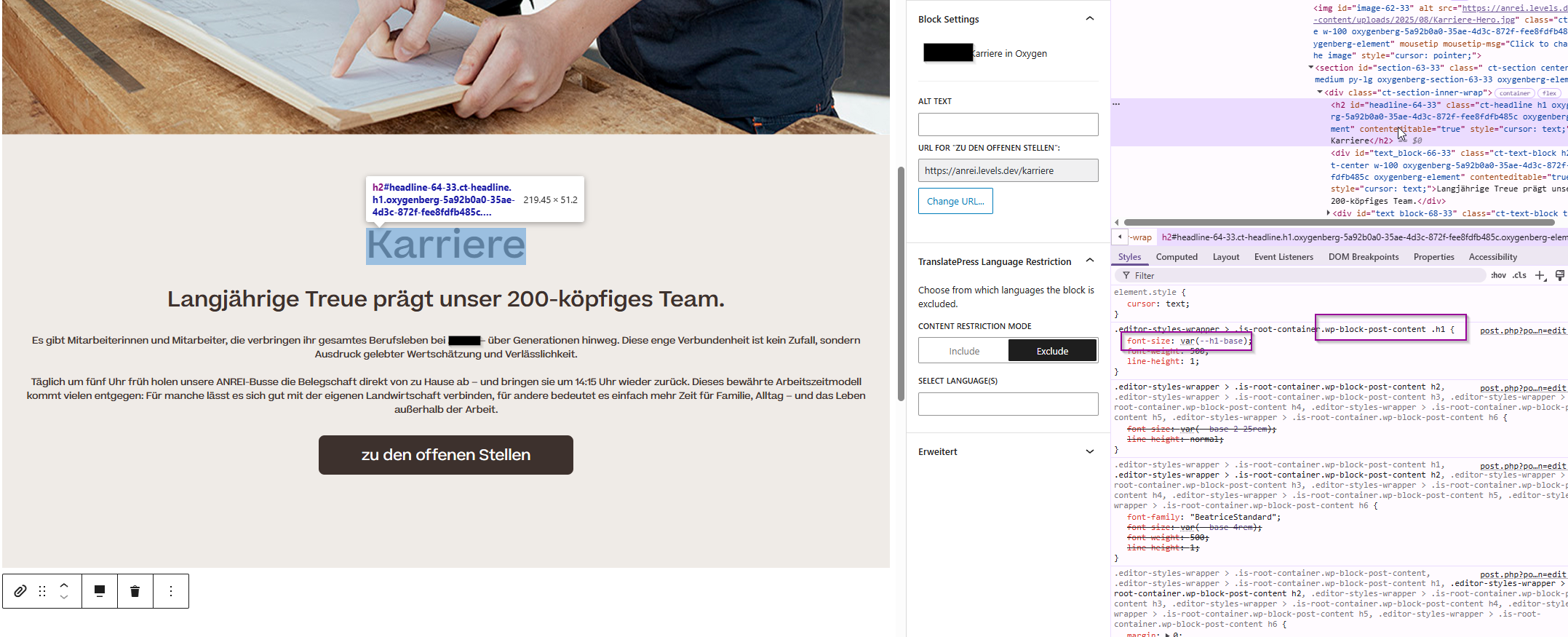
Before: Block editor with default styling
Changelog
1.0.0
- Initial release
- Automatic CSS collection from Oxygen sources
- Scoped CSS injection into block editor
- Support for reusable blocks
- Optional CSS parser library for enhanced reliability
- Regex fallback for environments without Composer