

Lewe Jira Connector
The Lewe Jira Connector plugin connects to a Jira host (Server, Data Center or Cloud) and displays information from there on your WordPress site.
Plugin info
Maintenance & Compatibility
Maintenance score
Maintained • Last updated 177 days ago
Is Lewe Jira Connector abandoned?
Likely maintained (last update 177 days ago).
Compatibility
Similar & Alternatives
Explore plugins with similar tags, and compare key metrics like downloads, ratings, updates, support, and WP/PHP compatibility.
Description
The Lewe Jira Connector plugin allows you to connect to a Jira host (Server, Data Center or Cloud) and display issue information from there on your WordPress site.
In the backend, you can create one or more Jira hosts to connect to. After setting them up, you can use shortcodes to retrieve issue or filter information from these hosts and display them on your WordPress pages and posts.
Lewe Jira Connector supports Bootstrap colors. If you do not like the Jira status category colors, you can replace them with a Bootstrap color.
The button, inline and panel displays of Jira issues are also based on popular Bootstrap visuals like alerts or badges.
Jira filter results are displayed in a table that allows column sorting.
Shortcode Examples
[jco-issue host="1072" key="MYPRJ-112" format="button"]

[jco-filter host="1072" jql="project=MYPRJ AND resolution=unresolved"]
Basic Features
- Unlimited Jira hosts
- Issue information button style
- Custom status category colors
Pro Features
- Issue information inline style
- Issue information panel style
- Jira filter result (sortable table)
Read more about the pro version license here…
Support
Choose your preferred support channel:
1. Lewe Jira Connector User Manual
2. Lewe Service Desk
3. WordPress Support Forum
Installation
Backend Installation
- Go to Plugin page
- Click Add New
- Enter ‘Lewe Jira Connector’ in search field
- Install and Activate
Manual Installation
- Download the plugin ZIP file at WordPress Listing
- Unpack the ZIP file locally
- Upload the ‘lewe-jira-connector’ folder to your ‘/wp-content/plugins/’ directory
- Activate the plugin on the ‘Plugins’ page of your WordPress backend
Configuration
Use the Jira Hosts post type to configure Jira hosts.
Use the “Lewe Jira Connector” sub-menu of your WordPress backend to configure the plugin options.
Frequently Asked Questions
Make sure you enter the full URL including http:// or https://. For Jira Cloud you need to enter the API Token as the password.
Make sure you specify the fields you want to display, either in the global plugin options or in the shortcode.
Review feed
Screenshots

Jira issue button options

Jira issue inline options

Jira issue panel options

Jira filter options
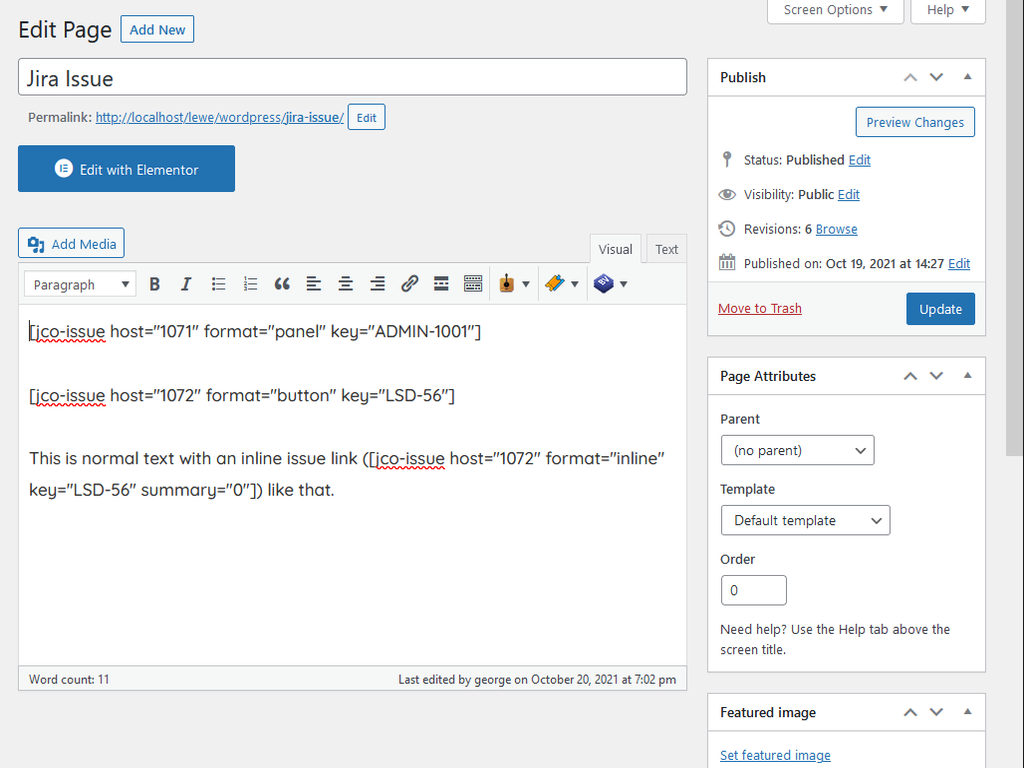
Shortcodes in classic editor
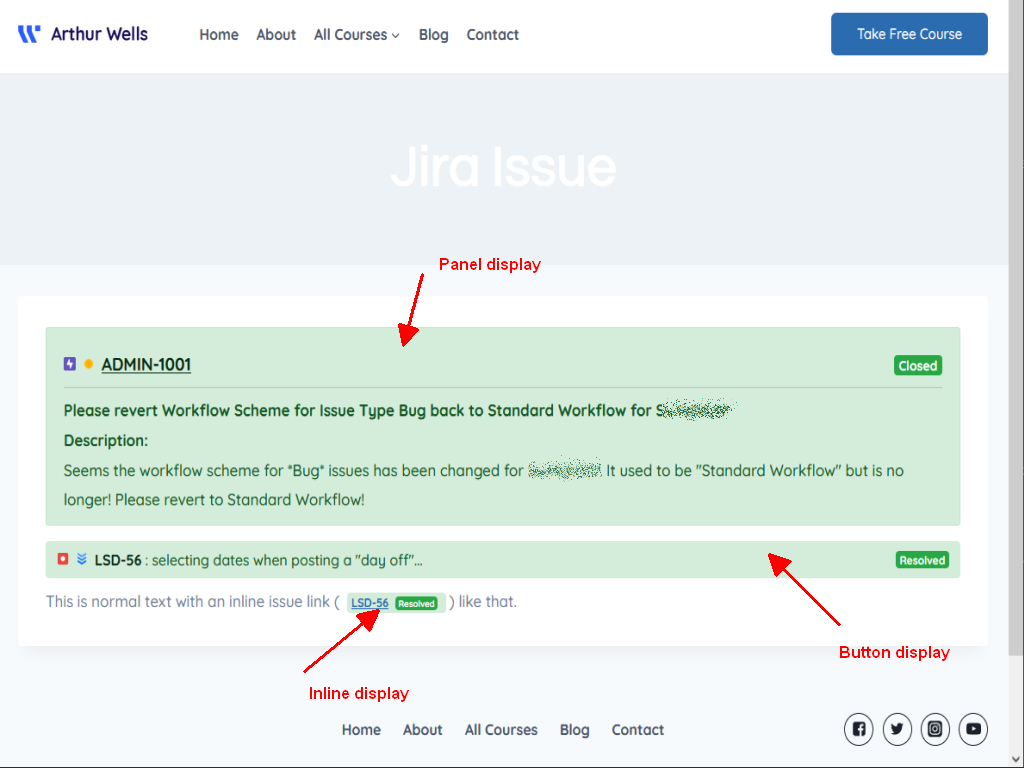
Button, Inline and Panel issue display

Jira filter result

Jira host editor

Status category colors
Changelog
2.9.0
- 2025-10-10
- Test host connection feature
- Shortcode issue icon fix
- Security improvements
- Code maintenance
2.8.0
- 2025-08-20
- Jira Could REST API deprection fix
2.7.7
- 2025-08-19
- Jira DC connection test fix
2.7.6
- 2025-07-08
- Code maintenance
- Status category ID fix
2.7.5
- 2025-07-07
- Code maintenance
- Status category debug fix
2.7.2
- 2023-04-12
- Custom field fix
2.7.1
- 2023-04-06
- Debug switch for filter shortcut
2.7.0
- 2023-03-30
- Custom field support
2.6.1
- 2022-10-15
- Updated documentation and support link
2.6.0
- 2022-09-23
- Added ‘Created’ to the Jira filter fields
2.5.2
- 2022-07-01
- Added Affects Version/s and Fix Version/s to the filter fields
2.5.1
- 2022-06-12
- Added Description to the filter fields
- Updated translator language file
2.5.0
- 2022-06-11
- Added option to not link the issue key to Jira
- Added Due Date to the filter fields
2.4.0
- 2022-02-28
- Fixed size for issue type and priority icon in filter display
2.3.0
- 2022-01-28
- Added support for PAT authentication
2.2.1
- 2022-01-26
- WordPress 5.9 compatibility check
2.2.0
- 2022-01-15
- Fixed public Jira connection issue
- PSR12 code maintenance
2.1.3
- 2021-11-03
- Fixed obsolete class reference
2.1.2
- 2021-11-02
- Code optimizations
2.1.1
- 2021-10-30
- Code optimizations
2.0.0
- 2021-01-15
- Updated WordPress plugin framework
- Added Jira Cloud support
- Added Jira filters
- Added inline style
- License Management
1.2.0
- 2019-11-19
- Updated button and panel styles
- Custom status category colors
- Code maintenance
1.0.0
- 2019-03-19
- Initital release