

Lil'Omi Shoutbox
Instantly add an ajax shoutbox to your Wordpress or BuddyPress site. Lets your visitors leave messages and chat with each other.
Plugin info
Maintenance & Compatibility
Maintenance score
Possibly abandoned • Last updated 5376 days ago • 1 reviews
Is Lil'Omi Shoutbox abandoned?
Possibly abandoned (last update 5376 days ago).
Compatibility
Similar & Alternatives
Explore plugins with similar tags, and compare key metrics like downloads, ratings, updates, support, and WP/PHP compatibility.
Description
Add a shoutbox to your WordPress or Buddypress site. Users can leave anonymous comments, or log in and pick a name and avatar for themselves.
Users can choose from 10 different lighthearted moods for their avatar such as Happy, Dizzy, and Bugeyed 🙂
Messages are loaded instantly with Ajax.
Messages can be easily moderated and deleted when logged in as an administrator.
Integrates with our authentication plugin so users that sign up for your shoutbox can automatically become users on your WordPress and BuddyPress site too! https://wordpress.org/extend/plugins/lilomi-avatar-and-authentication-plugin/
Installation
- Upload the
lilomi-shoutboxfolder to the/wp-content/plugins/directory - Activate the plugin through the ‘Plugins’ menu in WordPress
- Enter your email in the plugin settings.
- Add the Lil’Omi shoutbox widget to your sidebar from the Appearance/Widgets menu.
Frequently Asked Questions
Review feed
Screenshots
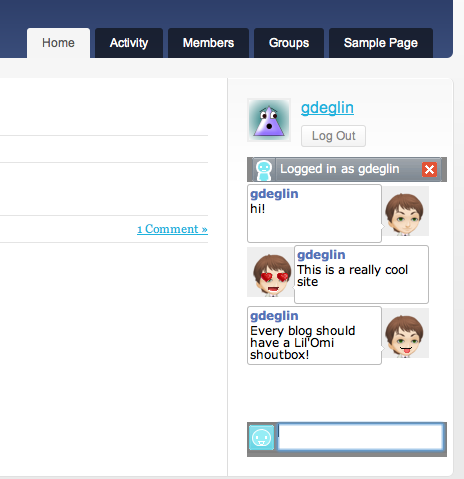
Shoutbox is visible on your blog sidebar.

Avatars are highly customizable.

Users can from 10 emotions for their avatar when they leave a message.
Changelog
1.0.7
Better settings explaination based on user feedback
1.0.6
Enable setting default text
1.0.5
Update tags
1.0.4
Tidy settings interface. Fix typo.
1.0.2
Note 3.2 compatibility.
1.0.1
Add message moderation.
Reduce chance of json library re error.
1.0.0
First release