
Multi Location for WP Job Manager
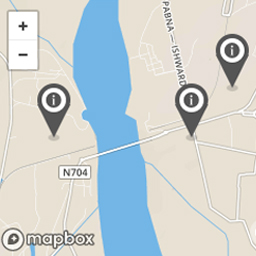
The multi location plugin adds the ability to add as many markers as you want. Multi location markers shows in single listing page as well as in the e …
Plugin info
Maintenance & Compatibility
Maintenance score
Possibly abandoned • Last updated 1685 days ago
Is Multi Location for WP Job Manager abandoned?
Possibly abandoned (last update 1685 days ago).
Compatibility
Similar & Alternatives
Explore plugins with similar tags, and compare key metrics like downloads, ratings, updates, support, and WP/PHP compatibility.
Description
It wasn\’t possible to add more than one marker or location in WP Job Manager with WP Job Manager extended location plugin. This plugin makes this happen. You can simply install and activate it. No other changes required. You will see a multi-location button to add as many locations as you need for the listing.
The multi-location plugin adds the ability to add as many markers as you want. Multi-location marker shows in single listing page as well as in the explore or search map.
This plugin has the following dependencies:
- WP Job Manager plugin
- WP Job Manager – Extended Location plugin
- WP Job Manager addon – Jobs Geolocation plugin.
Feel free to give feedback or contact me at
KEENDEVS at GMAIL dot COM
for any questions, comments or suggestions.
If any problem occurs, please contact us at https://keendevs.com/contact-us/
Installation
Quick Setup
1) Install the plugin through the backend of your WordPress site or via FTP.
Having trouble with installation? Just check our website with free videos on installation and setup.
From WordPress Backend (automatic):
Go to Plugins -> Add new -> click on Upload Plugin and upload the zip file.
Manual Setup:
1. Upload the zip folder /wp-content/plugins/ directory
2. Activate the plugin through the \’Plugins\’ menu in WordPress
Frequently Asked Questions
Review feed
Screenshots


Changelog
2.0
- New: Modified the plugin for every themes instead of listify theme.
- Removed: Removed some extra plugin dependency.
=1.0=
* uploading the first version