

Listings for Buildium
Gets your buildium property listings and display them in an interactive way instead of using iframe and gives you styling and SEO freedom.
Plugin info
Maintenance & Compatibility
Maintenance score
Maintained • Last updated 168 days ago
Is Listings for Buildium abandoned?
Likely maintained (last update 168 days ago).
Compatibility
Languages
Similar & Alternatives
Explore plugins with similar tags, and compare key metrics like downloads, ratings, updates, support, and WP/PHP compatibility.
Description
“Listings for Buildium” is a light-weight property listing plugin that allows you to list your rental properties on your WordPress site from your Buildium account using a shortcode.
The old iframe method of showing buildium rental listings does not allow site owners to customize the styling and improve SEO. This plugin will give you freedom to make any changes to the listings page.
All your buildium rental listings will be shown in an interactive way which you can customize using CSS easily. You will get all the filters from your buildium listings page working as they work there.
Shortcode: [bldm_listings]
where you want to show the rental listings. A full-width page is recommended for good styling.
Notice: This plugin depends on “allow_url_fopen” to get the content from buildium rental listings site. Please add “allow_url_fopen = 1” in your php.ini file or contact your hosting to enable it.
You will need to enter your buildium account page URL in the plugin settings that looks like this – https://example.managebuilding.com
(Please don’t include trailing slash at the end)
If you have any feedback or new feature request, please let us know by creating a support ticket and we will add/improve it as soon as possible.
Check our other plugin – Listings for Appfolio
Features
-
Easy setup for the plugin.
-
iframe alternative method that allows you any customization on the layout and styling.
-
SEO improvement.
-
No need to manually add rental listings.
-
No need to manually sync the listings with your buildium account.
-
Gives you styling freedom.
-
Filters to search for rental listings.
-
Interactive 3 column design for listings page.
-
Single property listing opens in the same page.
-
Easy to use shortcode.
-
Full screen gallery to view the property images.
-
Customization options in WordPress backend.
-
Support for multiple Buildium accounts to load listings from.
-
Hide/Show filters, buttons, Price, Availability, Title, Address.
-
Replaceable icons for bedroom and bathroom labels.
-
1 column and 2 columns design options.
-
Options to toggle different search filters.
-
Option to use custom link for Apply buttons.
-
Option to add a Page heading.
Installation
You can install the Plugin in two ways.
WordPress interface installation
- Go to plugins in the WordPress admin and click on “Add new”.
- In the Search box enter “Listings for Buildium” and press Enter.
- Click on “Install” to install the plugin.
- Activate the plugin.
- Go to Settings > Listings for Buildium and Enter URL.
- Save the settings and use shortcode [bldm_listings].
Manual installation
- Download and upload the plugin files to the /wp-content/plugins/listings-for-buildium directory from the WordPress plugin repository.
- Activate the plugin through the “Plugins” screen in WordPress admin area.
- Go to Settings > Listings for Buildium and Enter URL.
- Save the settings and use shortcode [bldm_listings].
Frequently Asked Questions
Once the plugin is activated, you will find the “Listings for Buildium” link under the Settings menu in WordPress admin area. Enter your buildium listing page URL that should look like this – https://example.managebuilding.com
Use “[bldm_listings]” shortcode where you want to show the listings with filters.
You don’t need to create a separate page for showing single property listing. The plugin uses the same page where you put “bldm_listings” shortcode.
Install the Listings for Buildium plugin on your WordPress website and enter the Buildium account url under the plugin’s settings. Then create a new page and insert the shortcode “[bldm_listings]” and save the page. Your listings from your Buildium account should display on your website now.
Review feed
Screenshots
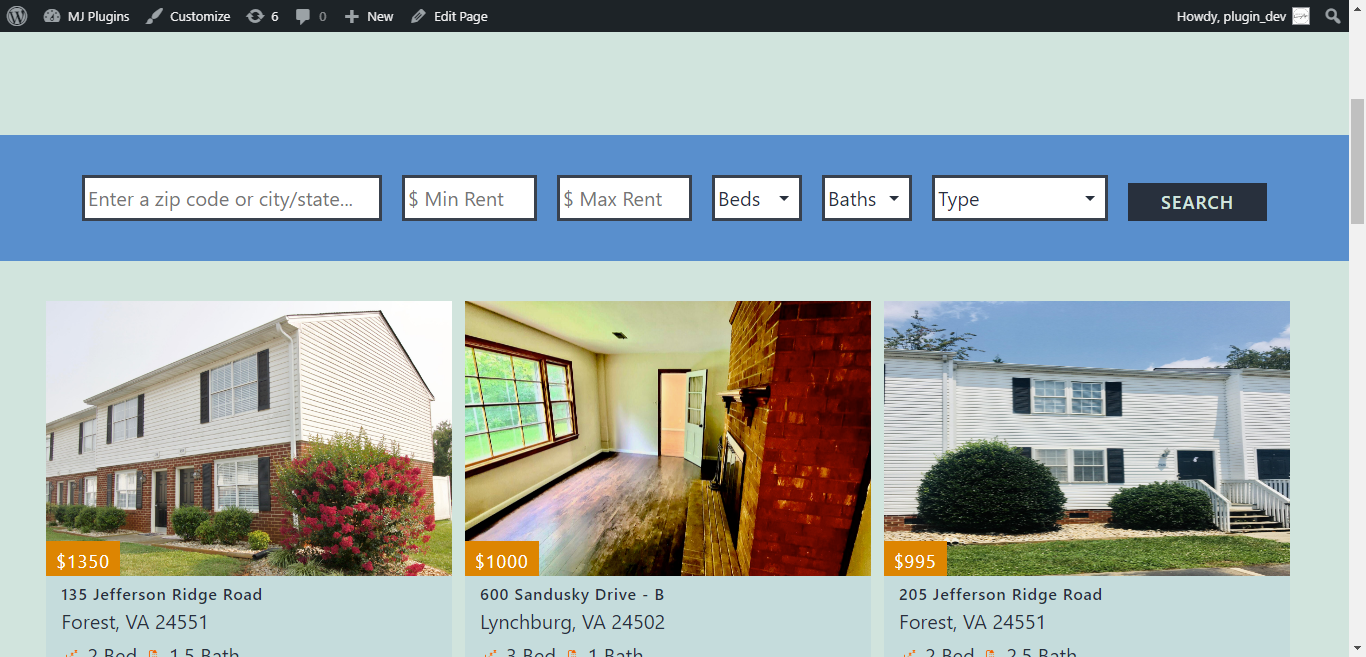
buildium rental listings filters

Interactive buildium rental listings

Settings for the plugin

Single Listing Design
Changelog
0.1.5
- 2025-10-16
- Improved security.
0.1.4
- 2025-03-22
- Fixed the Request Information button link.
0.1.3
- 2025-01-17
- Fixed escaping and sanitization for url configuration.
0.1.2
- 2024-03-24
- Updated description and demo site.
- Updated plugin author with a dedicated website.
0.1.1
- 2021-10-06
- Fixed the trailing-slash bug for single listing page.
0.1.0
- 2021-09-04
- Initial version of the plugin.