

Financial Stocks & Crypto Market Data Plugin
Prices, Tickers, NEWS & Fundamentals | Stocks • ETF • Funds • Indices • Futures • Bonds & Government Bonds • Options • Forex Pairs • Cryptocurrencies
Plugin info
Maintenance & Compatibility
Maintenance score
Possibly abandoned • Last updated 774 days ago • 7 reviews
Is Financial Stocks & Crypto Market Data Plugin abandoned?
Possibly abandoned (last update 774 days ago).
Compatibility
Similar & Alternatives
Explore plugins with similar tags, and compare key metrics like downloads, ratings, updates, support, and WP/PHP compatibility.
Description
Financial Plugin for Stocks Prices, News & Fundamentals
To explore the plugin’s features live, visit our
Live-demo website at wordpress-plugin.eodhd.com
With our Financial Plugin it’s easy to add on any WordPress website End-of-Day (EOD), Intraday, Delayed and Real-Time prices for:
- Stocks
- ETF
- Funds
- Indices
- Futures
- Bonds & Government Bonds
- Options
- Forex Pairs
- Cryptocurrencies
Currency Converter (Crypto + Forex) for WordPress website
Plugin provides your WordPress website users with the powerful tool for real-time converting of:
- Forex Currency to Cryptocurrency
- Cryptocurrency to Forex Currency
- Forex Currency to any other Forex Currency
- Cryptocurrency to any other Cryptocurrency
Add Fundamental data on any page of WordPress website
Without coding you’ll be able to add Stocks Fundamental Data or Cryptocurrency Fundamental Data
It is also allows to add Financial tables with Earnings, Balance Sheets, Equities, Stock Shares Outstanding, Cash Flows, Income Statements
Fundamental data is available for:
- Stocks
- ETF
- Funds
- Indices
- Cryptocurrencies
If you are looking for a simple solution to develop a Financial website, blog, company page, or personal site based on WordPress to display Stocks Market Data, then you already might have faced 2 main challenges:
1st How to get stocks data?
To obtain stocks exchange data legally, you could officially buy it on each Exchange, which is quite expensive.
Or get it via subscription to Financial Data API providers like EOD Historical Data (EODhd), Marketstack, Finnhub, Barchart, Financial Modeling Prep, Alpha Vantage, IEX Cloud, Tiingo, Intrinio, Quandl, Alpaca, Twelve Data, Polygon.io, etc.
2nd How to use it without coding?
Once you’ve obtained the data, the next question is “how to integrate it smoothly on your website?” To achieve that goal, EOD Historical Data (EODhd) became one of the pathfinders on the way to a better user experience.
With our Financial Plugin, by placing a simple SHORTCODES or with the help of WordPress widgets, you’ll be able to display Stocks Market Data eg: Stocks, ETF, Funds, Indices, Futures, Bonds, Options, Forex Pairs & Cryptocurrencies.
With the possibility to configure the type of shown prices: End of Day, Intraday, Delayed and Real-Time prices.
In a single solution, you’ll get licensed Financial data from more than 70+ Exchanges all around the world, and a powerful widget constructor interface to demonstrate on your webpage Fundamental data, Financial tables eg: Earnings, Balance Sheets, Equities, Cash Flows, Income Statements for any of 150,000+ tickers | 20000+ ETFs | 600+ indices | 1100+ forex pairs | 120+ CRYPTO pairs, in just a few clicks.
How to use the plugin?
The plugin could be used in a free trial mode, the DEMO API key allows obtaining data from a limited set of tickers data AAPL.US | TSLA.US | VTI.US | AMZN.US | BTC-USD | EUR-USD
To get full coverage, you should subscribe to the EOD Historical Data service and get your personal API key.
Explore the full documentation to learn more about all available symbols, exchanges, and API methods.
Installation
To start using our plugin, you’ll need to make two simple steps.
INSTALL Financial Stocks & Crypto Market Data Plugin
- Visit the plugins page within your dashboard and select ‘Add New’;
- Search for ‘Financial Stocks & Crypto Market Data Plugin’;
- Activate Financial Stocks & Crypto Market Data Plugin from your Plugins page;
- Go to ‘after activation’ below.
INSTALL Financial Stocks & Crypto Market Data Plugin MANUALLY
- Upload the plugin folder to the /wp-content/plugins/ directory;
- Activate the Financial Stocks & Crypto Market Data Plugin through the ‘Plugins’ menu in WordPress;
- Go to ‘after activation’ below.
AFTER ACTIVATION
- Go to the ’Quick start’ section;
- Try to generate your first widget by the SHORTCODE’;
- Or use the standard WordPress widget’s
Frequently Asked Questions
Send us an email to [email protected], and we will get back to you next 24 hours!
Review feed
Screenshots

Plugin overview
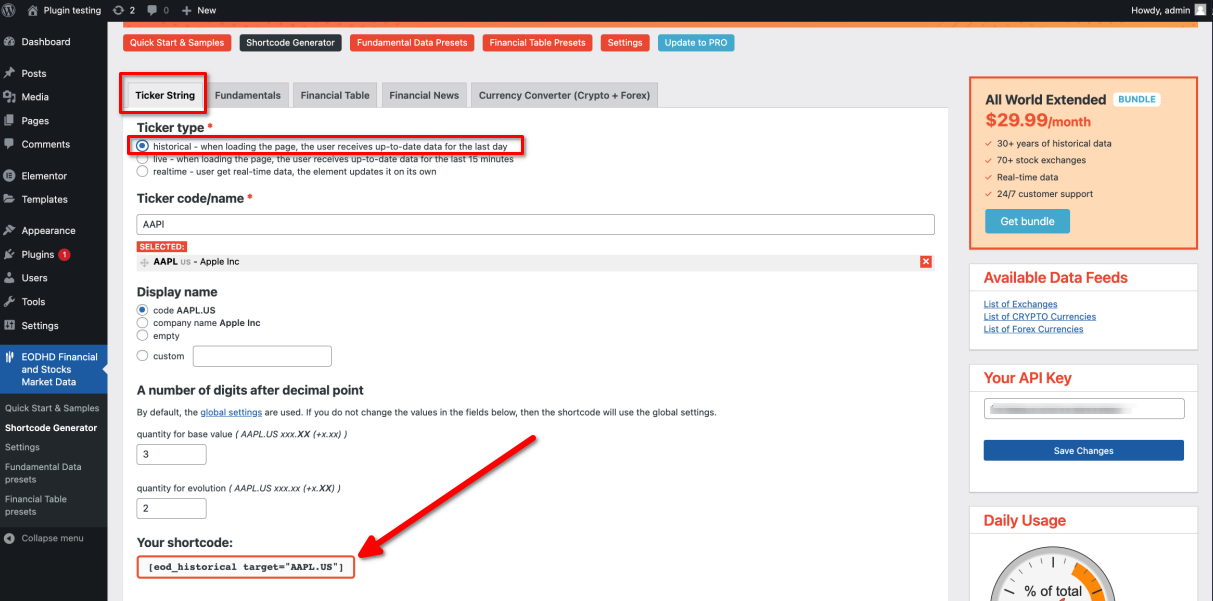
Ticker Shortcode Generator

Ticker Example

Fundamental Data Shortcode Generator

Fundamental Data Presets

Fundamental Data Preset Example

Fundamental Data Example

Financial Table Shortcode Generator

Financial Table Presets

Financial Table Preset Example

Financial Table Example

Financial News Shortcode Generator

Financial News Example

Currency Converter Shortcode Generator

Currency Converter Example

General settings

Changelog
Changed: replace links to eodhd.com