
Cryptocoin Live Ticker
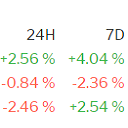
Display cryptocoins current price, 24 hours price change and 7 days price change on your website. You can select which coins/pairs to display.
Plugin info
Maintenance & Compatibility
Maintenance score
Possibly abandoned • Last updated 2846 days ago
Is Cryptocoin Live Ticker abandoned?
Possibly abandoned (last update 2846 days ago).
Compatibility
Similar & Alternatives
Explore plugins with similar tags, and compare key metrics like downloads, ratings, updates, support, and WP/PHP compatibility.
Description
Display cryptocoins current price, 24 hours price change and 7 days price change on your website. You can select which coins/pairs to display. Supported pairs:
- BTC: BTCUSD, BTCEUR, BTCGBP, BTCJPY, BTCCAD, BTCAUD, BTCKRW, BTCZAR, BTCNZD, BTCINR
- BCH: BCHUSD, BCHEUR, BCHBTC, BCHKRW
- ETH: ETHUSD, ETHEUR, ETHJPY, ETHCAD, ETHAUD, ETHBTC, ETHKRW
- ETC: ETCUSD, ETCKRW
- LTC: LTCUSD, LTCEUR, LTCAUD, LTCBTC, LTCKRW
- XMR: XMRUSD, XMREUR, XMRKRW
- XRP: XRPUSD, XRPEUR, XRPKRW
- IOTA: IOTUSD
- DASH: DSHUSD, DSHKRW
- NEO: NEOUSD
- OMG: OMGUSD
- ZEC: ZECUSD, ZECKRW
- XLM: XLMUSD
- QTUM: QTUMKRW
- EOS: EOSUSD, EOSKRW, EOSBTC, EOSETH
- ADA: ADAUSD, ADABTC, ADAETH
- BAT: BATUSD, BATBTC, BATETH
- GNT: GNTUSD, GNTBTC, GNTETH
- TRX: TRXUSD, TRXBTC, TRXETH
- NANO: NANOBTC, NANOETH
- XVG: XVGUSD, XVGBTC, XVGETH
- ONT: ONTBTC, ONTETH
- POWR: POWRBTC, POWRETH
The widget is highly customizable
- You can change the look and feel of the widget by modifying a CSS file (assets/style.css)
- You can select which pairs to display
- You can customize numbers format: decimals separator, thousands separator
- You can customize header names
- You can specify how long the pairs data are cached
Pairs data are fetched from Coinalyze . A reliable cryptocoin analysis website.
Installation
-
Download the plugin
-
In WordPress admin interface upload and activate the plugin
-
In WordPress admin interface go to Appearance->Widgets and place the widget where you want it to be displayed
Frequently Asked Questions
Installation Instructions
-
Download the plugin
-
In WordPress admin interface upload and activate the plugin
-
In WordPress admin interface go to Appearance->Widgets and place the widget where you want it to be displayed
Review feed
Screenshots

Default

Many pairs

Customized sample