

LiveHelp chat
Provide fast reliable live chat to assist your customer. Cloud based chat no setup fees. Fully customizable chat skin.
Plugin info
Maintenance & Compatibility
Maintenance score
Possibly abandoned • Last updated 2408 days ago • 7 reviews
Is LiveHelp chat abandoned?
Possibly abandoned (last update 2408 days ago).
Compatibility
Developers
Languages
Similar & Alternatives
Explore plugins with similar tags, and compare key metrics like downloads, ratings, updates, support, and WP/PHP compatibility.
Description
-
Customer service efficiency:
One chat agent may assist several customers at the same time, decreasing waiting times and telephone calls. An agent may trasfer chat conversations to another agent for additional help. When the operator is not available, users can fill in a form that you will receive ad an email. -
Customizable layout:
In administrator dashboard you may customize the appearance of your live chat window with logo, colors and font of your corporate image. Choose the best button and position for your needs. -
Advanced chat features:
You may customize your widget with activation rules: show only on some pages, after a chosen time, in defined weekdays… -
Compatibility with all browsers and OS:
LiveHelp chat is compatible with all major browsers: Internet Explorer(from version 7 onwards), Mozilla Firefox, Google Chrome, Safari both on Windows and Mac. -
File Transfer:
Transfer files directly via chat. The most common size files (documents, images) can be transferred from visitor and operator to minimize red tape. No mail blocking attachment. -
Complete chat logs available in real time for each connected user:
Immediate information about users: the web page from which the request was turned and old chats. -
Recorded chat sessions:
Recording of the conversations of the past 30 days, useful for monitoring staff, quality of service and the customer’s frequently asked questions. -
Advanced analytics:
Monitor the performance of your chat, track your e-commerce orders and increase your customer satisfaction. -
Competitive costs:
No installation costs, only an annual fee with progressive discounts based on the number of chat departments and chat agents.
This is the only official plugin for LiveHelp live chat.
Translations
You can add your translations here: translate.wordpress.org
Installation
- Click on “plugins” in the left panel, then click on “Add new”.
- Click on “upload” and select the livehelp.zip file
- Click on “install now” and then “activate plugin”: You’re ready!
As an alternative, you can search Livehelp in plugins panel and then press “install now”.
In the left menu now you can see “LiveHelp chat”. In this panel you can configure the widget on frontend.
- If you don’t have a valid LiveHelp ID, get one for free on http://www.livehelp.it/vedit/pagina.asp?lingua=EN&pagina=1413.
You will receive an e-mail with your ID and login data for the admin dashboard (http://server.livehelp.it). - Paste the 5-digits ID in widget configuration.
- Select the button layout and position.
- Save all and then use the button on the right for open the dashboard and the agent’s login.
Frequently Asked Questions
Q: Why should I use the LiveHelp chat plugin?
A: One chat agent may assist several customers at the same time, decreasing waiting times and telephone calls. An agent may trasfer chat conversations to another agent for additional help. When the operator is not available, users can fill in a form that you will receive ad an email.
Q: How do I start using LiveHelp chat?
A: After installing and enabling the plugin, a new menu button appears in the WordPress left menu. Here you can configure the widget and then see the result on frontend.
Q: How do I receive customers’ chat requests?
A: After installing the plugin you will find the agent’s login (enable desktop notifications at first login).
If you have any questions please contact us: [email protected]
http://www.livehelp.it/en/contact-us
Review feed
Immediato e funzionale
Simple and efficient
Screenshots
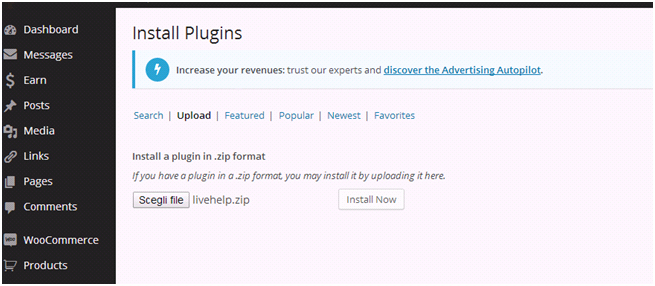
How to install the plugin

In this panel you can configure the widget on frontend

Chat window demo
Changelog
1.4
- Integrated native WP translation system – New translations available soon!
- Minor graphics improvements
1.3.6
- Tested with WP 5.2
- Improved strings and naming
1.3.4
- Menu icon fixed
1.3.3
- Menu icon updated and code refactored
1.3.2
- Major refactor to lighten the plugin.
1.3.1
- Minor bug fix.
1.3.0
- Minor bug fix.
1.2.5
- Minor bug fix.
1.2.0
- Added dynamic widget with activation rules.
1.0.1
- Added a new set of seven buttons.
1.0.0
- First stable release