

LLMs.txt and LLMs-Full.txt Generator
Generate llms.txt and llms-full.txt files for WordPress to guide AI and LLMs. Fully compatible with Yoast SEO, Rank Math, SEOPress, and All in One SEO …
Plugin info
Maintenance & Compatibility
Maintenance score
Maintained • Last updated 126 days ago • Support resolved 50% • 5 reviews
Is LLMs.txt and LLMs-Full.txt Generator abandoned?
Likely maintained (last update 126 days ago).
Compatibility
Similar & Alternatives
Explore plugins with similar tags, and compare key metrics like downloads, ratings, updates, support, and WP/PHP compatibility.
Description
The LLMS Full TXT Generator is a WordPress plugin designed to automatically generate llms.txt and llms-full.txt files in the root directory of your website.
These files provide a structured list of your pages and posts, useful for:
– content indexing
– AI training
– enhancing AI systems’ interaction with your site
Using these files helps optimize your website for AI discovery—similar to how robots.txt guides search engines.
Features
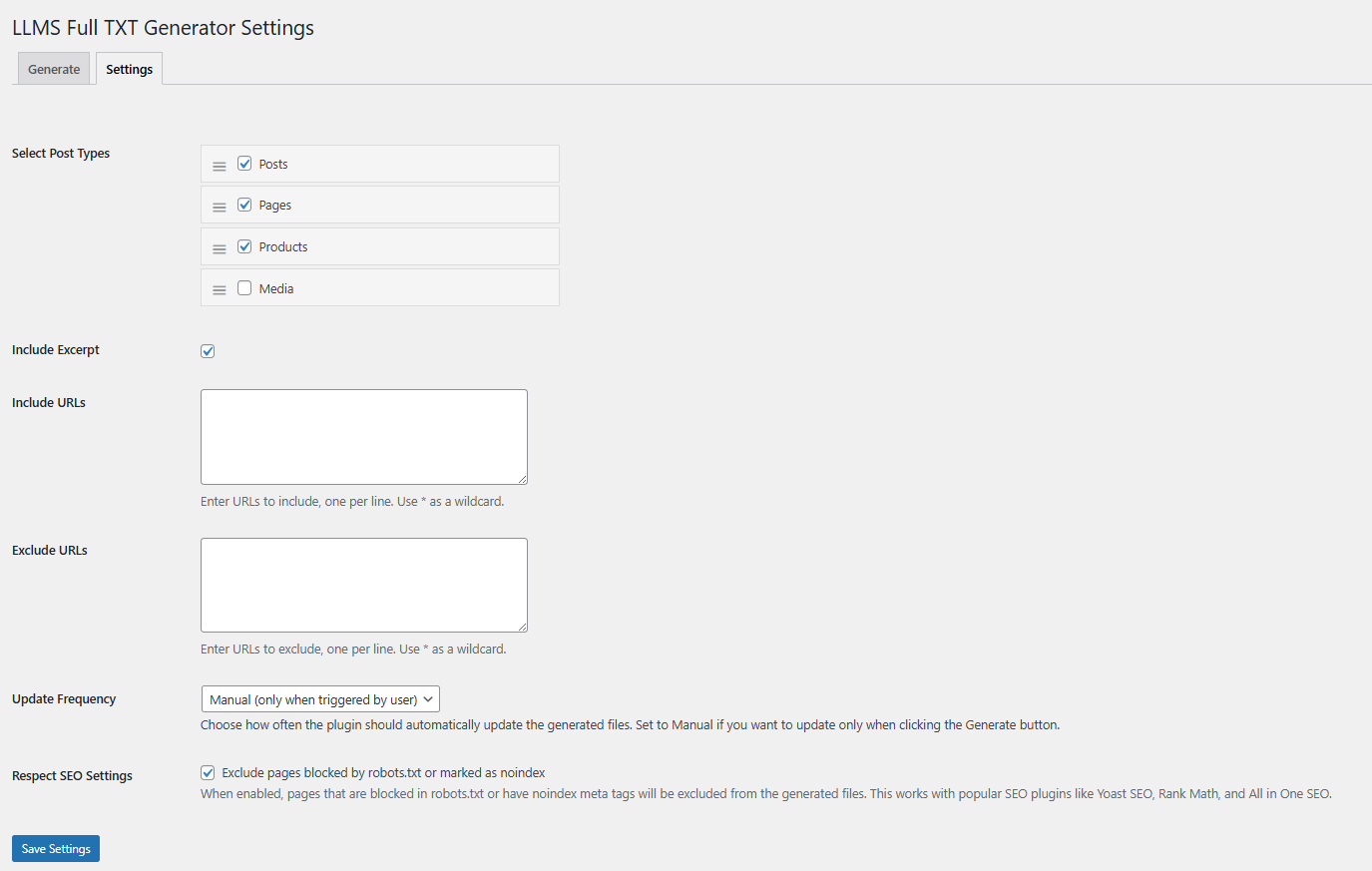
- Customizable Post Types: Select which post types to include in the generated files
- Enhanced Media Support: Full WordPress media library integration through attachment post type:
- Detailed media information including titles, URLs, alt text, captions, and descriptions
- Structured media documentation in Markdown format
- Post Excerpts: Option to include post excerpts for more detailed content representation
- URL Management: Include or exclude specific URLs or URL patterns using wildcards
- Easy Regeneration: Regenerate files easily when content changes to keep them up-to-date
- Enhanced SEO Integration: Fully compatible with all major SEO plugins, including:
- Yoast SEO
- Rank Math
- SEOPress
- All-in-One SEO
- Smart URL Pattern Matching: Advanced path matching for better content organisation
- Robots.txt Support: Respects your robots.txt configuration and noindex settings
- UTF-8 Support: Proper handling of special characters with UTF-8 BOM
Installation
- Upload the plugin files to the
/wp-content/plugins/llms-full-txt-generatordirectory, or install the plugin through the WordPress plugins screen directly. - Activate the plugin through the ‘Plugins’ screen in WordPress.
- Use the Settings > LLMS Full TXT Generator screen to configure the plugin and generate files.
Frequently Asked Questions
The llms.txt and llms-full.txt files are stored in the root directory of the WordPress installation.
With the LLMs.txt WordPress plugin, it’s recommended to regenerate the files only after making significant changes to the existing content of the website.
The AI SEO plugin for WordPress enables you to select which posts to include in the plugin settings.
Yes, you can specify URLs to include or exclude, and even use wildcards for pattern matching. For example, use /products/* to match all product pages or /private/* to exclude private content.
The WordPress LLMs.txt plugin is an SEO AI plugin. The llms.txt file helps AI models understand and interact with your website effectively, offering structured and relevant content summaries and detailed information.
The plugin fully supports and respects noindex settings from:
* WordPress core “Discourage search engines” setting
* Yoast SEO
* Rank Math
* SEOPress (both global and individual post settings)
* All in One SEO (AIOSEO)
You can use asterisk (*) as a wildcard in your include/exclude patterns.
Examples:
* /blog/* – matches all blog posts
* /2023/* – matches all content from 2023
* /private/* – excludes all private content
* /courses/* – matches all course pages
With the Markdown formatting in the llms.txt plugin for WordPress, you can structure headings and links to key content sections.
Media files are documented in a structured format with detailed information:
Example for images:
Image Title
URL: https://example.com/image.jpg
Alt Text: Descriptive alt text for the image
Caption: Image caption if available
Description: Detailed description of the image
textExample for documents:
Document Title
URL: https://example.com/document.pdf
Caption: Document caption if available
Description: Description or summary of the document
textThis structured format helps AI systems better understand your media content.
Review feed
Screenshots
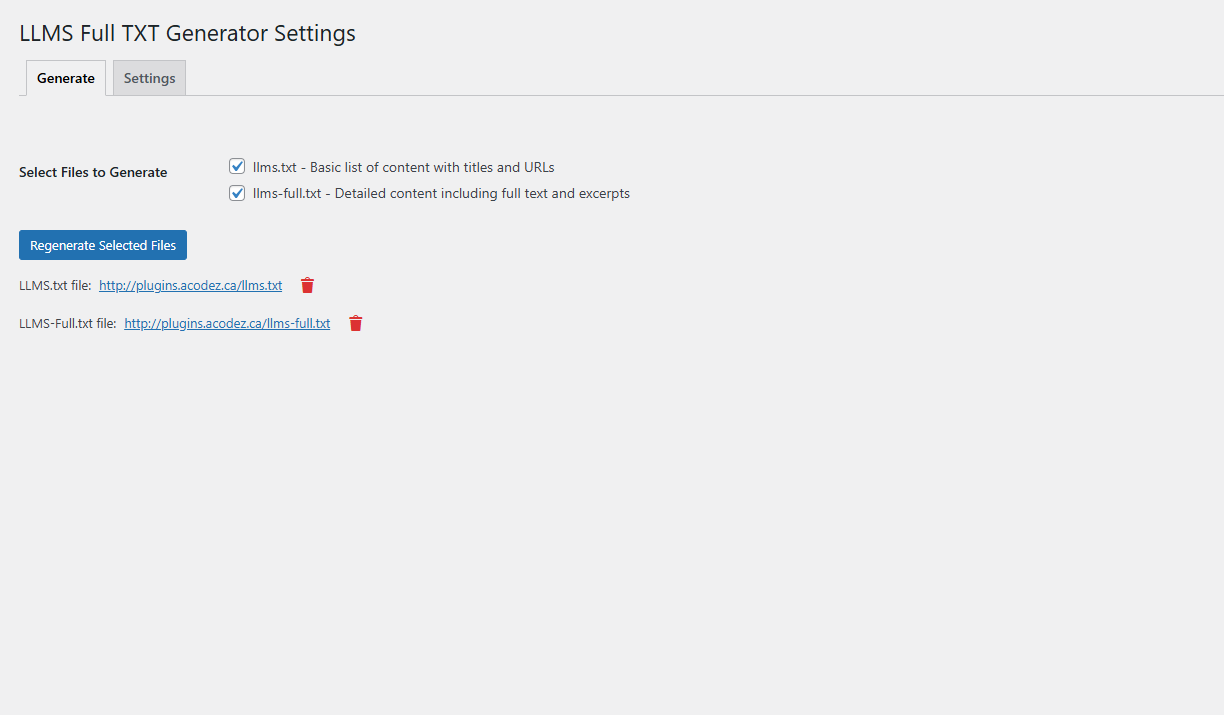
The LLMS Full TXT Generator settings page
Changelog
2.0.4
- Fixed – Files are now always generated in the correct public site root (home_url), even when WordPress is installed in a subdirectory (e.g. /wp/, /blog/, /wordpress/) – uses core get_home_path() function
- Added – Direct “View” links for llms.txt and llms-full.txt after generation
- Tested – Fully compatible with WordPress 6.7 and PHP 8.0+
2.0.3
- Improved URL pattern matching for better include/exclude
- Added Administration Email Address setting; includes email in TXT file headers for ownership/contact info
- Added llms-full.txt URL reference in llms.txt header for easier navigation between files
- Fixed admin email fallback to site admin email when custom option is empty
- Ensured admin email inclusion toggle works correctly in both manual and cron generations
2.0.2
- Added SEOPress integration with support for both global and individual post settings
- Improved URL pattern matching for better include/exclude functionality
- Fixed path matching issues with trailing slashes
- Enhanced wildcard pattern handling in URL rules
- Improved content organization by grouping entries by post type in both files
- Added post type headers and proper spacing for better readability
- Updated documentation with detailed wildcard usage examples
2.0.1
- PHP Error Fix
2.0.0
- Added no-index and robots.txt support
- Added proper UTF-8 BOM handling for generated files
- Improved UX
1.9.1
- Fixed Security issues.
1.9
- Added option to choose which files to generate (llms.txt, llms-full.txt, or both).
- Updated button text to “Regenerate” when files already exist.
- Improved file URL display to only show existing files.
1.8
- Fixed critical error when no public post types are available.
- Added validation to ensure at least one post type is selected.
1.7
- Added URL include and exclude functionality with wildcard support.
- Improved error handling for file generation.
1.0
- Initial release.