

LND For WP
Manage and use your LND node, right from your WordPress administration panel.
Plugin info
Maintenance & Compatibility
Maintenance score
Possibly abandoned • Last updated 2574 days ago
Is LND For WP abandoned?
Possibly abandoned (last update 2574 days ago).
Compatibility
Similar & Alternatives
Explore plugins with similar tags, and compare key metrics like downloads, ratings, updates, support, and WP/PHP compatibility.
Description
LND For WP is a WordPress plugin that allows you to manage and use your LND node, right from your WordPress administration panel. It provides a fully functional wallet interface, allowing you to send and receive funds across the Lightning Network with ease. The user interface is responsive and will adapt to fit any web enabled desktop, tablet or mobile device. You can search the Lightning Network graph, manage peer connections and open & close channels with ease. The plugin has QR support, enabling basic encoding & decoding of QR codes. LND For WP also adds a number of WordPress ‘shortcodes’, allowing you to embed LND functionality directly in your website pages and posts. New Shortcodes will be added with future versions, as needs & use cases arise.
Contribute
Contribute to the project on Github.
Installation
- Download the latest plugin release from WordPress or the GitHub repository.
- Browse to the ‘Plugins -> Add New’ page within WordPress.
- Click the ‘Upload Plugin’ button, select ‘Browse’ and choose the release .zip you downloaded in step 1.
- Press ‘Install Now’.
- On the next screen, press the ‘Activate’ button to turn on the plugin.
Frequently Asked Questions
What is LND?
LND stands for ‘Lightning Network Daemon’. It’s a software implementation of the ‘Lightning Network’, which is an open protocol layer that leverages the power of blockchains and smart contracts to make cheap, fast, private transactions available to anyone around the world. To learn more, visit Lightning Labs – Technology Overview.
Where can I download the latest version of LND?
https://github.com/lightningnetwork/lnd/releases
LND is up and running. Where are my macaroons?
Your macaroon files are generated automatically by LND when it is started. Assuming you’re running Bitcoin on mainnet, you would find them inside the data/chain/bitcoin/mainnet directory of your LND dir. By default, the LND dir is located at: ~/.lnd on Linux /Users/[username]/Library/Application Support/Lnd/ on Mac OSX or $APPDATA/Local/Lnd on Windows.
Review feed
Screenshots

Responsive layout adapts for desktop, tablet and mobile.

Manage Channels
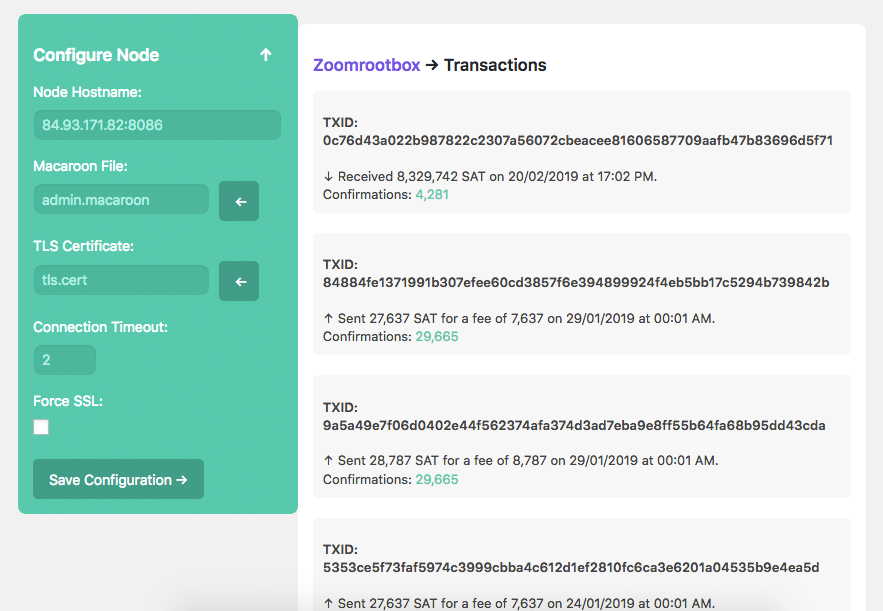
View Transaction History

Mobile Wallet
Changelog
0.1.2
- Fixed bugs when using readonly.macaroon & invoice.macaroon.
0.1.1
- Fixed bugs when attempting to pay invalid invoice.
0.1.0
- Stable release