
Maintenance 20/1003452d since update
Active installs
0
Downloads
1,012
Reviews
0
Age
9.5y
Plugin info
Total downloads: 1,012
Active installs: 0
Total reviews: 0
Average rating: 0
Support threads opened: 0
Support threads resolved: 0 (0%)
Available in: 1 language(s)
Contributors: 1
Last updated: 9/5/2016 (3452 days ago)
Added to WordPress: 9/5/2016 (9 years old)
Minimum WordPress version: 3.4
Tested up to WordPress version: 4.6.30
Minimum PHP version: f
Maintenance & Compatibility
Maintenance score
Possibly abandoned • Last updated 3452 days ago
20/100
Is Pattern Lock abandoned?
Possibly abandoned (last update 3452 days ago).
Compatibility
Requires WordPress: 3.4
Tested up to: 4.6.30
Requires PHP: f
Similar & Alternatives
Explore plugins with similar tags, and compare key metrics like downloads, ratings, updates, support, and WP/PHP compatibility.
No similar plugins found yet.
Description
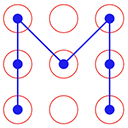
Pattern Lock allows to set pattern lock for wp admin screens. You can set pattern lock for your screen according to your choice.
How to use
- First Activate Plugin.
- Save Pattern Settings from Pattern Lock Settings Menu.
- Set Pattern Lock of your choice.
- Click on Lock Screen red button on top bar.
- Then Pattern Lock screen will appear.= Minimum requirements for Pattern Lock =
* WordPress 3.3+
* PHP 5.x
* MySQL 5.x
If any problem occurs, please contact us at http://www.webdesi9.com/support/.
Installation
- Upload the
pattern-lockfolder to the directory/wp-content/plugins/. - Activate the plugin using the ‘Plugins’ menu in WordPress.
Frequently Asked Questions
No FAQ available
Review feed
No reviews available
Screenshots

Pattern Lock Settings Page

Set pattern according to your choice

Pattern Lock Screen will show after click on Lock Screen red Button on Top Bar

Forgot Password ?
Changelog
1.0 (5th Sept,2016)
- Release First version