

Plugin info
Maintenance & Compatibility
Maintenance score
Possibly abandoned • Last updated 3142 days ago
Is Logging with Papertrail abandoned?
Possibly abandoned (last update 3142 days ago).
Compatibility
Similar & Alternatives
Explore plugins with similar tags, and compare key metrics like downloads, ratings, updates, support, and WP/PHP compatibility.
Description
Do you want to use Papertrail for better monitoring your websites? This plugin will enable you to send php-errors to Papertrail even if you do not have the knowledge, time or access to install the proper Papertrail hooks. You only need to install the plugin and enter your Papertrail information. The plugin will automatically send all the php errors and exceptions happening within WordPress to papertrail.
Notes
- A Papertrail account is needed, which is free for most use cases.
- Using this plugin will bypas the standard PHP error handler and php exception handler within the script execution of WordPress. When the exception is posted to papertrail the exceptions are retrown.
Resources
Papertrail Logging API
Troy’s send_remote_syslog.php
Php’s error handler
Plugin Handbook
Exception handling
PHP code coverage
Creating admin option pages
WordPress readme.txt
Installation
- Put the plugin in the plugins folder (
/wp-content/plugins/) - Activate plugin on the plugin page
- Enter your Papertrail information in the settings pages under the settings menu
- The system option allows you to change the system name within papertrail
- The program option allows you to differentiate within papertrail between diffent programs on one machine with the same name
- Choose between udp or tcp for your communication, use udp by default fallback to tcp if udp is not allowed on your environment
Frequently Asked Questions
Installation Instructions
- Put the plugin in the plugins folder (
/wp-content/plugins/) - Activate plugin on the plugin page
- Enter your Papertrail information in the settings pages under the settings menu
- The system option allows you to change the system name within papertrail
- The program option allows you to differentiate within papertrail between diffent programs on one machine with the same name
- Choose between udp or tcp for your communication, use udp by default fallback to tcp if udp is not allowed on your environment
Review feed
Screenshots
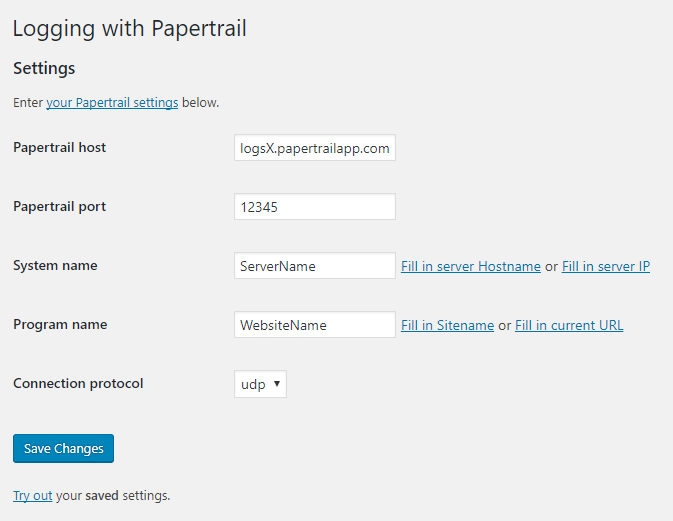
Admin settings page (running with WordPress 4.8 here)
Changelog
1.0.0
- Added: First release
- Added: Post errors to papertail
- Added: Post exceptions to papertrail
- Added: Admin settings page for saving papertrail information
- Added: Support custom system and program
- Added: Support udp and tcp(unenctrypted)
- Added: simple test settings on the admin page