

LogMyTrip
Viewing your posts as a route plotted on a Google map is simple with this plugin. Just add the shortcode [logmytripmap] to a page to see the map.
Plugin info
Maintenance & Compatibility
Maintenance score
Possibly abandoned • Last updated 4065 days ago
Is LogMyTrip abandoned?
Possibly abandoned (last update 4065 days ago).
Compatibility
Similar & Alternatives
Explore plugins with similar tags, and compare key metrics like downloads, ratings, updates, support, and WP/PHP compatibility.
Description
Your posts are plotted on a Google map as points on a route in date order. Just create a page for your map, then add the shortcode [logmytripmap] anywhere in the page to see your map appear. Clicking on a point icon can show a picture taken at that location if one is attached to a post. A small Google map is displayed on the “Edit Post” screen to allow users to geotag their posts.
Hovering over the address when viewing individual posts reveals a map of the post location. See www.LogMyTrip.co.uk for more info.
Installation
- Upload the ‘logmytrip’ directory to the ‘/wp-content/plugins/’ directory.
- Activate the plugin through the ‘Plugins’ menu in WordPress.
- Create a page and add the shortcode [logmytripmap] anywhere on the page.
- Add posts and geolocate them on a Google map. Posts can include photo’s, either directly in the text or as attachments.
Frequently Asked Questions
Can I upload pictures directly from my mobile and have them show up on a LogMyTrip map?
You can upload your pictures using WordPress for iPhone, Android, Blackberry or Nokia. Geolocate your post using these apps and then it will show up on a LogMyTrip map.
Does the plugin read EXIF (latitude/longitude) data from my photo and use it to plot my location?
It does on the www.LogMyTrip.co.uk site, but not using the plugin alone.
Can I create more than one trip on the www.LogMyTrip.co.uk website?
It’s only one trip per user, but it’s easy to create an additional user using an alternative email address, then use it to create another trip.
Does the LogMyTrip plugin work with the Geolocation plugin?
The LogMyTrip plugin works with, but does not require, the Geolocation plugin.
Please Note: = This plugin plots ALL posts that have associated geolocation information in date order for the default (post_author = 1) user. Points without geolocation data, or for other users, will not be plotted. However, you can switch to a different user by creating a cookie called ‘tid’ on the root of your site with a value equal to the ID required; e.g. Cookie: tid=4 for post_author 4.
Review feed
Screenshots
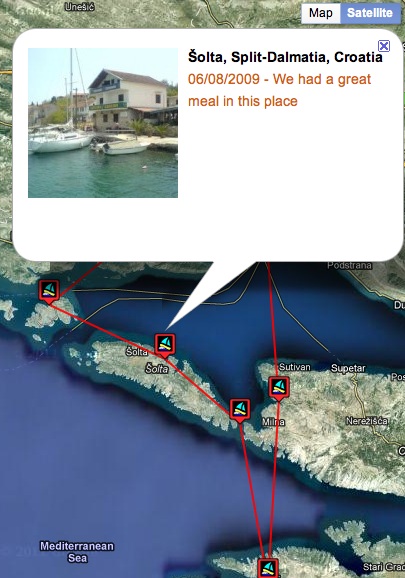
Example of the LogMyTrip map in use.