

Logo Switcher Divi
This plugin will add a option in Divi theme customizer to upload logo.
Plugin info
Maintenance & Compatibility
Maintenance score
Stale • Last updated 249 days ago • 2 reviews
Is Logo Switcher Divi abandoned?
Likely maintained (last update 249 days ago).
Compatibility
Similar & Alternatives
Explore plugins with similar tags, and compare key metrics like downloads, ratings, updates, support, and WP/PHP compatibility.
Description
Divi logo switcher will add a new option in your Divi theme customizer> Header And Navigation> Fixed Navigation to upload your logo that will show when you scroll down the page.
Requires
Divi WordPress theme
Tested up to Divi 4.26.1
Features
- Add an option to upload your logo at theme customizer
- Work with divi logo height
- No coding required
Other Plugins by CoderPlus
X Scroll To Top – Responsive
Add a lightweight, customizable scroll-to-top button to your site.
🔗 View Plugin
Role‑Based Analytics for WooCommerce (Premium)
Filter WooCommerce sales reports by WordPress user roles analyze order counts, product sales, coupon usage, downloads, and compare top customer groups with built‑in leaderboards.
🔗 View on WooCommerce.com
Woo Subscription Trial Coupon
Enable coupon discounts for trial periods in WooCommerce Subscriptions.
🔗 View Plugin
Installation
Through Dashboard
- Log in to your WordPress admin panel and go to Plugins -> Add New
- Type Divi logo switcher in the search box and click on search button.
- Find Divi logo switcher plugin.
- Then click on Install Now after that activate the plugin.
- Click on setting button & add your logo form theme customizer.
Installing Via FTP
- Download the plugin to your hardisk.
- Unzip.
- Upload the “logo-switcher-divi” folder into your plugins directory.
- Log in to your WordPress admin panel and click the Plugins menu.
- Then activate the plugin.
- Click on setting button & add your logo form theme customizer.
Frequently Asked Questions
No, it doesn’t work without divi theme.
Review feed
Logo Switcher
Screenshots
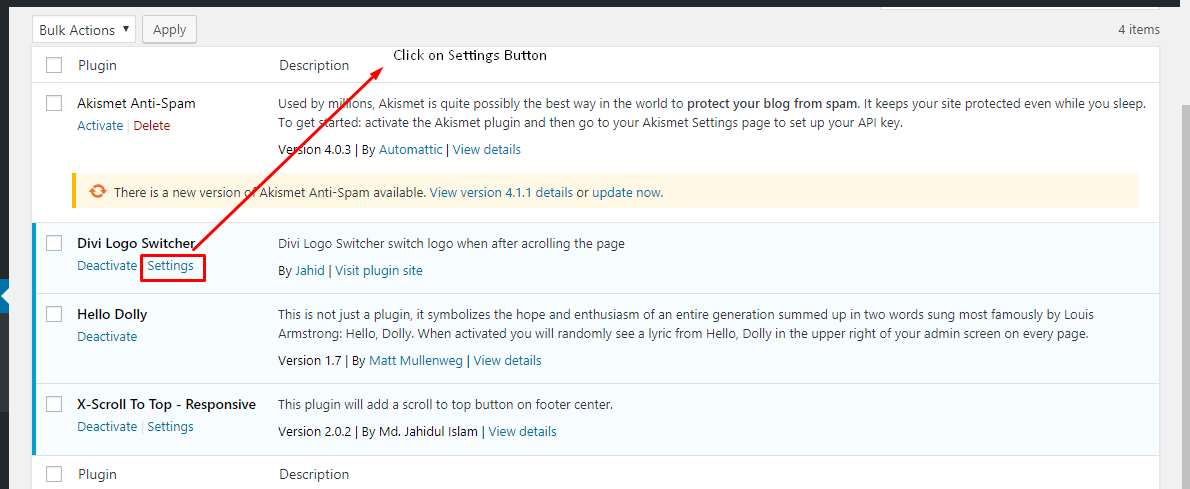
Click the Settings button

Select your logo to click "Select Logo"

Upload or select logo form media library

Scroll down and check the new logo & publish customizer

This is the final version
Changelog
2.0.0 – July 13, 2024
Restruture plugin files and add autoload
Added language support pot file i18n
1.0.3 – Octobor 26, 2019
- Fix bug
1.0.2 – Octobor 26, 2019
- Improve code
1.0.1 – July 26, 2019
- Fix inline centred logo
1.0.0 – May 25, 2019
- initial release