

LSX Customizer
The LSX Customizer extension increases your control over how the LSX theme will display on your website.
Plugin info
Maintenance & Compatibility
Maintenance score
Possibly abandoned • Last updated 958 days ago
Is LSX Customizer abandoned?
Possibly abandoned (last update 958 days ago).
Compatibility
Languages
Similar & Alternatives
Explore plugins with similar tags, and compare key metrics like downloads, ratings, updates, support, and WP/PHP compatibility.
Description
The LSX Customizer plugin allows you to customise your LSX website by adding additional customizer options to the WordPress customizer.
Key features:
* Set the website layout for desktop and mobile.
* Customise the WordPress login screen with background images, logo and colours.
* Control the colours of your menu, buttons, links and hover states on your website.
* If you’re using WooCommerce, all the customizer options for your store are grouped in one place.
* Control The Events Calendar colours if installed.
* If you are using LSX Currencies extension, the currency switcher options will appear in the customiser when LSX Customizer is activated.
WordPress Block Editor Supported
Add colors to use within the block editor primary, secondary and tertiary colour palettes.
Check out our release post on the update for more information.
WooCommerce Supported
Activate WooCommerce, then use the WordPress Customizer to enable cart & my account menus or customise the checkout page.
Documentation
Comprehensive documentation available on LightSpeed’s LSX product site.
Support
Contact the LightSpeed for assistance via the LSX support form.
If you are experiencing issues with the LSX plugin, please log any bug issues you are having on the LSX Customiser Issues page.
Contributing
Extensible, adaptable, and open source — LSX Customiser is created with theme and plugin developers in mind. If you’re interested to jump in the project, there are opportunities for developers at all levels to get involved.
If you’re a developer who’s spotted a bug issue and have a fix, or simply have the functionality you think would extend our core theme, we are always happy to accept your contribution! Visit the LSX Customiser on Github and submit a Pull Request with your updates.
Installation
You can also download and install the extension directly from the backend of your website
- Login to the backend of your website.
- Navigate to the “Plugins” dashboard item.
- Select the “Add New” option on the plugins page.
- Search for “LSX Customizer” in the plugin search bar.
- Download and activate the plugin.
Frequently Asked Questions
For help setting up and configuring the Customizer plugin please refer to our user guide
For add-on support from LightSpeed, get a quote from us!
Not unless you are making use of the The LSX theme!
All of the LSX Extensions were built for the LSX theme. Be sure to have it installed and activated for this extension to function.
Bugs can be reported either in our support forum or preferably on the LSX Customizer GitHub repository.
Yes you can! Join in on our GitHub repository :)Take a look at all our Frequently Asked Questions, we are sure you’ll find what you’re looking for.
Go to Appearance > Customise, and start customising your website the way you want. You can find details on all the options in the documentation.
Review feed
Screenshots
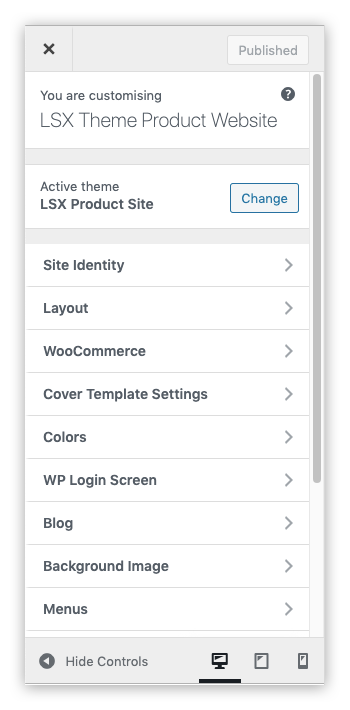
Customizer panels

Customizer WooCommerce panels

Customizer Cover Template Settings

Customizer WP Login Screen

Customizer Block Editor Colour Palette

Customizer WooCommerce Cart Options

Customizer Cover Template Settings with Alternate logo