

LTI Sitemap
Search engines will only feature content in search results if they can reach and peruse content. Having a sitemap at the root of your website makes it …
Plugin info
Maintenance & Compatibility
Maintenance score
Possibly abandoned • Last updated 3764 days ago
Is LTI Sitemap abandoned?
Possibly abandoned (last update 3764 days ago).
Compatibility
Similar & Alternatives
Explore plugins with similar tags, and compare key metrics like downloads, ratings, updates, support, and WP/PHP compatibility.
Description
Search engines will only feature content in search results if they can reach and peruse content. Having a sitemap at the root of your website makes it easier for specialized programs such as search engine bots to find that content.
LTI Sitemap will generate a set of sitemaps that robots can easily crawl through (it’s a simple set of links, packaged into XML), as well as make the sitemap human-readable by separating post types and allowing you to select the types of content to feature.
It integrates with Google Search console, allowing you to manage the main sitemap from WordPress.
Available languages
- English
- Français
Mapping your content
The following information can be mapped, if the corresponding option is activated:
- Front page and personalized pages,
- Posts,
- With no categorization,
- Categorization by year,
- Categorization by month and year,
- Pages,
- Authors,
- Images in posts,
- News
LTI Sitemap can generate Google news sitemaps which allow Google to keep track of your most recent news items.
A postbox is added to the post editor to specify whether a post is classified as news. Optional news fields can be filled:
– Title,
– Keywords,
– Access (full, subscription, registration)
– Genre (press release, satire, blog, op ed, opinion, user generated)
– Stick tickers
Taking advantage of the Google Search Console
We want to make sure WordPress users know about the Search console by facilitating the process of managing the main sitemap directly from WordPress. Without these types of tools, it would be hard to assess whether our SEO efforts are worth putting time and effort into!
Contribution
You can help us by:
- Translating the plugin in your own language (get in touch with us for details),
- Submitting bugs and feature requests in the github project’s issue tracker,
- Submitting code via pull requests,
- Visiting our blog and associated resources to interact with us.
Installation
The easiest way to install the plugin is to use the plugins management page in your administration panel.
Also, the package can be downloaded manually and unzipped in the /wp-content/plugins/ directory.
When resources have been copied, the plugin can be activated by looking for a “LTI Sitemap” entry in the plugins page and clicking on “Activate”.
Configure the options by locating our logo at the bottom of the admin sidebar.
Clicking on the “Deactivate” button will disable the post editing box information associated with the plugin. The “Delete” button will remove any LTI Sitemap related field in the database.
Frequently Asked Questions
We’ll add more entries to this section as we get feedback from you.
Why sitemaps?
Other than facilitating the indexing of your site, sitemaps offer an easy way to detect potential issues having to do with crawling on your site. Using Google or Bing webmaster tools, you can identify which sets of pages encountered problems and correct potential issues more quickly.
Review feed
Screenshots

Admin options, General tab

Admin options, Google tab

Admin options, Bing tab

Admin options, News tab
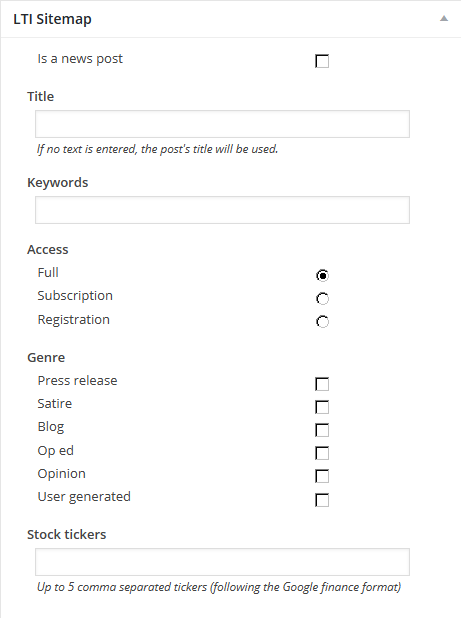
Meta box in the post editing page.
Changelog
- 0.5.0
- First Version
- 0.5.1
- Bug fix: rewrite rules have to be initiated whenever the plugin loads, not just when it activates.