

LTL Freight Quotes – Old Dominion Edition
Real-time LTL freight quotes from Old Dominion Freight Line. Fifteen day free trial.
Plugin info
Maintenance & Compatibility
Maintenance score
Stale • Last updated 181 days ago • 2 reviews
Is LTL Freight Quotes – Old Dominion Edition abandoned?
Likely maintained (last update 181 days ago).
Compatibility
Similar & Alternatives
Explore plugins with similar tags, and compare key metrics like downloads, ratings, updates, support, and WP/PHP compatibility.
Description
Old Dominion Freight Lines (NASDAQ: ODFL) is headquartered in Thomasville, North Carolina. The company has a reputation for providing quality service and ranks solidly in the top 10 LTL carriers in terms of annual revenue. It offers a variety of LTL freight services throughout the United States and to Canada and Mexico. If you don’t have a Old Dominion Freight Lines account number, contact them at 866-378-3748.
Key Features
- Displays negotiated LTL shipping rates in the shopping cart.
- Provide quotes for shipments within the United States and to Canada.
- Custom label results displayed in the shopping cart.
- Display transit times with returned quotes.
- Product specific freight classes.
- Support for variable products.
- Define multiple warehouses.
- Identify which products drop ship from vendors.
- Product specific shipping parameters: weight, dimensions, freight class.
- Option to determine a product’s class by using the built in density calculator.
- Option to include residential delivery fees.
- Option to include fees for lift gate service at the destination address.
- Option to mark up quoted rates by a set dollar amount or percentage.
- Works seamlessly with other quoting apps published by Eniture Technology.
Requirements
- WooCommerce 6.4 or newer.
- Old Dominion Freight Line account number.
- Your username and password to Old Dominion.com.
- A API key from Eniture Technology.
Installation
Installation Overview
Before installing this plugin you should have the following information handy:
- Your Old Dominion Freight Line account number.
- Your username and password to odfl.com.
If you need assistance obtaining any of the above information, contact your local Old Dominion Freight Line office
or call the Old Dominion Freight Lines at 866-378-3748.
A more comprehensive and graphically illustrated set of instructions can be found on the Documentation tab at
eniture.com.
1. Install and activate the plugin
In your WordPress dashboard, go to Plugins => Add New. Search for “LTL Freight Quotes – odfl Edition”, and click Install Now.
After the installation process completes, click the Activate Plugin link to activate the plugin.
2. Get a API key from Eniture Technology
Go to Eniture Technology and pick a
subscription package. When you complete the registration process you will receive an email containing your API key and
your login to eniture.com. Save your login information in a safe place. You will need it to access your customer dashboard
where you can manage your API keys and subscriptions. A credit card is not required for the free trial. If you opt for the free
trial you will need to login to your Eniture Technology dashboard before the trial period expires to purchase
a subscription to the API key. Without a paid subscription, the plugin will stop working once the trial period expires.
3. Establish the connection
Go to WooCommerce => Settings => ODFL Freight. Use the Connection link to create a connection to your Old Dominion Freight Lines account.
5. Select the plugin settings
Go to WooCommerce => Settings => ODFL Freight. Use the Quote Settings link to enter the required information and choose
the optional settings.
6. Enable the plugin
Go to WooCommerce => Settings => Shipping. Click on the link for Old Dominion Freight Lines and enable the plugin.
7. Configure your products
Assign each of your products and product variations a weight, Shipping Class and freight classification. Products shipping LTL freight should have the Shipping Class set to “LTL Freight”. The Freight Classification should be chosen based upon how the product would be classified in the NMFC Freight Classification Directory. If you are unfamiliar with freight classes, contact the carrier and ask for assistance with properly identifying the freight classes for your products.
Frequently Asked Questions
If the shopping cart contains one or more products tagged to ship LTL freight, all of the products in the shopping cart
are assumed to ship LTL freight. To ensure the most accurate quote possible, make sure that every product has a weight, dimensions and a freight classification recorded.
In the absence of a freight class, the plugin will determine the freight classification using the density calculation method. To do so the products weight and dimensions must be recorded. This is accurate in most cases, however identifying the proper freight class will be the most reliable method for ensuring accurate rate estimates.
One of the shipment parameters (weight, dimensions, freight class) is different, or additional services (such as residential
delivery, lift gate, delivery by appointment and others) were required. Compare the details of the invoice to the shipping
settings on the products included in the shipment. Consider making changes as needed. Remember that the weight of the packaging
materials, such as a pallet, is included by the carrier in the billable weight for the shipment.
Contact your local Old Dominion Freight Line office for assistance. You might also consider getting a subscription to ClassIT offered
by the National Motor Freight Traffic Association (NMFTA). Visit them online at classit.nmfta.org.
Check your phone book for local listings or call 804-353-1900.
Usernames and passwords to Old Dominion Freight Lines online shipping system are issued by Old Dominion Freight Lines. Go to Old Dominion Freight Lines and click the Sign Up link at the top right of the page in “Login to My Old Dominion” window. You will be redirected to a page where you can register as a new user.
You must register your installation of the plugin, regardless of whether you are taking advantage of the trial period or
purchased a API key outright. At the conclusion of the registration process an email will be sent to you that will include the
API key key. You can also login to eniture.com using the username and password you created during the registration process
and retrieve the API key key from the My API keys tab.
Login to eniture.com and navigate to the My API keys tab. There you will be able to manage the licensing of all of your
Eniture Technology plugins.
The plugin has a single site API key. To use it on another website you will need to purchase an additional API key.
If you want to change the website with which the plugin is registered, login to eniture.com and navigate to the My API keys tab.
There you will be able to change the domain name that is associated with the API key.
No. Each API key allows you to identify one domain for your production environment and one domain for your staging or
development environment. The rate estimates returned in the staging environment will have the word “Sandbox” appended to them.
If you can successfully test your credentials from the Connection page (WooCommerce > Settings > ODFL Freight > Connections)
then you have one or more of the following licensing issues:
1) You are using the API key on more than one domain. The API keys are for single sites. You will need to purchase an additional API key.
2) Your trial period has expired.
3) Your current API key has expired and we have been unable to process your form of payment to renew it. Login to eniture.com and go to the My API keys tab to resolve any of these issues.
Review feed
Screenshots
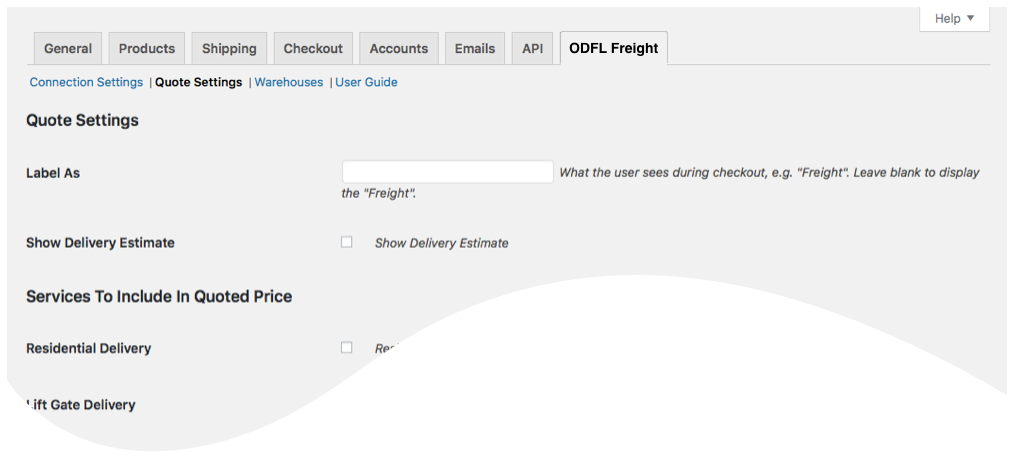
Quote settings page

Warehouses and Drop Ships page
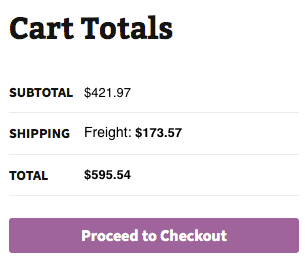
Quotes displayed in cart
Changelog
4.2.13
- Update: Added location-specific Residential and Liftgate Pickup feature.
- Update: Resolved compatibility warnings with the latest version of WooCommerce.
- Update: Improved shipment handling: virtual products are now treated as single-shipment cases instead of multi-shipment cases in both cart and checkout.
4.2.12
- Update: Added a new “Review Plugin” button for improved user feedback and engagement.
4.2.11
- Update: Fix: Security Enhancements: Resolved vulnerability issues for improved plugin security and compliance.
4.2.10
- Update: Updated connection tab according to wordpress requirements
4.2.9
- Update: Introduced an error management feature.
- Update: Introduced a liftgate weight restriction rule.
- Update: Introduced backup rates.
- Update: Added an inside delivery feature.
- Fix: Corrected the order of the plugin tabs.
- Fix: Resolved issues with the calculation of live shipping rates in draft orders.
4.2.8
- Update: Introduced country filter to override rates shipping rule
4.2.7
- Update: Introduced capability to suppress parcel rates once the weight threshold has been reached.
- Update: Compatibility with WordPress version 6.5.2
- Update: Compatibility with PHP version 8.2.0
4.2.6
- Update: Introduced the handling unit feature.
- Update: Updated the description text in the warehouse.
4.2.5
- Update: Changed required plan from standard to basic for Show Delivery Estimates on the checkout.
4.2.4
- Update: Display “Free Shipping” at checkout when handling fee in the quote settings is -100% .
- Update: Introduce the Shipping Logs feature.
- Fix: Show “product level markup” and “origin level markup” on order detail widget
4.2.3
- Update: Compatibility with WooCommerce HPOS(High-Performance Order Storage)
4.2.2
- Update: Modified expected delivery message at front-end from “Estimated number of days until delivery” to “Expected delivery by”.
- Fix: Inherent Flat Rate value of parent to variations.
- Fix: Fixed space character issue in city name.
4.2.1
- Update: Added compatibility with “Address Type Disclosure” in Residential address detection
4.2.0
- Update: Introduced origin level markup and product level markup
4.1.6
- Update: Compatibility with WordPress version 6.1
- Update: Compatibility with WooCommerce version 7.0.1
4.1.5
- Update: Conflict resolved with “Flexible Product Fields” plugin
4.1.4
- Update: Included product parent id along with variant ID required by freightdesk.online
4.1.3
- Update: Introduced connectivity from the plugin to FreightDesk.Online using Company ID
4.1.2
- Update: Compatibility with WordPress version 6.0.
- Update: Included tabs for freightdesk.online and validate-addresses.com
4.1.1
- Update: Compatibility with WordPress multisite network
- Fix: Fixed support link.
4.1.0
- Update: Added features, Multiple Pallet Packaging and data analysis.
4.0.0
- Update: Compatibility with PHP version 8.0.
- Update: Compatibility with WordPress version 5.8.
- Fix: Corrected product page URL in connection settings tab.
3.3.1
- Update: Added feature “Weight threshold limit”.
- Update: Added feature In-store pickup with terminal information.
3.3.0
- Update: Added weight threshold feature for LTL freight on the quote settings page.
- Update: Added feature to show In-store pickup and local delivery with terminal address.
- Update: added feature ‘Hold at terminal’
3.2.0
- Update: Cuttoff Time.
- Update: Added images URL for FDO portal.
- Update: CSV columns updated.
- Update: Micro-warehouse.
3.1.2
- Update: Added compatibility with WP 5.7, compatibility with shippable ad-don, compatibility with account number ad-don fields showing on the checkout page.
- Update: WP Tags added
- Update: Shippable params changed
- Fix: Order widget fixed when no quotes
3.1.1
- Update: Sync orders to freightdesk.online
3.1.0
- Update: Compatibility with WordPress 5.6
3.0.9
- Update: Introduced product nesting feature
3.0.8
- Update: Compatibility with WordPress 5.5
3.0.7
- Update: Compatibility with WordPress 5.4
3.0.6
- Update: Introduced ODFL account type[Sender/Receiver] in account specific warehouse
3.0.5
*Update: Compatibility with custom programming
3.0.4
- Fix: Removed extra files and rename class name.
3.0.3
- Update: Introduced Account Number on warehouse tab
3.0.2
*Update: Compatibility with WordPress 5.1
3.0.1
- Fix: Identify one warehouse and multiple drop ship locations in basic plan.
3.0.0
- Update: Introduced new features and Basic, Standard and Advanced plans.
2.1.1
*Update: Compatibility with WordPress 5.0
2.1.0
*Update: Added the ability to identify the account number
2.0.1
*Fix: Corrected quotes labels on checkout page
2.0.0
*Update: Introduced compatibility with the Residential Address Detection plugin.
1.1.5
*Update: Improved finding nearest warehouses.
1.1.4
*Fix: Fixed an issue with the setting that controlled the display of alternate shipping methods.
1.1.3
- Fix: Fixed issue with show quotes
1.1.2
- Fix: Fixed issue with inherent parent shipping class to variant
1.1.1
- Fix: Fixed issue with new reserved word in PHP 7.1
1.1.0
- Update: Compatibility with WooCommerce 4.9.
1.0.1
- Update: Compatibility with WordPress 4.8
1.0
- Initial release.