

Magic Liquidizer Responsive Table
A simple and lightweight Wordpress plugin that converts HTML <table> into responsive.
Plugin info
Maintenance & Compatibility
Maintenance score
Possibly abandoned • Last updated 2326 days ago • 54 reviews
Is Magic Liquidizer Responsive Table abandoned?
Possibly abandoned (last update 2326 days ago).
Compatibility
Similar & Alternatives
Explore plugins with similar tags, and compare key metrics like downloads, ratings, updates, support, and WP/PHP compatibility.
Description
A simple and lightweight WordPress plugin that transforms your normal HTML table into mobile responsive table. It’s a must have Responsive Web Design (RWD) tool for developing your website. Page tables may overlap in small screens or when dragging your browser to minimizing it for mobile screens simulation especially when the table contains large contents such as texts and images. So this is your solution!
Magic Liquidizer Responsive Table plugin – is just one of many features of Magic Liquidizer for a complete Responsive Web Design solution such as images, texts, forms, tables, navigation menu, and other HTML elements.
The demonstration link below is where Magic Liquidizer plugin used, minus anything else, just observe the Responsive Table function. See it in action by following this DEMO.
If you like this plugin, good ratings is much appreciated.
For more information kindly check InnoveDesigns.com Responsive Table article. and leave a message via our contact form for further concerns. Also you can join the project on GitHub Magic-Liquidizer-Responsive-Table Project.
Installation
Installation is very easy, download and upload via WordPress Plugin Section.
- After activation, go to Dashboard > Magic Liquidizer Lite > Table.
You’re done!
Frequently Asked Questions
Where to find Magic Liquidizer Responsive Table settings?
You can find via WordPress Dashboard > Magic Liquidizer Lite > Table.
How to get table Class or ID?
You can use Chrome Inspector or Firefox Firebug Extension to inspect element. But basically table value signifies that all <table> .. </table> will make responsive. Please watch this video tutorial on YouTube
How to make tables in two columns
It’s very simple, just add these CSS lines into your stylesheet
.ml-responsive-table dt.ml-title {
     clear: none;
     float: left;
     width: 45% !important;
}
.ml-responsive-table dd.ml-value {
     clear: none;
     float: left;
     width: 45% !important;
}
Review feed
Screenshots

How does your Table look like BEFORE. screenshot-1.png
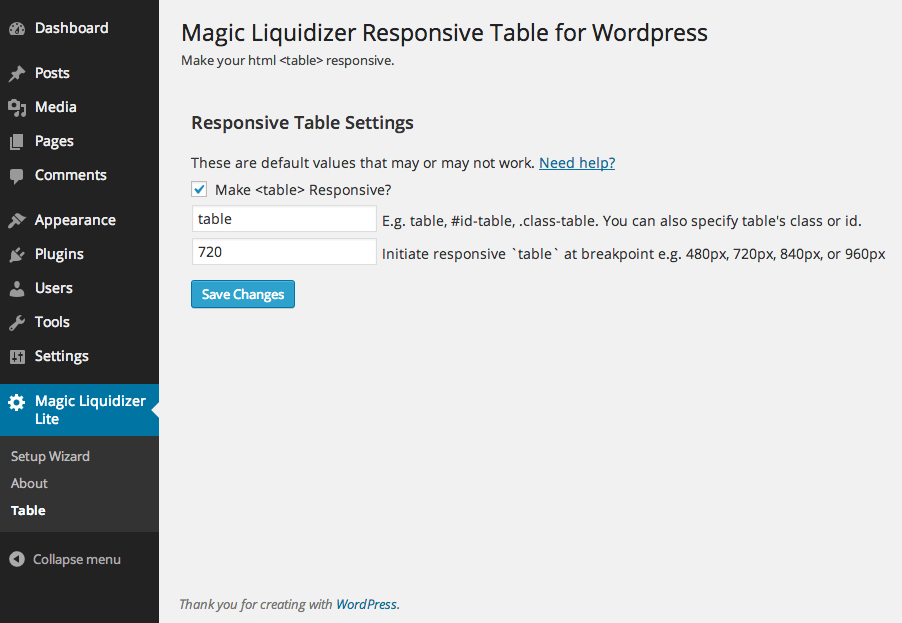
Magic Liquidizer Responsive Table - Wordpress Admin Section. screenshot-2.png
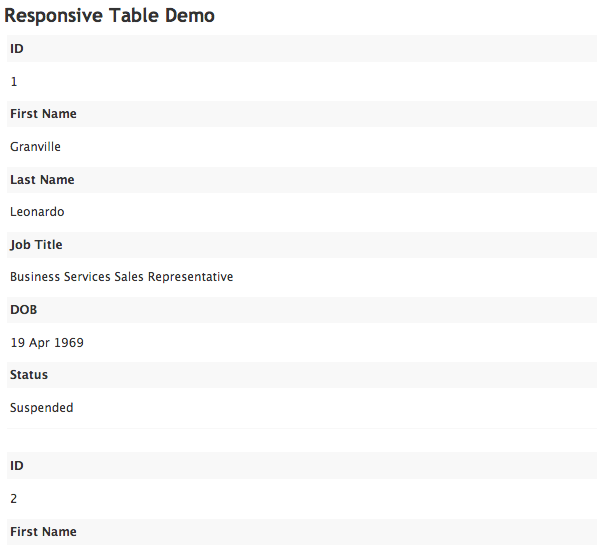
This screenshot was taken from our DEMO page AFTER installation. Client-side screenshot. screenshot-3.png
Changelog
2.0.4 – 11/19/2019
- [Fixed] “Notice: Undefined index” PHP warning
2.0.3 – 08/13/2018
- [Fixed] Fatal Error on Older PHP versions
2.0.2 – 08/10/2018
- [Fixed] No display on mobile view due to empty fields on Selectors
2.0.1 – 08/04/2018
- [Added] Fields added for table header and table row selectors
- [Fixed] Duplicate issue on bind JS actions or events in the ID attribute only.
@see this thread https://wordpress.org/support/topic/duplicate-content-36/ and https://wordpress.org/support/topic/duplicate-content-fix/ for more details
Special thanks to @franciscus and @spiderwisp for helping me to fix this issue.
2.0.0 – 02/02/2017
- [Improved] JS to support most of HTML Table Format
- [Improved] Styling or CSS fixes
- [Fixed] Uninstall fixes
1.0.8 – 05/30/2016
- [Modified] Utilizing add_action() called
wp_footerinstead ofwp_print_footer_scripts - [Fixed] Preventing the script to kick in Wp Login Page /wp-admin
1.0.7 – 04/11/2016
-
- [Added] Internationalizing (text domain)
-
- [Modified] Simplifying Codes
-
- [Updated] Actions and Filters Hooks
1.0.6 – 08/29/2014
-
- [Added] Magic Liquidizer Responsive Navigationbar Compatibility
1.0.5 – 08/27/2014
-
- [Changed] id-* to ml-*
-
- [Improved] JS
-
- [Changed] CSS Class from clearfix to ml-clearfix
-
- [Changed] CSS paddings and background color
-
- [Added] jQuery noConflict()
-
- [Added] Two column Table in mobile view see FAQ
1.0.4 – 05/03/2014
-
- [improve] JS
-
- [Compatibility] Latest Wp Version
1.0.3 – 02/03/2014
-
- [fixed] Uninstallation Hook
-
- [added] .clearfix class
1.0.2 – 02/03/2014
-
- [fixed] Breakpoint Implementation
-
- [fixed] Specifying classes or id’s
-
- [ready] API for Magic Liquidizer Responsive Form
-
- [Changes] Plugin Screenshots screenshot-2.png
1.0.1 – 01/30/2014
-
- CSS Fixes
-
- Move Plugin Section to Dashboard > Magic Liquidizer Lite > Table
-
- Database Changes
-
- API do_action Implemented
1.0.0 – 01/09/2014
- Initial Released Date