

Magic WP Coupons – Lite
Magic WP Coupons is a WordPress based plugin which can magically turn your WordPress theme into a affiliate coupons site.
Plugin info
Maintenance & Compatibility
Maintenance score
Possibly abandoned • Last updated 3635 days ago • 19 reviews
Is Magic WP Coupons – Lite abandoned?
Possibly abandoned (last update 3635 days ago).
Compatibility
Similar & Alternatives
Explore plugins with similar tags, and compare key metrics like downloads, ratings, updates, support, and WP/PHP compatibility.
Description
We are taking off our premium plugin. The Prosperent.com just ceased to allow coupon codes using their API. So we will not be able to deliver premium plugin any more.
What is Magic WP Coupons Plugin?
Magic WP Coupons is a WordPress based plugin which can magically turn your WordPress theme into a coupon website. Tap into the huge referral commission market by offering your site visitors valuable online discount coupons. Magic WP Coupons easily lets you define stores and add coupons. This plugin will generate shortcodes for different stores or retailers and you can generate and use these shortcodes on your pages and posts, wherever you want to show discount coupons. We are constantly improving WP Magic Coupons and your feedback is always welcome. We are adding new features and updating this plugin often. For extra automated functionality, check out our premium version below.
Features
- Install, setup and start earning affiliate commissions quickly and easily.
- Great look for coupon display and premium upgraded designs available.
- Likes / Dislikes system built in for user feedback.
- Click counter system.
- External CSS support.
- Compatible with 99% of WordPress templates available.
- Widget ready.
- Upload your own templates to tailor your coupon boxes.
- Multiple coupon box templates feature allows you to upload mulitple coupon box templates and switch between them.
- Affiliate URls are now cloaked in Magic WP Coupons (Lite version).
- 10 coupon templates are available to use in your theme.
- Social sharing inside coupon, is enabled.
Programming Support
If you are having trouble in setting up this plugin on your site, or you want to customize the look and feel. We are always here to help you. You can surely contact us via our contact us page and let us modify create your coupon website.
Designs Valley
Credits
Arbitrary section 1
Installation
- Upload “Magic WP Coupons” to the “/wp-content/plugins/” directory.
- Activate the plugin through the “Plugins” menu in WordPress.
- Go to Settings page and configure your plugin.
- Go to your post or page edit screen and use shortcode generator insert button from toolbar in editor area to generate desired shortcodes to use on your pages.
- You’re done!
How to use this plugin
- Go to the left menu in your wp-admin control panel and click on stores. Now you can add or edit stores from this location. Assign a featured image to stores that will be shown on coupon posts for each store.
- Now you can add your coupons as normal posts, there will be a custom meta box for you to add coupon details and assign to stores, etc.
- To display all the coupons on any page or post, use the following shortcode
[coupons limit=”10″ orderby=”date” order=”DESC”]
Frequently Asked Questions
Will Magic WP Coupons transform my site into a coupon site?
Magic WP Coupons will allow you to use simple shortcodes on any desired posts or pages and show discount coupons inside your content. It only transforms the areas of your site that you want it to. You can use as many or as few targeted coupons on your site as you want, helping you earn extra revenue from affiliate plans.
Is Magic WP Coupons compatible with all WordPress themes?
Yes, any theme can be used for Magic WP Coupons. We recommend a blog style theme, but with coding changes you can likely get any theme to display the simple coupon format
Can I customize the theme to change the look and feel with Magic WP Coupons?
Yes, Magic WP Coupons allows you to use your own CSS. You can visit the Magic WP Coupon setting page in your admin panel to allow external CSS which will pick up styles from your in use theme.
Do Lite version support Prosperent.com API?
No, the lite version only allows you to add your own coupon codes for different retailers or online stores. If you would like to use the automated Prosperent.com API, you will need to purchase the premium version of Magic WP Coupons.
Is Magic WP Coupons compatible with multi-lingual sites?
No, currently Magic WP Coupons does not support multi-lingual sites. Therefore we are considering this feature in the newer version, being launched shortly.
Review feed
Screenshots

Magic WP Coupons settings page to enable/disable features

Uploading and activating new templates
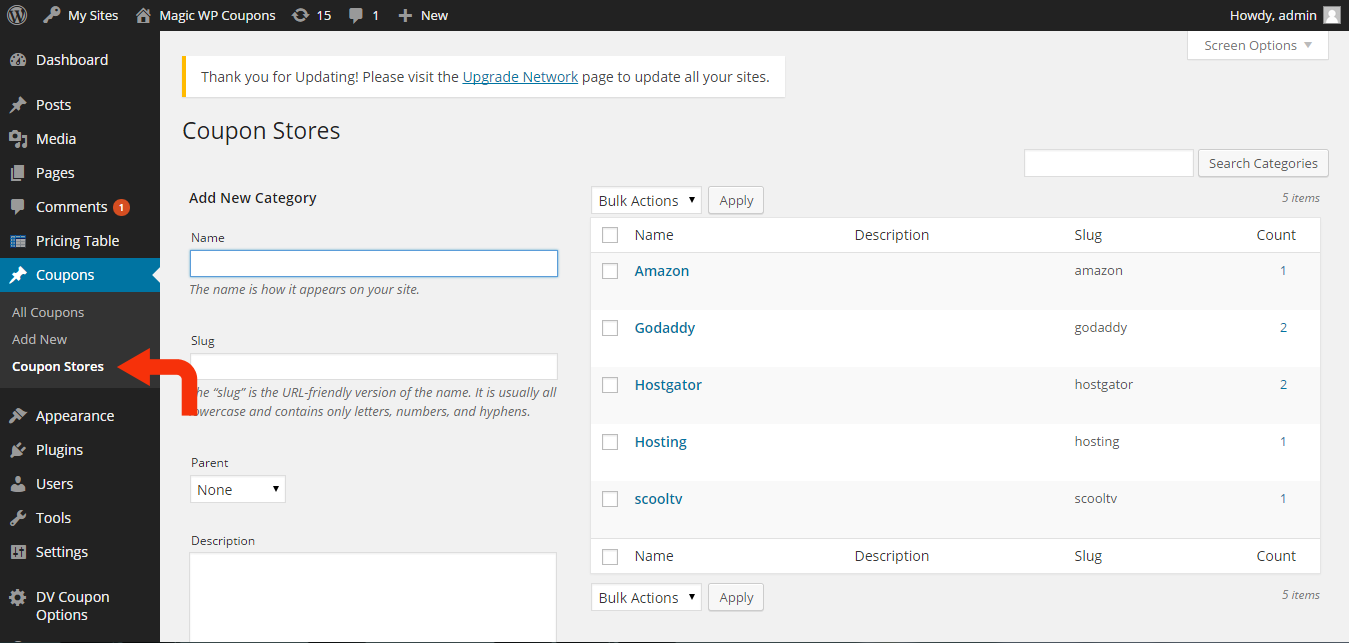
Managing coupon stores

Adding new coupons manually

Using shortcode insert button

Adding shortcodes to page or posts
Changelog
1.0
Initial release.
2.0
- Added shortcode ability. Shortcodes are now used on your posts or pages where you want to display discount coupons.
- Added support for different coupon snippets or box templates so you can change the look and feel of coupon displays.
- Added compatibility for WordPress 4.0.
- “Click to copy” bug is fixed.
2.1
- Coupon box snippets layout issue fixed.
- Coupon box template selector is enabled.
- Coupon box template installer is enabled.
- Save button for admin configurations is fixed now.
- Click to copy but fixed.
- IP based like/dislike and click counter.
- Shortcode button in WYSIWYG editor, is fixed now.
= 2.2=
1. Network error bug is fixed.
= 3.0=
1. Several bugs fixed.
2. 10 new templates added to use in your WP theme.
3. Social Sharing.
4. Detailed reporting feature added.
5. More premium features available in LITE version now.