

Make Section & Column Clickable For Elementor
Make Section & Column Clickable For Elementor is a WordPress plugin to clickable your elementor column & section in your WordPress website.
Plugin info
Maintenance & Compatibility
Maintenance score
Stale • Last updated 182 days ago • 10 reviews
Is Make Section & Column Clickable For Elementor abandoned?
Likely maintained (last update 182 days ago).
Compatibility
Similar & Alternatives
Explore plugins with similar tags, and compare key metrics like downloads, ratings, updates, support, and WP/PHP compatibility.
Description
A plugin that allows users to click in the whole column or section instead of individual elements
- Users will be able to click on the whole column when you add a link on that.
- Users will be able to click on the whole section when you add a link on that.
HOW TO USE IT
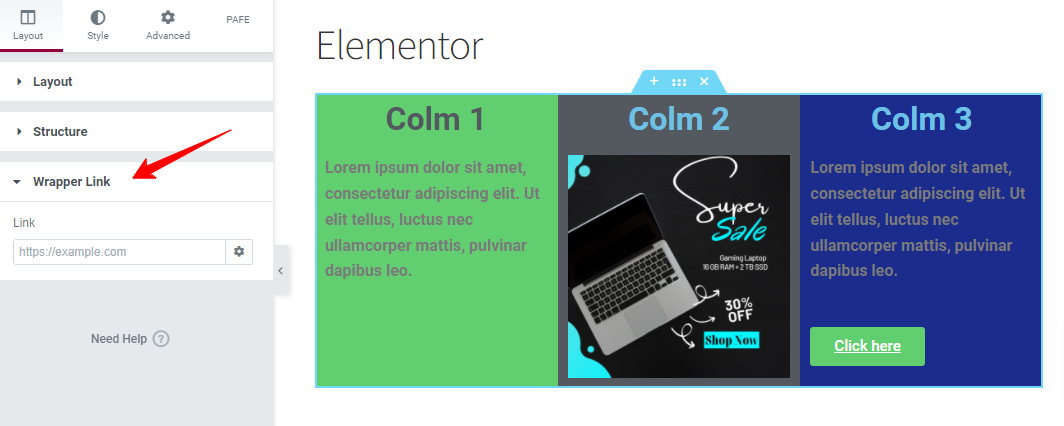
After installing the plugin, open your Elementor editor, start editing a Column or Section, and under the Layout block (wrapper link option) you can add your custom link.
You can make my day by submitting a positive review on WordPress.org!
Contribute
This may have bugs and lack of many features. If you want to contribute on this project, you are more than welcome. Please fork the repository from Github.
Privacy Policy
Make Section & Column Clickable For Elementor uses Appsero SDK to collect some telemetry data upon user’s confirmation. This helps us to troubleshoot problems faster & make product improvements.
Appsero SDK does not gather any data by default. The SDK only starts gathering basic telemetry data when a user allows it via the admin notice. We collect the data to ensure a great user experience for all our users.
Integrating Appsero SDK DOES NOT IMMEDIATELY start gathering data, without confirmation from users in any case.
Learn more about how Appsero collects and uses this data.
Installation
- Upload
Make Section & Column Clickable For Elementorto the/wp-content/plugins/directory - Activate the plugin through the ‘Plugins’ menu in WordPress
Frequently Asked Questions
This plugin will add a custom URL field in each column or section of your Elementor editor. If you fill it, the column will be clickable..
If you have any issue, please use the support here.
Yes.
Review feed
Code change to allow target _blank or _self
Screenshots
Changelog
1.0
- Initial version.
1.1
- WordPress version compatible
1.2
- Fix/elementor version compatible
1.3
- Add Contributing link via github
- Add donate link for supporting
- Compatible with elementor version
1.4
- Compatible with WordPress version
- Compatible with Elementor version
1.5
- Add automatic new tab opening for wrapper link
- Add wrapper link within container
- Compatible with WordPress version
- Compatible with Elementor version
1.6
- Add new tab option in wrapper settings menu
- Compatible with WordPress version
- Compatible with Elementor version
1.7
- Compatible with WordPress version
- Compatible with Elementor version
1.8
- Fix PHP Warning: Trying to access array offset on value of type null
- Compatible with WordPress version
- Compatible with Elementor version
1.9
- Compatible with WordPress version
- Compatible with Elementor version
2.0
- Compatible with WordPress version
- Compatible with Elementor version
- Add Appsero SDK
2.1
- Compatible with WordPress version
- Compatible with Elementor version
2.2
- Compatible with WordPress version
- Compatible with Elementor version
2.3
- Compatible with WordPress version
- Compatible with Elementor version