

Manage User Avatar
WP Manage User Avatar plugin allows you to set your users avatar and select a uniform avatar theme for all users. You can set a avatar from the initia …
Maintenance 20/1001817d since update
Active installs
30
Downloads
1,621
Reviews
0
Age
5.0y
Plugin info
Total downloads: 1,621
Active installs: 30
Total reviews: 0
Average rating: 0
Support threads opened: 0
Support threads resolved: 0 (0%)
Available in: 1 language(s)
Contributors: 1
Last updated: 4/11/2021 (1817 days ago)
Added to WordPress: 4/11/2021 (4 years old)
Minimum WordPress version: 3.0.1
Tested up to WordPress version: 5.7.14
Minimum PHP version: f
Maintenance & Compatibility
Maintenance score
Possibly abandoned • Last updated 1817 days ago
20/100
Is Manage User Avatar abandoned?
Possibly abandoned (last update 1817 days ago).
Compatibility
Requires WordPress: 3.0.1
Tested up to: 5.7.14
Requires PHP: f
Similar & Alternatives
Explore plugins with similar tags, and compare key metrics like downloads, ratings, updates, support, and WP/PHP compatibility.
Description
Do you want a simple amd uniform avatar theme for your users?
Is yes, then consider using this plugin.
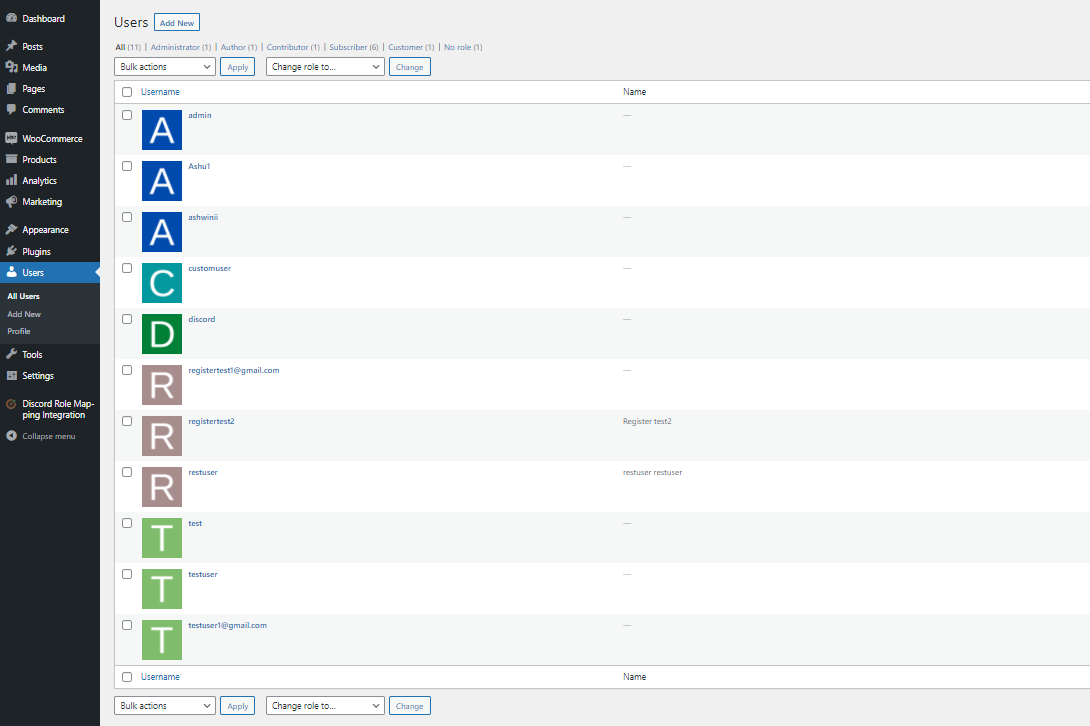
The initial letter of the username is taken and the image of this letter is set as an avatar for the user.
Where are these images are stored?
- Go to the plugin folder /wp-content/plugins/escaleta-wp-avatar/assets/avatars/alphabets and ta-da you found all the images from A to Z.
- Images are named simply by letters (e.g. a.png, b.png, etc)
- You can also place your own images with same names so that the plugin will take it and set as a user avatar.
Do you have a suggestion?
- We are still in a development of this plugin. We want to improve and provide an added value to our users with each update of this plugin.
- Your valuable feedback, suggestion and even a samll comment will point us in the right direction.
- Please write to us at [email protected]
Installation
- Upload the plugin files to the /wp-content/plugins/escaleta-wp-avatar directory, or install the plugin through the WordPress plugins screen directly.
- Activate the plugin through the ‘Plugins’ screen in WordPress.
- Good to go.
Frequently Asked Questions
No FAQ available
Review feed
No reviews available
Screenshots

Changelog
0.0.1
- First version release.