

Plugin info
Maintenance & Compatibility
Maintenance score
Possibly abandoned • Last updated 466 days ago • 5 reviews
Is Manga+Press Comic Manager abandoned?
Possibly abandoned (last update 466 days ago).
Compatibility
Similar & Alternatives
Explore plugins with similar tags, and compare key metrics like downloads, ratings, updates, support, and WP/PHP compatibility.
Description
Manga+Press is a webcomic management system for WordPress. Manga+Press uses WordPress posts, pages and categories to help you keep track of your comic posts. Manga+Press also includes its own custom template tags to help make creating themes easier.
Credits
(c) 2008-2024 Jessica C. Green
Found a bug? Or did you find a bug and figure out a fix? Visit http://www.manga-press.com/support/. Please include screenshots, WordPress version, a list of any other plugins you might have installed, or code (if you figured out a fix). Be as detailed as possible.
For updates, you can visit http://www.manga-press.com/
This program is free software; you can redistribute it and/or modify it under the terms of the GNU General Public License as published by the Free Software Foundation; either version 2 of the License, or (at your option) any later version.
This program is distributed in the hope that it will be useful, but WITHOUT ANY WARRANTY; without even the implied warranty of MERCHANTABILITY or FITNESS FOR A PARTICULAR PURPOSE. See the GNU General Public License for more details.
You should have received a copy of the GNU General Public License along with this program; if not, write to the Free Software Foundation, Inc., 59 Temple Place, Suite 330, Boston, MA 02111-1307 USA
Installation
-
Unpack the .zip file onto your hard drive.
-
Upload the
mangapressfolder to the/wp-content/plugins/directory. -
Activate the plugin through the ‘Plugins’ menu in WordPress
-
Create two new pages; these pages will be your latest comic and comic archives pages. Label them something like ‘Latest Comic’
and ‘Past Comics’ or whatever, as long as it makes sense to you. -
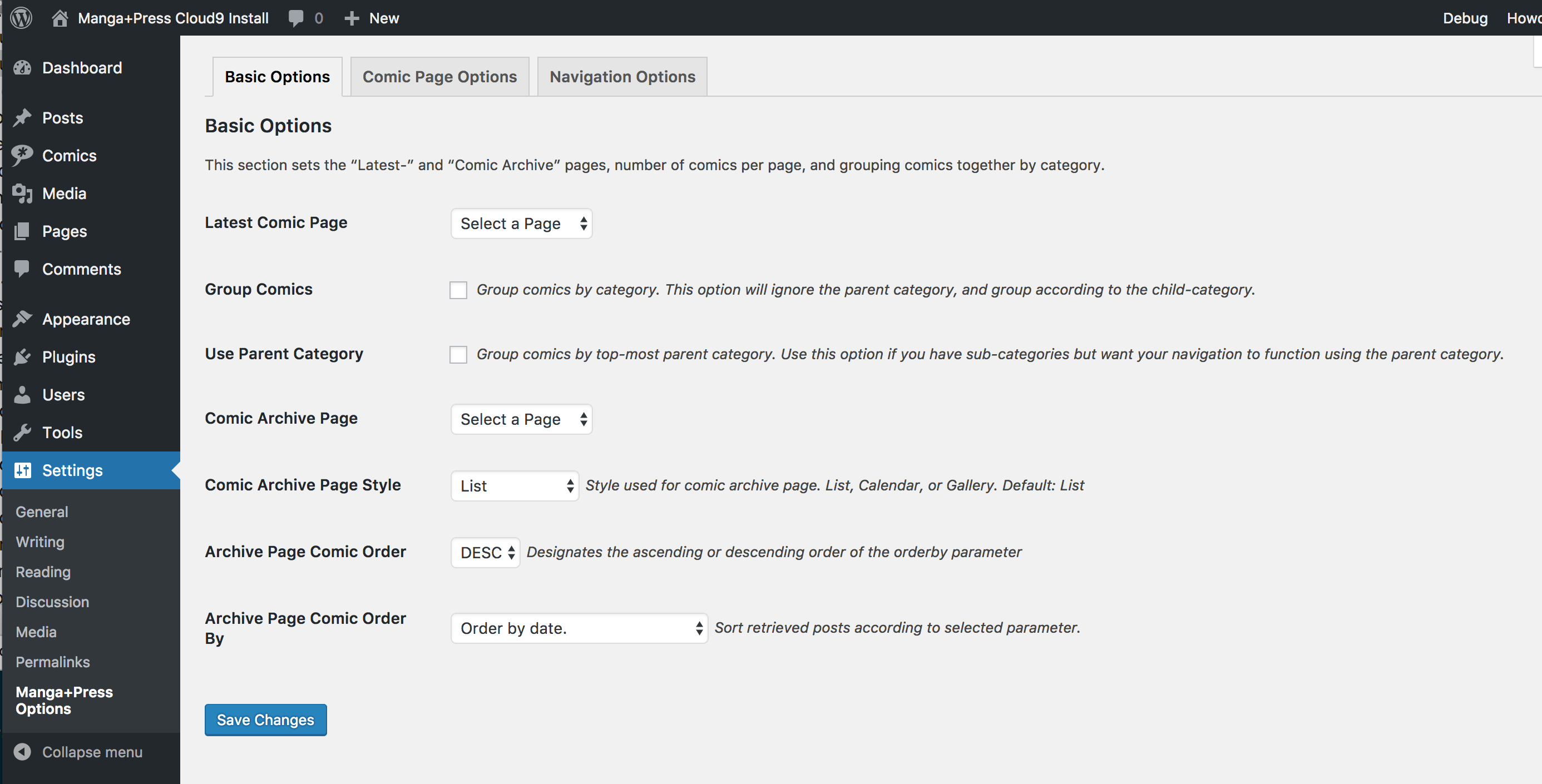
Click on the Manga+Press Options tab under Settings and go to Basic Manga+Press Options, and set Latest Comic Page, and Comic
Archive Page to your two newly created pages.
Frequently Asked Questions
I’m using the bundled theme for TwentyEleven, -Twelve, or -Thirteen but the Custom CSS and/or Insert Navigation options have no effect? Or they add a second navigation bar
This is because the navigation for the comics is built into the theme. Using a different theme or overriding the default theme’s template will allow you to use the options. (however, see issue #17 for additional issues)
Does Manga+Press work on WordPress Multi-site?
Yes, it does. However, a few steps must be taken to make Manga+Press’ child-themes available to your network. See the question below on the steps to take to enable the child-themes on Multisite.
The bundled themes aren’t available in WordPress Multi-site. What’s going on?
This is because the plugin hasn’t been activated for the entire MS network. In order for the child-themes to be available, Manga+Press must be available to the entire network. This can be done by going to Network Admin > Plugins and clicking the Network Activate link for Manga+Press. Once this is done, then both the parent- and child-themes need to made available to the network as well. This can be accomplished by going to Network Admin > Themes, selecting the themes in question, choosing Bulk Actions > Network Enable, and then clicking Apply.
Is Manga+Press responsive?
Not by itself. However, Manga+Press doesn’t really output markup other than the comic navigation. Responsiveness depends on the theme that is being used. The themes bundled with Manga+Press — the TwentyEleven thru TwentyFourteen child-themes — all have some level of responsiveness that is dependent on their parent themes.
Is Manga+Press compatible with Advanced Custom Fields
Yes, it is! Manga+Press is simply a stripped down custom post-type with a custom Featured Image meta-box. Like any other post-type, you can add a new field group using ACF — however, you will have to configure your theme to display these custom fields.
Is Manga+Press compatible with the WPML plugin?
I have never had the chance to test Manga+Press with the WPML plugin so I can’t really guarantee compatibility. Since Manga+Press works like a standard WordPress post, and WPML is compatible with custom post-types, this shouldn’t be a problem.
Do you take feature requests?
I do take feature requests, but I also judge each request on the basis of how well the new feature fits into Manga+Press’ current functionality and also how feasible the new feature is to implement into Manga+Press’ core.
Review feed
Screenshots
screenshot-1.png
screenshot-2.jpg
screenshot-3.jpg

screenshot-4.jpg
Changelog
3.1
- 3.1.0
- Refactoring and code cleanup
- Deprecation of functions in favor of WordPress Core functions
- Added better block theme support
- Removed Group By parent option due to code complexity and ease of maintenance
- Added WordPress REST api support
- Added random link option
3.0
-
3.0.2
- Change PHP requirement to 7.4
- Updated code to be PHP 8-compliant
-
3.0.1
- Fixed issue where templates for Latest Comic page and Comic Archive page weren’t loading correctly
- Corrected CSS positioning for comic navigation wrapper
- Added support for WordPress 5.5.1
-
3.0
- Removed child themes
- Added sorting options for Comic Archive Page
- Added comic archive calendar template
- Added comic archive gallery template