

Map pins
Add custom markers on an embedded Google Map. Includes full search-ability, my-location via GPS, a list of nearby locations, and business hours.
Plugin info
Maintenance & Compatibility
Maintenance score
Possibly abandoned • Last updated 2745 days ago • 4 reviews
Is Map pins abandoned?
Possibly abandoned (last update 2745 days ago).
Compatibility
Similar & Alternatives
Explore plugins with similar tags, and compare key metrics like downloads, ratings, updates, support, and WP/PHP compatibility.
Description
Map pins makes it easy to create a map with locations of businesses, events, or venues on a map.
You can:
- Insert a Google Map with custom markers anywhere on your blog using a shortcode.
- Show a scrollable list of locations next to the Google Map.
- Order the locations based on distance from visitor location (based on browser location).
- Oodles of information can be maintained per pin/location.
- Business hours are defined per location. Visitors can search for currently opened locations.
- Most options are highly customizable:
- All options can be controlled by shortcode parameters
- Show different sets of locations on various pages by using the location category
- You can display only a map, display a map and list combination and even show only a list of locations (for example in your sidebar). All variants are searchable.
- Includes country specific search options, for example zip-code optimized searching (powered by Google Maps).
- Large number of marker-icons provided (courtesy of Maps Icons Collection project by Nicolas Mollet). You can add your own custom icons to the map as well.
- Configurable admin environment to make location maintenance very easy.
- Automatic scaling of the map boundaries based on locations shown.
- English and Dutch translations are included.
- Translatable using .mo and .po files.
- Optimized for WordPress Multisite
Your visitors can:
- Browse a Google Map with all the locations you added.
- Use an intelligent search option to find locations close to a location (search powered by Google Maps).
- Find locations based on their current location (using GPS / IP location via the browser).
- Search based on business hours of a location is opened right now or not.
- Find information about the location you added by clicking a map marker including: name, address, business hours, any text you add and a hyperlink).
Example shortcode:
[mappins-map width=”500″ height=”900″ searchbar=”Y” list=”left” showmap=”show” listwidth=”40%”]
List of location attributes:
name, address, zipcode, city, country, telephone, category, markericon, openinghours, link URL, latitude/longitude
Licenses:
- The plugin uses wonderful custom marker icons from the Maps Icons Collection project by Nicolas Mollet. (http://mapicons.nicolasmollet.com/)
- Header photo by Dave77459 (http://www.flickr.com/photos/dave77459/6335868568/) cc license (http://creativecommons.org/licenses/by-nc-sa/2.0/)
Installation
To install Map Pins manually, follow these steps:
- Get the plugin using the plugins->add menu and search for
map-pins - Activate the plugin through the Plugins menu in WordPress
- Get a Google Maps API key here: https://developers.google.com/maps/documentation/javascript/get-api-key (and also enable Google Places API on this key if you want to use the search box)
- Go the the plugin settings page and paste your Google Maps API key there. All other settings are optional.
- Configure the Map Pins locations through the Map Pins menu (located in the left menu or in case of WPMU on network level)
- Embed the Map Pins map on any page or post using the [mappins-map] shortcode.
- Enjoy
Otherwise just use the plugin-install page in wordpress.
Frequently Asked Questions
Q: How many maps I can insert into a post or page?
A: The number of map-pins objects on a page is limited to 1 per page. You can change the shortcut parameters (like width, list-style, category) on other pages.
Q: How can I show other sets of locations on different pages
A: You can filter shown locations based on category on different pages. The category filter is part of the shortcut parameters, so you can change the category filter on each page. For each location the category can be selected.
Q: Can I upload a CSV of XLS file with locations?
A: No. But you can use phpAdmin or another mysql tool to fill the database.
Q: Clicking `my-location` shows an error
A: You need an SSL (https://) website, otherwise the browser does not allow this.
Q: I am using WP Multisite and have one child site for each of my stores. Can I use one database defined in the network?
A: Yes. The database is maintained on the network level.
Q: Is Google Maps a free service? I don’t want to pay Google.
A: Unfortunately, Google Maps is a payed service nowadays. Fortunately the free-tier is pretty large and you will propably not hit the free-tier limit for a low-traffic site. However you should protect your key (see google key management) otherwise people can (and will!) obtain your key from your website and start using it. Also, its Google, so the pricing can change any minute now.
Q: I want to use my own pin icons.
A: You can! Just put them in the plugin pics directory (so that is wp-content/plugins/map-pins/pics in your install). The plugin will find them automagically.
Review feed
Screenshots
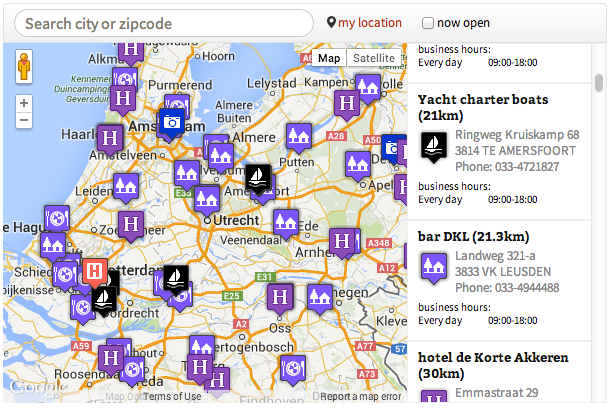
Map pins with map, list and search bar

Defining your pins

Configure map-pins
Changelog
1.29
- Fixed submenu. First submenu is now called locations, and not map-pins. Took a lot of googling to find the solution but https://wordpress.stackexchange.com/questions/52675/how-to-remove-duplicate-link-from-add-menu-page came to the resque.
1.20
- Allow filtering on category
1.13
- some styling fixed
1.10
- Added required Google Maps API key
1.02
- fixed short php tags
- tested with latest wordpress version
1.01
- php 5.2 compatible and php version check
1.0
- After hours notification with moon icon
- screenshots and other nice info on wordpress.org
- made responsive
0.1
- Initial release.