

MartinCV OpenAi Post
Utilizes OpenAi GPT-3.5-turbo to generate Post based on the post title. You can use it with Gutenberg or Classic editor. Works for both posts and page …
Plugin info
Maintenance & Compatibility
Maintenance score
Possibly abandoned • Last updated 477 days ago • 2 reviews
Is MartinCV OpenAi Post abandoned?
Possibly abandoned (last update 477 days ago).
Compatibility
Similar & Alternatives
Explore plugins with similar tags, and compare key metrics like downloads, ratings, updates, support, and WP/PHP compatibility.
Description
This plugin utilizes OpenAi GPT-3.5-turbo to generated Blog Post based on the entered post title.
You can use it with Gutenberg Editor or the Classic editor. Works for both posts and pages.
Features:
- Users can set global OpenAi Settings via Settings -> OpenAi Post.
- Users can overwrite the global settings per post via the Post editor.
- When generating post users can choose to add Introduction, Conclusion, Number of headings as well as include number of images.
When adding images, image size field is also available.
Installation
Installation and uninstallation are extremely simple. You can use WordPress’ automatic install or follow the manual instructions below.
Installing:
- Download the package.
- Extract it to the “plugins” folder of your WordPress directory.
- In the Admin Panel, go to “Plugins” and activate it.
- Go to Settings -> OpenAi Post to add your API Key and set your desired values.
Uninstalling:
- In the Admin Panel, go to “Plugins”, deactivate the plugin and click “Delete”.
Usage:
Using this plugin is simple. Once it has been activated, navigate to Settings -> OpenAi Post and add your API Key and desired values for the settings.
Once this is done and saved, go to create a Post or Page. In the sidebar you will notice new box OpenAi. There you can play with the options to your desire and click on Generate button. Depending on the options this action might take a while. Once it is done the content is populated in the editor area. It works with Gutenberg Editor and Classic Editor.
If you need any additional help fell free to contact me at [email protected] for more information.
Frequently Asked Questions
Thanks, donations help us to continue improving our plugins. Read More About Donations.
Depending on the settings set, the request might take more time. It also depends how busy the OpenAi is.
This is because it probably run out of tokens. If you include big number of headings you need to increase the Max Length number.
Review feed
Works Great
Glad to see OpenAI here.
Screenshots
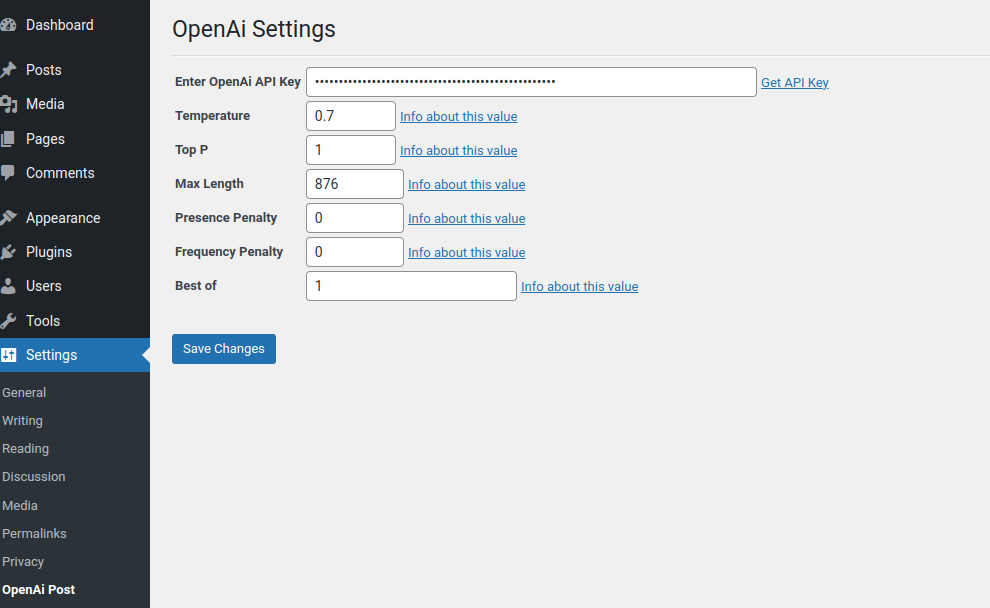
The Settings screen for the plugin.

The OpenAi options in the Add / Edit post screen.

Generated Post
Changelog
1.0
Release Date – 14 December 2022
- Public release of ‘MartinCV OpenAi Post’