

MaxSlider
MaxSlider is a free WordPress slider plugin that lets you create responsive sliders for your website. Shortcode and Visual Composer support included.
Maintenance 42/100343d since update
Active installs
8,000
Downloads
90,974
Reviews
12
Age
9.4y
Plugin info
Total downloads: 90,974
Active installs: 8,000
Total reviews: 12
Average rating: 4.7
Support threads opened: 0
Support threads resolved: 0 (0%)
Available in: 4 language(s)
Contributors: 7
Last updated: 4/25/2025 (343 days ago)
Added to WordPress: 11/4/2016 (9 years old)
Minimum WordPress version: 5.0
Tested up to WordPress version: 6.8.3
Minimum PHP version: f
Maintenance & Compatibility
Maintenance score
Stale • Last updated 343 days ago • 12 reviews
42/100
Is MaxSlider abandoned?
Likely maintained (last update 343 days ago).
Compatibility
Requires WordPress: 5.0
Tested up to: 6.8.3
Requires PHP: f
Languages
Similar & Alternatives
Explore plugins with similar tags, and compare key metrics like downloads, ratings, updates, support, and WP/PHP compatibility.
Smart Slider 3
Rating 4.9/5 (1,114 reviews) • Active installs 900,000
Depicter — Popup & Slider Builder
Rating 4.7/5 (218 reviews) • Active installs 100,000
Prime Slider – Addons for Elementor
Rating 4.5/5 (77 reviews) • Active installs 100,000
Rolo Slider
Rating 4.4/5 (8 reviews) • Active installs 1,000
Layer Slider
Rating 2.9/5 (10 reviews) • Active installs 500
Xpro Slider For Beaver Builder – Lite
Rating 5.0/5 (1 reviews) • Active installs 400
Description
MaxSlider is probably the easiest way to add a custom responsive slider to any page of your website. Create unlimited sliders with unlimited slides and custom settings per slider/slide!
Check out the demo now!
Features:
- Unlimited Sliders
- Unlimited slides per slider
- Responsive layouts
- Flexible settings per slide/slider
- Auto-slide option
- Slide effects
- Set the pause between slides
- Set a custom height per slider
- Show/Hide Previous/Next Arrows
- Set Background/Foreground arrow colors
- Set title text, title size and title color per slide
- Set subtitle text, subtitle size and subtitle color per slide
- Set button text, button background color, button text color, and button URL per slide
- Set horizontal and vertical content alignment per slide
- Grab the shortcode and show your sliders anywhere on your pages
- Block editor (Gutenberg) block available
- Visual Composer custom module available
Installation
- Upload the plugin files to the
/wp-content/plugins/maxsliderdirectory, or install the plugin through the WordPress plugins screen directly. - Activate the plugin through the “Plugins” screen in WordPress
- In the WordPress admin dashboard you should see a new post type named “MaxSlider”
- Navigate to the new MaxSlider post type and add your slides!
Frequently Asked Questions
No FAQ available
Review feed
No reviews available
Screenshots
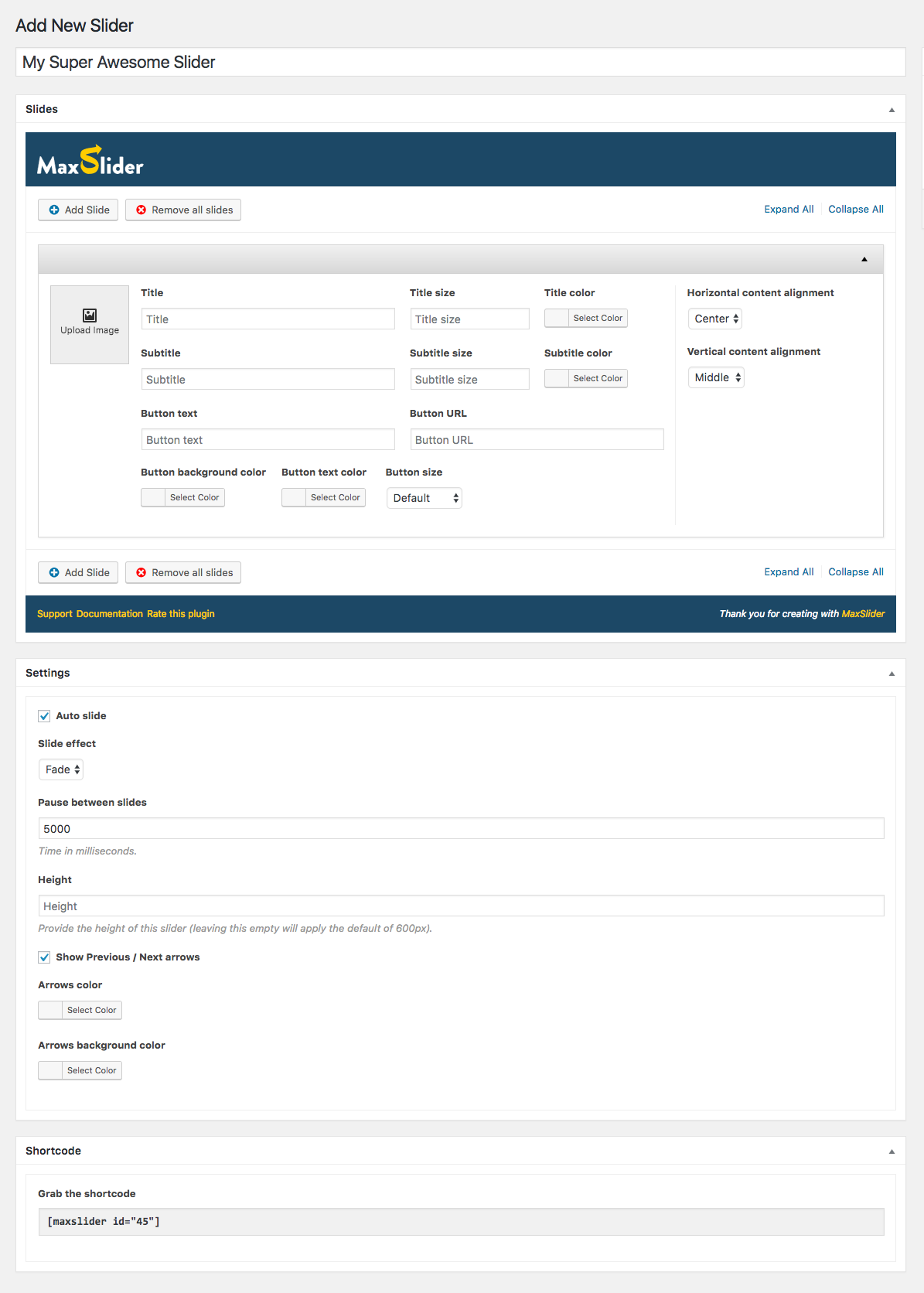
The MaxSlider Interface
Changelog
1.2.4
- Sanitize shortcode parameter to avoid potential Local File Inclusion (LFI) vulnerabilities.
1.2.3
- Fixed issue where since the iframe-ing of the block editor in WP 6.3, block editor assets would not get enqueued under specific circumstances.
- Block editor assets are now enqueued via the ‘enqueue_block_assets’ action instead of ‘enqueue_block_editor_assets’.
- Moved block.php out of block/src as it now gets deleted on build.
1.2.2
- Fixed deprecation warning “Required parameter follows optional parameter” in PHP 8.x
1.2.1
- Fixed a deprecation warning that would get thrown after WP 5.8 (action ‘block_categories’ renamed to ‘block_categories_all’).
1.2.0
- Added Slider block for the block editor.
- All color options now support opacity.
- Removed usage of dashicons for the arrows in the frontend, replace them with SVG.
- Styles simplification, saner button defaults for the slider’s buttons.
- Slider dot navigation in phablet/mobile are now larger to aid tapping.
- Added height units as a slider option (pixels, viewport height)
- Users can now get the shortcode with a specific template (if available) applied. Templates can be added by themes or plugins via the ‘maxslider_templates’ filter.
- Fixed issue where some empty CSS selectors would be output.
1.1.8
- Added the ability to select both arrows and dots as the slider’s navigation.
- Navigation color now applies on the dot navigation instead of the Navigation background color.
- Fixed minor backend stylistic issues.
1.1.7
- Added per-slide overlay color.
- Fixed minor backend stylistic issues.
1.1.6
- Fixed alpha color picker issues.
1.1.5
- Fixed alpha color picker issues caused by WordPress 4.9
1.1.4
- Added the (optional) template passed to the shortcode, as a parameter to the $slider variable.
1.1.3
- Fixed another issue where the plugin could break some themes that enqueued the ‘alpha-color-picker’ script.
1.1.2
- Fixed issue where the plugin could break some themes that enqueued the ‘alpha-color-picker’ script.
1.1.1
- Minor stylistic fixes.
1.1.0
- Slides are now sortable.
- Image size list now groups sizes depending on source.
- You can now Batch Upload/create slides.
- Added per-slide content background color.
- Each new slide now copies the first slide’s values instead of adding a completely empty slide. It should speed up slide creation.
- Added support for dots, arrows, or no navigation.
- Added support for navigation position.
- Dev note: White-label can now be enabled by adding a
add_filter( 'maxslider_whitelabel', '__return_true' );call in your theme. - Dev note: Refactored/moved styling code outside the template files. This is a potentially breaking change. THEMES OVERRIDING THE OUTPUT, MUST UPDATE THEIR TEMPLATES.
- Dev note: “Show arrows” (‘_maxslider_show_arrows’ meta key) checkbox has been removed, in favor of “Navigation type” (‘_maxslider_navigation’ meta key) dropdown.
- Dev note: “Arrows color” and “Arrows background color” (‘_maxslider_arrows_fg_color’ and ‘_maxslider_arrows_bg_color’ meta keys) have been removed, in favor of “Navigation color” and “Navigation background color” respectively (‘_maxslider_navigation_fg_color’ and ‘_maxslider_navigation_bg_color’ meta keys).
- Dev note: Backwards compatibility for the removed/renamed fields above, has been maintained, and will be available until version 1.3.0. If you have overridden or written code that depends on MaxSlider, please update you code as soon as possible.
- Other minor code and styling fixes.
1.0.1
- The shortcode now supports a second argument, “template”. e.g.
[maxslider id="123" template="fullwidth"]It can be used when the theme provides alternative templates, or can be used by theme authors directly. - The template used (e.g. slug-template.php) is now passed along with the template vars down to the predefined templates hierarchy.
1.0.0
- Initial release.