

Measure Viewport Size
Captures the viewport size of visitors' browser window and stores it as events in Google Analytics
Plugin info
Maintenance & Compatibility
Maintenance score
Possibly abandoned • Last updated 4599 days ago
Is Measure Viewport Size abandoned?
Possibly abandoned (last update 4599 days ago).
Compatibility
Similar & Alternatives
Explore plugins with similar tags, and compare key metrics like downloads, ratings, updates, support, and WP/PHP compatibility.
Description
Monitoring and analysing the size of the browser windows of your visitors is crucial for you to optimise the experience, design and conversion rate of your site. More than ever with the advent of responsive web design. This plugin gathers viewport data and stores it in Google Analytics.
Using a javascript event triggered by the onload event, this plug in measures the browser viewport size of your visitor’s browser and sends the result to your Google Analytics account as an event.
You must have the asynchronous Google Analytics tracking script installed on your site and use _gaq as the object name.
The template you are using must support the body_class filter hook introduced in wordpress 2.8
Details on the technique behind this solution can be found here http://beantin.se/post/354097397/track-viewport-google-analytics
To view the results, log in to your Google Analytics account (but wait a day for GA to process the data) and look at Content -> Events -> Top Events.
In that report you will see and event called “Viewport” with three actions; “Width”, “Height”, and “Size”. The label within the action “Size” shows the exact dimensions of the browser viewport size of each visitor to your site.
Installation
- Download the .zip file and unpack
- Upload the measure-viewport-size directory to the
/wp-content/plugins/directory - Activate the plugin through the ‘Plugins’ menu in WordPress
- Make sure
<body <?php body_class(); ?>>exists in header.php in the theme you are using
Frequently Asked Questions
I’ve installed the plugin but I can’t see any stats yet?
It can take up to 24 hours after the first visit to your site after installation of the plugin for events to appear in Google Analytics.
I’ve waited more than 24 hours, but still no stats are appearing?
Make sure your theme supports the body_class filter. See the readme.txt
I’m getting a javascript error when I view my site
Perhaps you are logged in (as admin) and have configured the “Google Analytics For WordPress” plugin to ignore visits from a user group. This plugin is dependent on the Google Analytics tracking object being present. Enable tracking for all visitors.
<?php code(); // goes in backticks ?>
Review feed
Screenshots
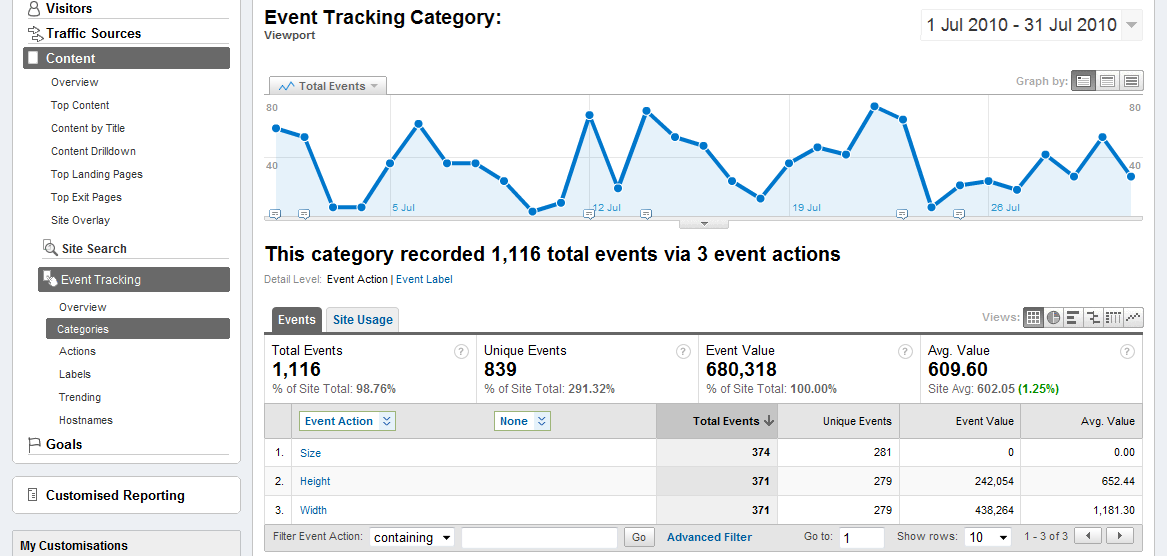
The Viewport event category report in Google Analytics.
Changelog
1.0.3
- added opt_noninteraction to prevent events affecting bounce rate.
1.0.2
- Fixed plugin URL & updated readme.
1.0.1
- Initial release.
0.0.5
- Initial dev version.