

Media Hygiene: Remove or Delete Unused Images and More!
The Media Hygiene plugin removes unused media from the WordPress library to free up space, reduce clutter, and improve server performance.
Plugin info
Maintenance & Compatibility
Maintenance score
Stale • Last updated 336 days ago • Support resolved 100% • 28 reviews
Is Media Hygiene: Remove or Delete Unused Images and More! abandoned?
Likely maintained (last update 336 days ago).
Compatibility
Similar & Alternatives
Explore plugins with similar tags, and compare key metrics like downloads, ratings, updates, support, and WP/PHP compatibility.
Description
The Media Hygiene plugin removes unused media from the WordPress library to free up space, reduce clutter, and improve server performance. With features like bulk delete and deep folder scanning, it’s a must-have for finding and deleting unused images and media.
Introducing Media Hygiene
Introducing the Media Hygiene plugin – the ideal solution for optimizing your WordPress media library! With this powerful plugin, you can quickly and easily remove all unused images, reducing clutter, and freeing up valuable server space. This plugin is a must-have for anyone looking to delete unused images in WordPress or remove unused images from the media library.
Media Hygiene is fully compatible with major WordPress builders, including plugins like WooCommerce, custom fields and posts plugin, sliders, SEO, and more – making it versatile and convenient for all types of WordPress users. Unique features like “One shot delete” and “One-shot download” allow you to bulk delete media and download all images from the WordPress media library make it easy to keep your media library organized and up-to-date.
Making offsite backups? Reduce the time and cost of disk space with a smaller backup file size.
Say goodbye to a cluttered and disorganized WordPress media library, and hello to a cleaner, more efficient WordPress site! Whether you’re an agency, blogger, photographer, or business owner, Media Hygiene is the perfect tool for keeping your media library in tip-top shape.
Get it now and keep your WordPress site super clean!
Some use cases for website owners
-
Unable to keep track of unused media files in the media library.
-
Uploading the same images in different sizes to figure out optimal size and forgetting which one was actually used.
-
Switching out an image in a post with another and can’t find it media library file.
-
Updating the logo with a new version and don’t want the old one to be indexed by Google.
-
Images included with purchased theme but never deleted after site was launched.
-
After a website was redesigned or rebranded, there may a number of old images or media files no longer in use.
-
Before migrating to a new hosting provider, cleaning up the media library may make it a smoother and faster migration process.
-
Getting a warning from your hosting provider that you are hitting the storage limit, make your backups smaller.
-
You have guest posts or contributors who may have left behind a number of images.
-
Changing your product listings or discontinuing products in e-commerce sites may mean images are left unused.
-
After trying out a theme, deactivation of theme may leave behind media files.
How is it Different?
- Media Hygiene Pro scans the entire website using a number of different techniques. One way is to “visualize images/media in page source code” to confirm the existence of a media file even when builders/plugins/themes use specialized custom posts to display their widgets on-screen.
File Types:
- Media Hygiene will recognize most if not all major file types stored in the WordPress media library. This includes but not limited to PDF, jpg, png, gif, mp4, mp3, csv, zip, rar, and txt files. We also cover alternative extension spelling such as jpeg.
Standard Features:
-
Dashboard – shows list of all unused media by occupied space and by type.
-
Notifications – get email notifications when new files have been uploaded and not scanned on a specific schedule (daily, weekly, bi-weekly, monthly, quarterly)
-
Site builder compatibility – works with all major site builders such as Elementor (see list below).
-
Whitelist – keep files safe from deletion. Perfect for files linked to from off-site sources.
-
Filtering – files by name and date.
-
Backup – download unused media file individually or by page.
-
Delete – remove files individually or by page.
-
Scan – scanning process for all media files not linked to any page/post or other theme settings.
-
Support – only through WordPress repository.
Changelog
Compatibility
Please check our website to see a completely list of compatible plugins/themes.
-
Gutenberg – Standard
-
Elementor Basic – Standard
-
Bricks (builder)
-
Divi (builder)
-
WP Bakery Page Builder (builder)
-
Beaver Builder (builder)
-
Visual Composer (builder)
-
Avada (theme)
-
Enfold (theme)
-
Flatsome (theme)
-
More to come…
Pro (available now)
-
Customer Support – directly from the plugin – Pro
-
Faster scanning through the use of WP-CLI (WordPress command line interface)
-
Unique scanning process for multiple page builders with one click
-
Advanced Filtering – Pro
- Media Filter by Year
- Media Filter by Type (jpg, png, gif, wmv, mp4, etc.)
-
One Shot Download (all files)
-
One Shot Removal (all files)
-
Folder Scan (sub-folder scanning coming soon!)
-
Woocommerce
-
Custom Post Types
-
SEO Plugins
- All in One
- Yoast
- SEO Press
-
Custom Fields Plugins – Pro
- ACF
- Pods
- Custom Field Suite
- Custom Post Suits
-
Sliders
- Meta Slider
- Slider Revolution
Pro (coming soon)
-
Custom Fields Plugins – Pro
- Jet Engine (coming soon)
- Meta Box (coming soon)
- CPT UI (coming soon)
-
Remote server backup and restore – Pro (coming soon)
-
Scheduled Scans – Pro (coming soon)
-
Custom Email Notifications – Pro (coming soon)
-
WPML / Weglot / TranslatePress (coming soon)
Installation
From Your WordPress Dashboard
- Go to Plugins >Add New
- Search for Media hygiene
- Click on Install Now Button
- Click on Activate Now After successfully installed in your site.
From WordPress.org
- Download Media hygiene
- Upload the media-hygiene folder to the /wp-content/plugins/ directory
- Activate Media hygiene plugin from your plugins page.
Frequently Asked Questions
The Media Hygiene plugin has a built-in media scanner that looks at the WordPress database, theme and plugin(s) to identify which media files are no longer in use. You’ll be presented a list in our dashboard that is safe to delete.
Please backup your site before you delete the files.
The Media Hygiene plugin will not remove media files that are in use on your website. This means that if a media file is being used in a post, page, or other database entry, it will NOT show up in the scanning results and be presented as an option to be deleted.
If you are certain that some files are being used on your site, you can whitelist that file and it will longer be considered for deletion.
The Media Hygiene uses a few scanning modes. The first mode compares the database entries of specific modules with the files. The second mode scans each folder in the wp-content/upload directory. It identifies files that are not listed in the database and considers them to be unused.
The Media Hygiene plugin does not have the ability to look inside backups and/or remove any files from your backups.
While removing unused media files does not directly impact page loading times, removing unused media files can actually improve the performance of your server and indirectly improve loading times. Unused media files take up space on your server and can cause backups to take longer.
Like any software, there is a small risk of data loss or corruption when using the Media Hygiene plugin. However, the developer has taken steps to minimize this risk by thoroughly testing the plugin and including safety features on various hosting platforms (e.g. shared, VPS, and dedicated). Please note: websites hosted on shared platforms have a greater probability of failure due to limited allowable resources dictated by the hosting provider.
Additionally, it is always recommended to keep a backup of your website before using any plugin that modifies your directories, just in case something goes wrong.
The frequency at which you run the Media Hygiene plugin depends on how frequently you add media files to your website. There is an email notification feature that allows informs you of the number of files uploaded but not scanned.
If your website receives a high volume of traffic and media files are frequently added, it’s recommended to set notifications more frequently, such as every week.
The Media Hygiene plugin is designed to work seamlessly with all the most popular WordPress themes and plugins. However, WordPress is a dynamic ecosystem where there are many changes occurring. The developers have tried to accommodate every possibility.
To our knowledge, the plugin does not have any known conflicts with other plugins or themes.
We strongly recommend backing up the website and/or running the plugin on a staging or development environment.
If you do encounter any issues or conflicts, you can contact the developer for support and guidance. The developer will work to resolve the issue as soon as possible and provide a solution.
Yes, the Media Hygiene plugin allows you to preview the media files that will be deleted before they are removed. The plugin’s media scanner will provide a list of all the unused media files, including details such as the file name, image, location (URL), and size.
You can review the files and whitelist the file to prevent deletion.
Yes, there is customer support available for the Media Hygiene plugin. The developer provides basic support through the WordPress repository, where you can find answers to frequently asked questions and troubleshoot common issues.
Pro users will have access to direct support inside the plugin. The support team will respond to inquiries as soon as possible, but response times may vary depending on the nature of the inquiry and the volume of support requests.
Yes, the Media Hygiene plugin allows you to exclude certain media files type from scan that do not display in unused files by adding files to a whitelist in the scan results list or It is for Folder Scan separate from Regular Media Scan.
The Media Hygiene plugin does not have a built-in feature to restore deleted media files. You can restore accidentally deleted media files by using a backup of your website.
No, the Media Hygiene plugin does not allow you to schedule the plugin to run automatically at regular intervals. We will be including this in the Pro version of the plugin.
This feature is not available yet but coming.
This feature is not available yet but coming.
No, Media Hygiene will remove the file in its entirety from the WordPress media library. It does not remove metadata only.
The Media Hygiene plugin is designed to be compatible with the latest version of WordPress. The developer regularly updates the plugin to ensure that it continues to work seamlessly with the latest version of WordPress.
Review feed
WOW
Must try Plugin to clean unwanted Images
Awesome and Mind Blowing
Giving it a 5 but with reservations...
Media cleaning is hard. This makes it easy!
Screenshots
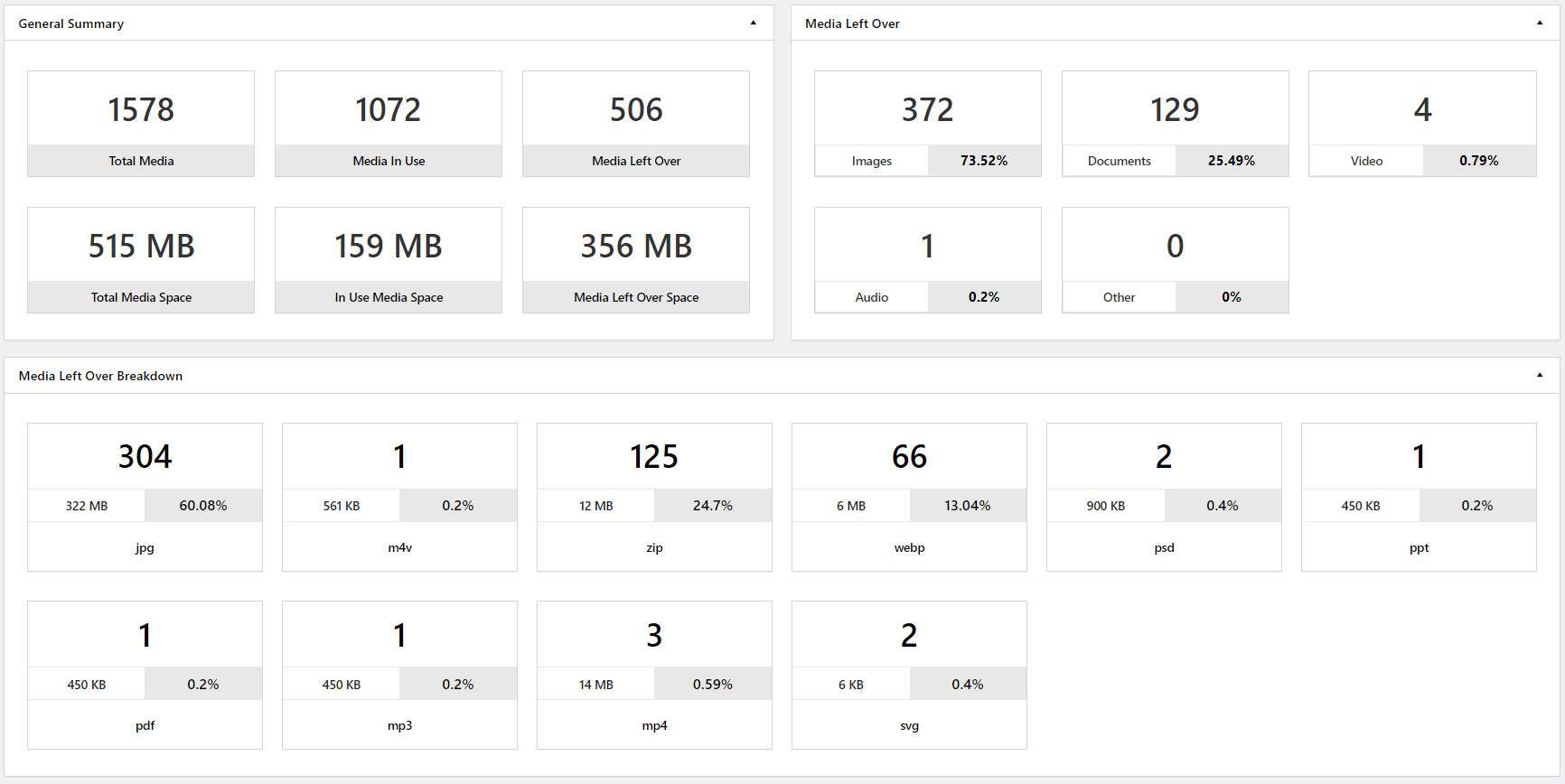
Scan and See
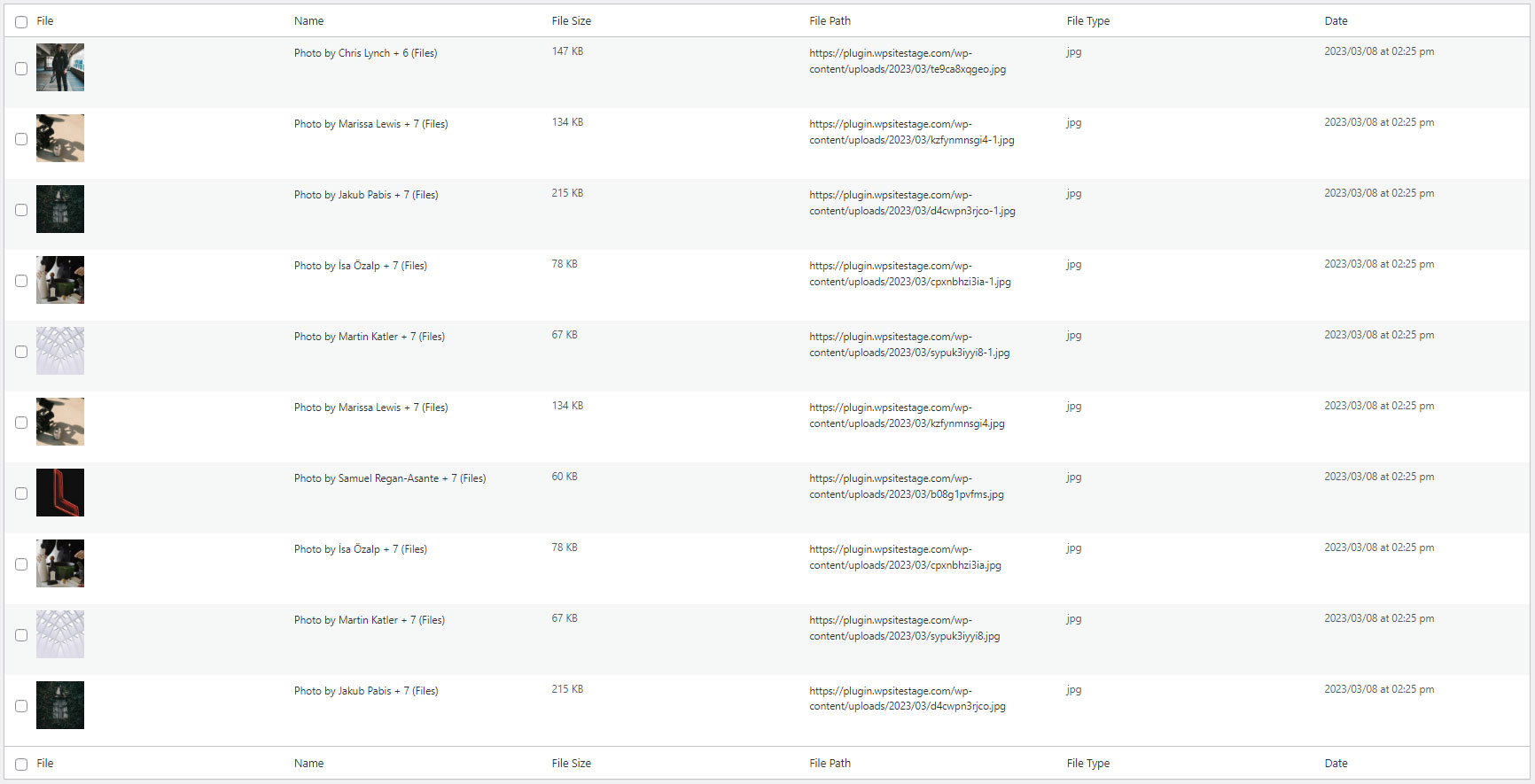
Identify Unused Media Files
Remove Media Files