

Media Library Downloader
Professional media download solution with bulk operations, smart management, and enterprise-grade security for WordPress
Plugin info
Maintenance & Compatibility
Maintenance score
Stale • Last updated 215 days ago • 5 reviews
Is Media Library Downloader abandoned?
Likely maintained (last update 215 days ago).
Compatibility
Developers
Languages
Similar & Alternatives
Explore plugins with similar tags, and compare key metrics like downloads, ratings, updates, support, and WP/PHP compatibility.
Description
Transform your WordPress media library into a powerful download center! While WordPress doesn’t provide native file download capabilities, Media Library Downloader bridges this gap with enterprise-grade functionality and professional user experience.
Whether you need to download a single image or backup hundreds of media files, this plugin makes it effortless with intuitive one-click downloads, smart bulk operations, and advanced management features.
Core Features:
- Single & Bulk Downloads – Download individual files instantly or create ZIP archives from multiple selections
- Universal Compatibility – Works seamlessly with both List and Grid view layouts
- Smart Download Management – Automatic file organization with customizable naming patterns
- Progress Indicators – Real-time feedback during download preparation
- AJAX Technology – Lightning-fast downloads with no page refreshes
Advanced Features:
- Admin Settings Dashboard – Complete control panel for configuration and monitoring
- Download Activity Logging – Track usage patterns and generate statistics
- Automatic Cleanup – Scheduled maintenance to keep your server optimized
- Security & Permissions – Enterprise-grade access control and CSRF protection
- Accessibility Compliant – Full keyboard navigation and screen reader support
- Developer Friendly – Extensive hooks and filters for customization
Perfect For:
- Content Creators – Quickly download media for offline editing
- Site Administrators – Bulk backup and migration of media files
- Agencies – Client asset delivery and portfolio management
- Developers – Media file management during development
- Anyone – Who needs efficient file access from WordPress media library
Experience the difference of professional-grade media management with intuitive design and powerful functionality!
How to Use
Once the plugin is installed and activated, you can start downloading files from your media library immediately.
Downloading Single Files
- Go to your WordPress admin area
- Navigate to Media > Library
- You can use either List view or Grid view
- Locate the file you want to download
- Click the Download button that appears next to each media file
- The file will be downloaded to your computer
Downloading Multiple Files
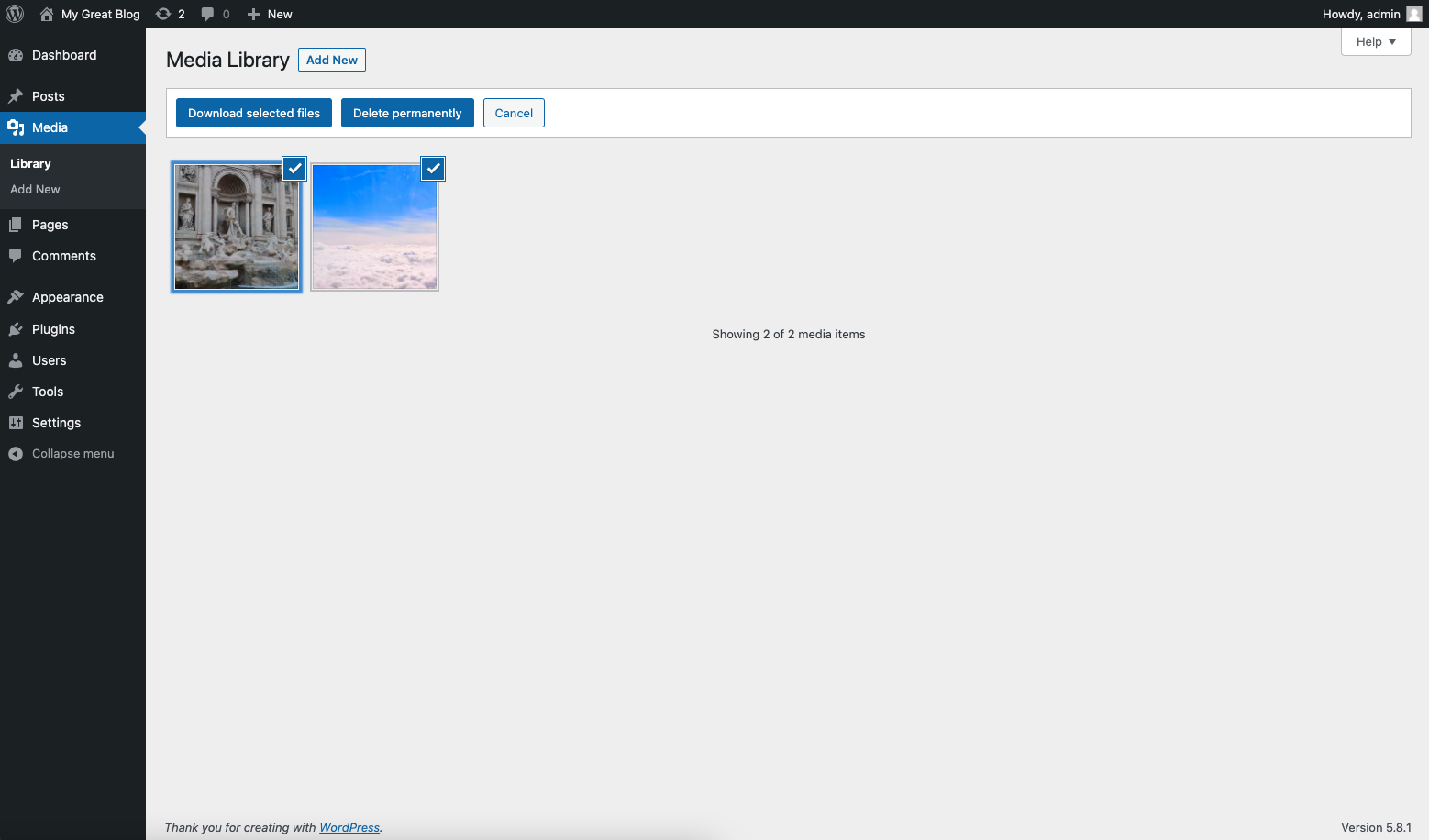
- Go to Media > Library
- Switch to List view for easier bulk selection
- Use the checkboxes to select multiple files you want to download
- Click the Bulk Download button
- All selected files will be packaged and downloaded as a ZIP file
View Options
The plugin works seamlessly with both WordPress media library view options:
- List View: Shows files in a table format with download buttons in each row
- Grid View: Displays files as thumbnails with download options accessible via hover or click
Plugin Settings
- Go to Settings > Media Downloader in your WordPress admin
- Configure maximum download size limits (default: 100MB)
- Set automatic cleanup intervals for temporary files (default: 24 hours)
- Enable download logging to track activity (optional)
- Customize ZIP filename patterns with placeholders like {timestamp}, {date}, {user}
- Use manual cleanup to remove temporary files immediately
Important Notes
- Downloads are processed using AJAX, so there’s no page reload
- Large files or multiple file downloads may take a few moments to process
- Ensure your browser allows downloads from your WordPress site
- The plugin respects WordPress user permissions – only users with appropriate media access can download files
- Temporary ZIP files are automatically cleaned up based on your settings
- Download activity can be logged and viewed in the admin dashboard
Installation
- Upload the
media-library-downloaderfolder to the/wp-content/plugins/directory - Activate the plugin through the ‘Plugins’ menu in WordPress
Frequently Asked Questions
Review feed
Screenshots
Changelog
1.4.0
- MAJOR UPDATE: Complete security and feature overhaul
- Added CSRF protection with nonces for all AJAX requests
- Improved input validation and sanitization
- Added file access permission checks
- Enhanced security for temporary file handling
- NEW: Single file download functionality
- NEW: Download progress indicators and better user feedback
- NEW: Individual download buttons in both List and Grid views
- NEW: Admin settings page in Settings > Media Downloader
- NEW: Configurable maximum download size limits
- NEW: Automatic cleanup scheduling with configurable intervals
- NEW: Optional download activity logging and statistics
- NEW: Custom ZIP filename patterns with placeholders
- NEW: Enhanced accessibility with ARIA labels and keyboard navigation
- NEW: Developer hooks and filters for extensibility
- Added manual cleanup option in admin settings
- Added download statistics dashboard
- Fixed critical logic bug in temp folder cleanup
- Optimized memory usage for large file downloads
- Added file size limits and duplicate filename handling
- Improved error handling with detailed messages
- Better internationalization support
- Modern JavaScript with ES6 class structure
- Added comprehensive code documentation
- Improved WordPress cron integration for automatic maintenance
- Enhanced user IP tracking for security logs
- Better error handling in admin interface
- Performance optimizations and WordPress coding standards compliance
1.3.3
- Fix bug where download button where disabled
1.3.2
- Fix vulnerabilities regarding access control
1.3.1
- Fix bug where download button where disabled
1.3
- Fix bug where file are empty
- Refacto code with vanilla javascript
1.2.2
- Add dismissible notice on dashboard
- Remove init hook to check_requirements
1.2.1
- Code optimization
- Add fallback to cURL method if allow_url_fopen value is not defined
1.2
- Code optimization
- Compatible with grid/list library view
1.1.1
- Add counter
1.1
- Check PHP requirements on plugin activation
- Reorder code
1.0
- Initial release