

Maintenance 56/100150d since update
Active installs
2,000
Downloads
41,869
Reviews
27
Age
12.0y
Plugin info
Total downloads: 41,869
Active installs: 2,000
Total reviews: 27
Average rating: 4.4
Support threads opened: 0
Support threads resolved: 0 (0%)
Available in: 4 language(s)
Contributors: 2
Last updated: 11/4/2025 (150 days ago)
Added to WordPress: 3/23/2014 (12 years old)
Minimum WordPress version: 3.5
Tested up to WordPress version: 6.8.3
Minimum PHP version: f
Maintenance & Compatibility
Maintenance score
Maintained • Last updated 150 days ago • 27 reviews
56/100
Is Media Search Enhanced abandoned?
Likely maintained (last update 150 days ago).
Compatibility
Requires WordPress: 3.5
Tested up to: 6.8.3
Requires PHP: f
Developers
Similar & Alternatives
Explore plugins with similar tags, and compare key metrics like downloads, ratings, updates, support, and WP/PHP compatibility.
Media Search Plus
Rating 0.0/5 (0 reviews) • Active installs 10
TWG Media File Size Column
Rating 0.0/5 (0 reviews) • Active installs 0
Apex Folders
Rating 0.0/5 (0 reviews) • Active installs 0
iFolders – Ultimate Folder Organizer for Media Library, Pages, Posts and Users
Rating 4.6/5 (10 reviews) • Active installs 300
VA Removing Exif
Rating 5.0/5 (1 reviews) • Active installs 300
MediaCommander – Bring Folders to Media, Posts, and Pages
Rating 0.0/5 (0 reviews) • Active installs 20
Description
This plugin is made for:
- Search through all fields in Media Library, including: ID, title, caption, alternative text and description.
- Search Taxonomies for Media, include the name, slug and description fields.
- Search media file name.
- Use shortcode
[mse-search-form]to insert a media search form in posts and template files. It will search for media by all fields mentioned above.
Installation
Using The WordPress Dashboard
- Navigate to the ‘Add New’ in the plugins dashboard
- Search for ‘media-search-enhanced’
- Click ‘Install Now’
- Activate the plugin on the Plugin dashboard
Uploading in WordPress Dashboard
- Navigate to the ‘Add New’ in the plugins dashboard
- Navigate to the ‘Upload’ area
- Select
media-search-enhanced.zipfrom your computer - Click ‘Install Now’
- Activate the plugin in the Plugin dashboard
Using FTP
- Download
media-search-enhanced.zip - Extract the
media-search-enhanceddirectory to your computer - Upload the
media-search-enhanceddirectory to the/wp-content/plugins/directory - Activate the plugin in the Plugin dashboard
Frequently Asked Questions
Please add the following code to the functions.php in your theme:
function my_get_attachment_url( $url, $post_id ) {

    $url = wp_get_attachment_url( $post_id );

    return $url;
}
add_filter( 'mse_get_attachment_url', 'my_get_attachment_url', 10, 2 );
Review feed
No reviews available
Screenshots
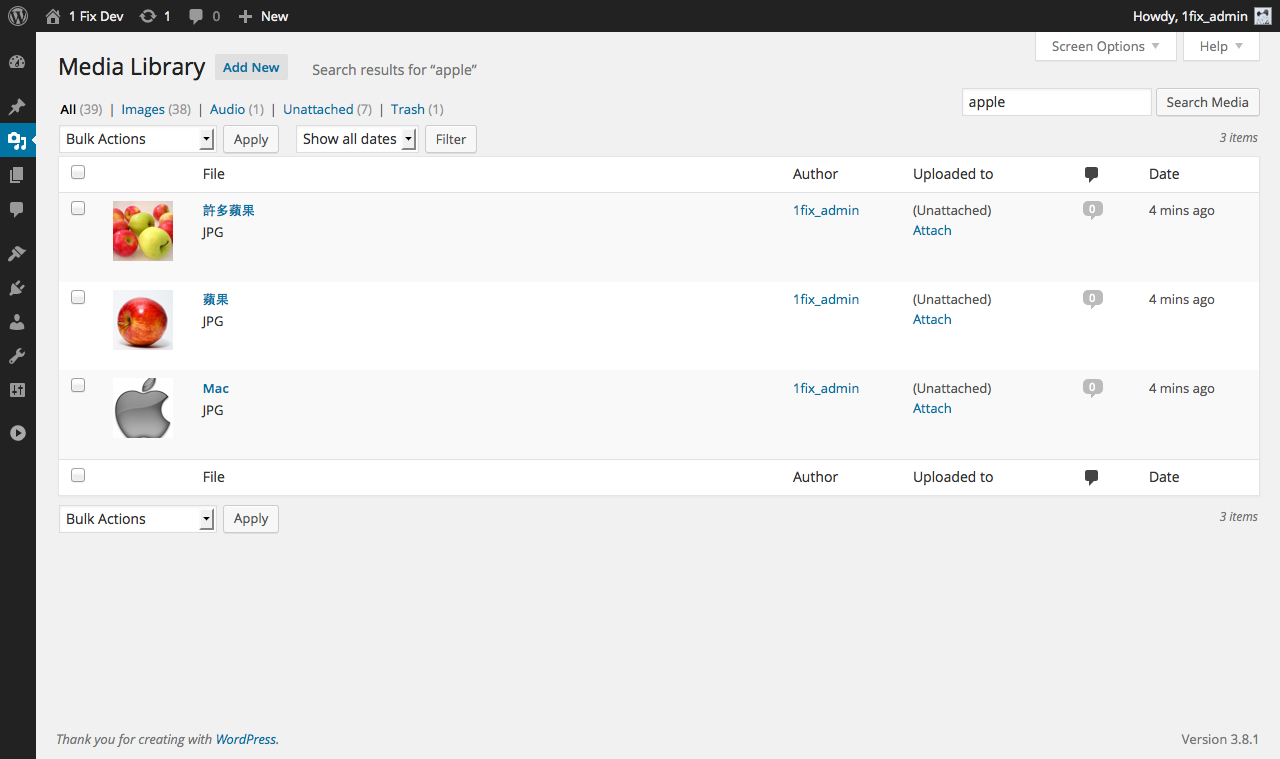
Demo search on the Media Library screen.

Demo search on the Insert Media - Media Library screen.
Changelog
0.9.1
- Fix: Prevent “Not unique table/alias: wp_postmeta” SQL error by aliasing the postmeta JOIN. Props @mikemeinz. See https://wordpress.org/support/topic/sql-syntax-error-26/
0.9.0
- Added the languages pt_BR and es_ES. Thanks to @larodiel.
- Fixed an issue when searching for images in the Image block, the plugin caused the HTTP 500 error. Also thanks to @larodiel.
0.8.1
- Fix PHP notices and updated the “Tested up to” field.
0.8.0
- Supporting MIME type and date filters when searching in the Media Library. Thanks to @jedifunk for spotting this bug.
0.7.3
- Fix PHP warnings. Thanks to @DavidOn3.
0.7.2
- Bug fix: Make the search work with WPML Media – All languages.
- Filter the search form if it’s on the media search results page.
- Make the images clickable in the search results. Can be disabled by setting the filter
mse_is_image_clickabletofalse.
0.7.1
- Bug fix: Remove duplicate search results when WPML plugin is activated, THE RIGHT WAY.
0.7.0
- Remove duplicate search results when WPML plugin is activated. Props @joseluiscruz.
0.6.1
- Security update: use
$wpdb->prepareto process SQL statements. Thanks to @daxelrod for this.
0.6.0
- Add ID to search fields.
- Modify the clauses with
posts_clausesfilter.
0.5.4
- Add filter
mse_get_attachment_urlto modify the attachment URLs in the media search results.
0.5.3
- Bug fix: Filtered excerpt should be returned, not echoed.
0.5.2
- Display thumbnails in the media search results.
0.5
- Use shortcode
[mse-search-form]to insert a media search form in posts, which only searches for media files (through all fields).
0.4
- Search media file name.
0.3
- If there are Taxonomies for Media, search the name, slug and description fields.
0.2.1
- Add DISTINCT statement to SQL when query media in the “Insert Media” screen
0.2.0
- The first version